The chatbot handed them over. Why is the customer still waiting?
Handoffs fail quietly. Here is how to catch every customer your team still owes a reply.
Read inBahasa Melayu中文
Customers wait after a chatbot handoff because the handoff ends the bot's job without starting anyone else's. The chat moves to a shared inbox, nobody is told it is theirs, and it sinks under newer messages. The fix is a clear owner, a time limit, and one daily list of everyone still waiting for a person.
Why do customers get stuck after a chatbot hands them over?
A chatbot hands a conversation to a person for good reasons: the customer asked for a human, the question is outside what the bot knows, or the order needs a decision only staff can make. At that moment the customer believes they are next in line. On your side, very little happens.
In most setups the handoff only changes the chat's status. It lands in the same inbox as every other conversation, often unassigned, sometimes marked as "open" among hundreds of others that are also open. Nobody gets a task. If the team is busy, or the handoff happens at 11 p.m., the chat waits until someone happens to scroll to it.
Three patterns make it worse:
- Everyone assumes someone else took it. In a shared inbox with no owner, a handed-over chat belongs to the whole team, which in practice means no one.
- New messages bury old ones. Inboxes sort by the latest message. A customer who stopped writing after the handoff drops down the list while fresh enquiries push in on top.
- The bot looks like it answered. The customer got a reply ("Let me connect you with our team"), so the chat doesn't look unanswered at a glance. It only looks unanswered if you know a person still owes the next message.
Messaging is where customers now expect to reach a business. Meta reported in May 2022 that one billion people message a business each week on WhatsApp, Messenger and Instagram Direct, and in Malaysia 98.0% of people were online at the end of 2025. Every one of those chats that reaches a person has to be picked up by a person.
What does a slow reply after a handoff cost you?
The customer who was handed over is usually the one who matters most that day. They asked something the bot couldn't close: a price for a custom job, a complaint, a booking that needs checking, a bulk order. They are closer to buying, or closer to leaving, than anyone chatting with the bot.
People expect speed here. In HubSpot's research, 90% of customers rated an immediate response as important or very important when they had a customer service question, and 82% did when they had a sales question. A handoff that waits for hours reads as "they passed me on and forgot me", which is worse than a slow first reply, because the customer was promised a person.
It costs you in ways that don't show up as a complaint:
- Leads go cold. A buyer comparing three shops takes the first one that answers properly. You don't see the loss; you just never hear back.
- Customers repeat themselves. When someone finally picks the chat up hours later, they often start from scratch, and the customer has to explain again.
- Your numbers look better than your service. An average first-reply time that mixes instant bot replies with slow human ones hides the customers who waited all night.
How do you make sure no handed-over customer is forgotten?
You don't need a big process. You need four habits, and each works with any tool:
- Give every handoff an owner. Either route handed-over chats to a named person or team, or agree that whoever is on duty owns everything handed over during their shift.
- Set a time limit, and treat it as late when it passes. Pick a number your team can keep, such as 30 minutes during working hours. A customer past that limit is late, not just "open".
- Keep one list of who is waiting for a person. Not the whole inbox: only the customers the bot handed over who haven't had a reply from a human. This list should be short, and it should be the first thing anyone looks at.
- Clear the list before starting on anything new. Every morning, and after every break, reply to everyone on it. When it is empty, you are caught up.
Measure it honestly. Track the time until a person first replies, not the time until anything replied, and look at the slow ones instead of only the average. If some customers waited days, that is worth knowing, even when it makes the number look bad. Setting business hours on each inbox lets you separate "waited overnight" from "waited while we were open".
What should a daily check cover?
A good morning check takes a few minutes and answers two questions: what needs a person today, and how did yesterday go?
| Look at | Why |
|---|---|
| Customers waiting since a handoff | They were promised a person. Reply first. |
| Hot leads without a reply | Buyers close to deciding cool off within hours. |
| Replies the AI got wrong | A promised refund or a wrong price needs a person to fix it before it spreads. |
| New FAQ answers to approve | Approving what customers keep asking lets the bot answer it next time, so fewer chats need a handoff. |
| Share of chats handed to your team | A rising share means the bot is missing something. The reasons tell you what. |
| Your team's first-reply time | The one number that shows whether customers felt answered. |
The order matters. Waiting customers and hot leads come before anything else, because every hour costs more there than anywhere on the list.
How does Mampu AI show you who is waiting?
In Mampu AI, the Home screen is that daily check. Once your AI agent is live, administrators land on Home on their first visit each day, and the Open today's summary button in the morning lead report email brings them there too.
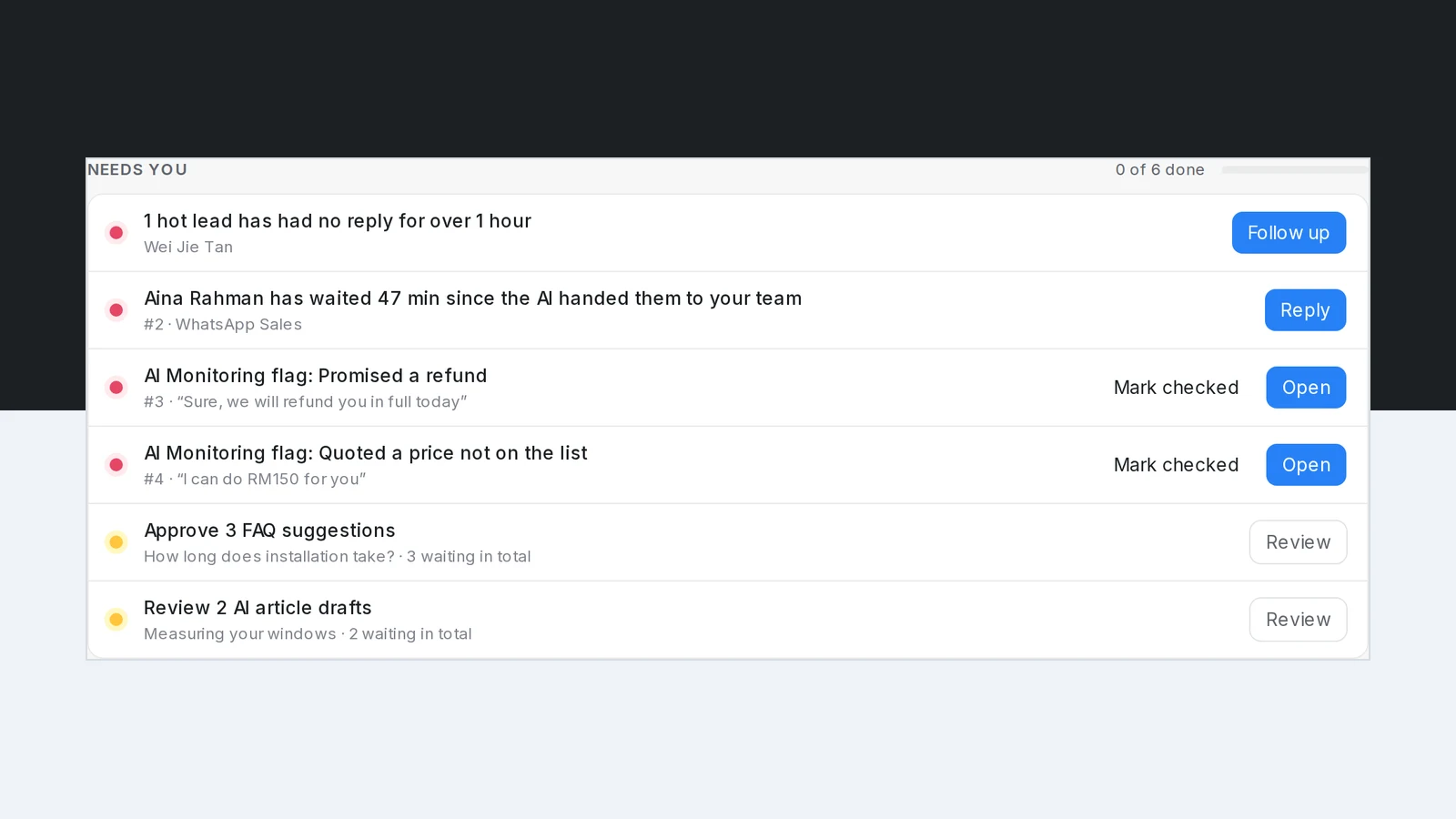
Needs you lists what needs a person today, most urgent first, each with the button that does the job:
- Customers who have waited more than 30 minutes since the AI handed them to your team, with Reply. A wait of two days or more reads in days, so nothing hides behind a large hour count.
- Hot leads that have had no reply for over an hour, with Follow up.
- AI Monitoring flags, such as a reply that promised a refund, with Open and Mark checked.
- Up to five FAQ suggestions a day to approve, and AI article drafts to review.
A row ticks itself off once it is handled: a person replies to the customer, the suggestions are approved, or the flag is checked. When the list is empty, Home says You're all caught up for today. Everyone on the team sees the same list, so a customer answered by one teammate is cleared for all.
Below it, How the business did shows customers served, replies sent by AI, the share AI passed to your team with its top reasons, and Team first reply, for today, 7 days or 30 days, each against the period before. The latest daily lead report sits alongside, with the leads worth a follow-up.
Frequently asked questions
Sources
Every rule and figure on this page is dated and linked to its source. Mampu AI figures are anonymised percentages across customers on Mampu AI.
Figures checked: 28 September 2026
Public sources
- Meta Newsroom, "Announcing New Products to Make Business Messaging Easier" (19 May 2022)https://about.fb.com/news/2022/05/announcing-new-products-to-make-business-messaging-easier/
- DataReportal, "Digital 2026: Malaysia"https://datareportal.com/reports/digital-2026-malaysia
- HubSpot, "Live Chat Exposes a Fatal Flaw in Your Go-to-Market" (updated March 2025)https://blog.hubspot.com/sales/live-chat-go-to-market-flaw
See who is waiting for your team, every morning
Message our team. We'll connect your WhatsApp and show you the one page that lists every customer still waiting for a person, with a button to reply.

