Start each day on Home with what needs you and how the business did
Home now lists what needs you today, from waiting customers to hot leads and flags, with your AI agents' numbers and the lead report on one page.
Read inBahasa Melayu中文
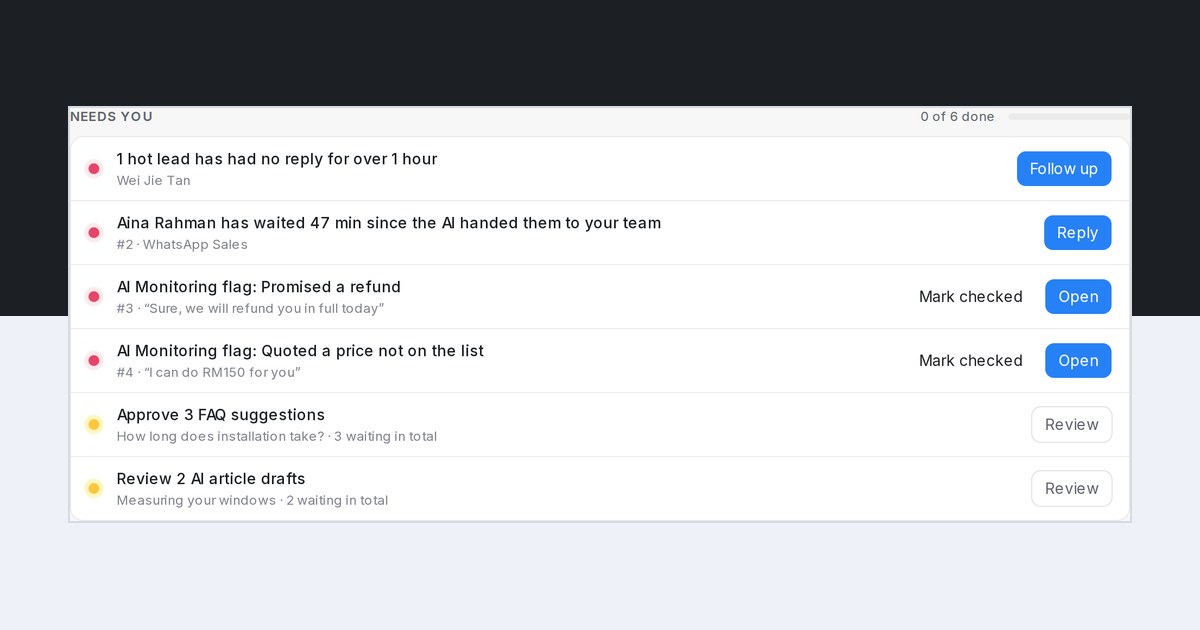
Mampu AI now opens each day on Home with a one-page summary for administrators: what needs a person today, and how the business did. Once your AI agent is live, the first visit of the day lands here, and the morning lead report email's Open today's summary button brings you back.
How do I see what needs me today in Mampu AI?
- Open Home. Needs you lists the day's to-dos, most urgent first: customers waiting since a handoff, hot leads without a reply, AI Monitoring flags, and FAQ suggestions and article drafts to approve.
- Click the button on a row, such as Reply or Review, to go straight to it.
- Rows tick themselves off once they are handled. When nothing is left, Home says You're all caught up for today.
What does How the business did show?
- Customers served, Replies sent by AI, AI done and AI passed to your team for Today, 7 days or 30 days, each against the period before.
- The latest daily lead report in brief: new leads by level, who is still waiting, who went quiet and who is worth a follow-up.
- Details captured by AI, Team first reply and AI Monitoring flags, beside the lead report. The arrow on a tile opens what is behind the number.

