See a customer's chats from every channel in one conversation
Read a customer's other WhatsApp, Facebook, Instagram and TikTok chats inside the one you have open, in time order, with switches to keep some apart.
Read inBahasa Melayu中文
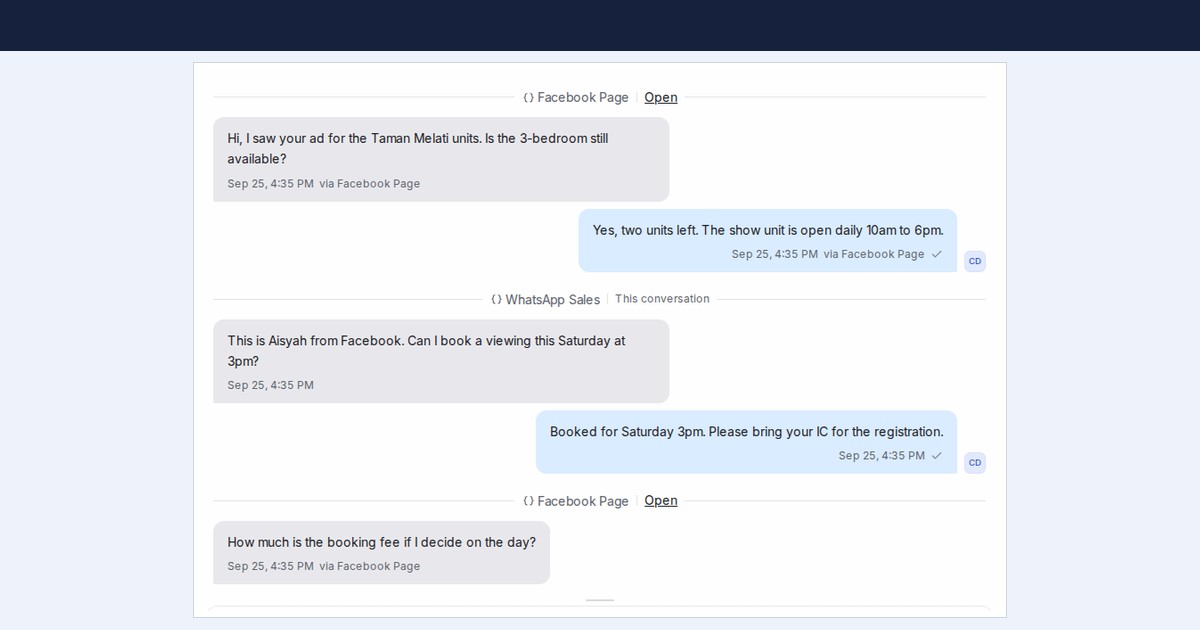
Mampu AI now shows a customer's messages from their other conversations, on WhatsApp, Facebook, Instagram and TikTok, inside the conversation you have open, in the order they were sent. Your team reads one history instead of switching between chats, and your flow agent can confirm what the customer already said there instead of asking again.
How do I see a customer's other conversations in Mampu AI?
- Open any conversation of the customer. Their messages from other conversations appear between dividers that name the inbox they came through, oldest first.
- Scroll up to load older messages from all of their conversations.
- To reply in another conversation, click Open on its divider. The reply box always sends to the conversation you have open.
How do I keep a project's or a conversation's history separate?
- For a number that belongs to a separate project or brand, open Settings → Inboxes, choose the inbox and turn off Share history across inboxes on its Settings tab. Its conversations then show only their own messages, stay out of your other inboxes, and its flow agent doesn't reuse answers from elsewhere.
- For one conversation, open the ⋮ menu next to Resolve and choose Keep history separate. Share history again undoes it, and your teammates see the change at once.
- Both switches are on by default. History is grouped by contact, so use the contact's Merge tab when the same person shows up as two contacts.

