Your AI chatbot replied to a customer. How do you know what it actually did?
Every automated reply should leave a trail your team can read in the chat itself. Here is what that trail needs to show.
Read inBahasa Melayu中文
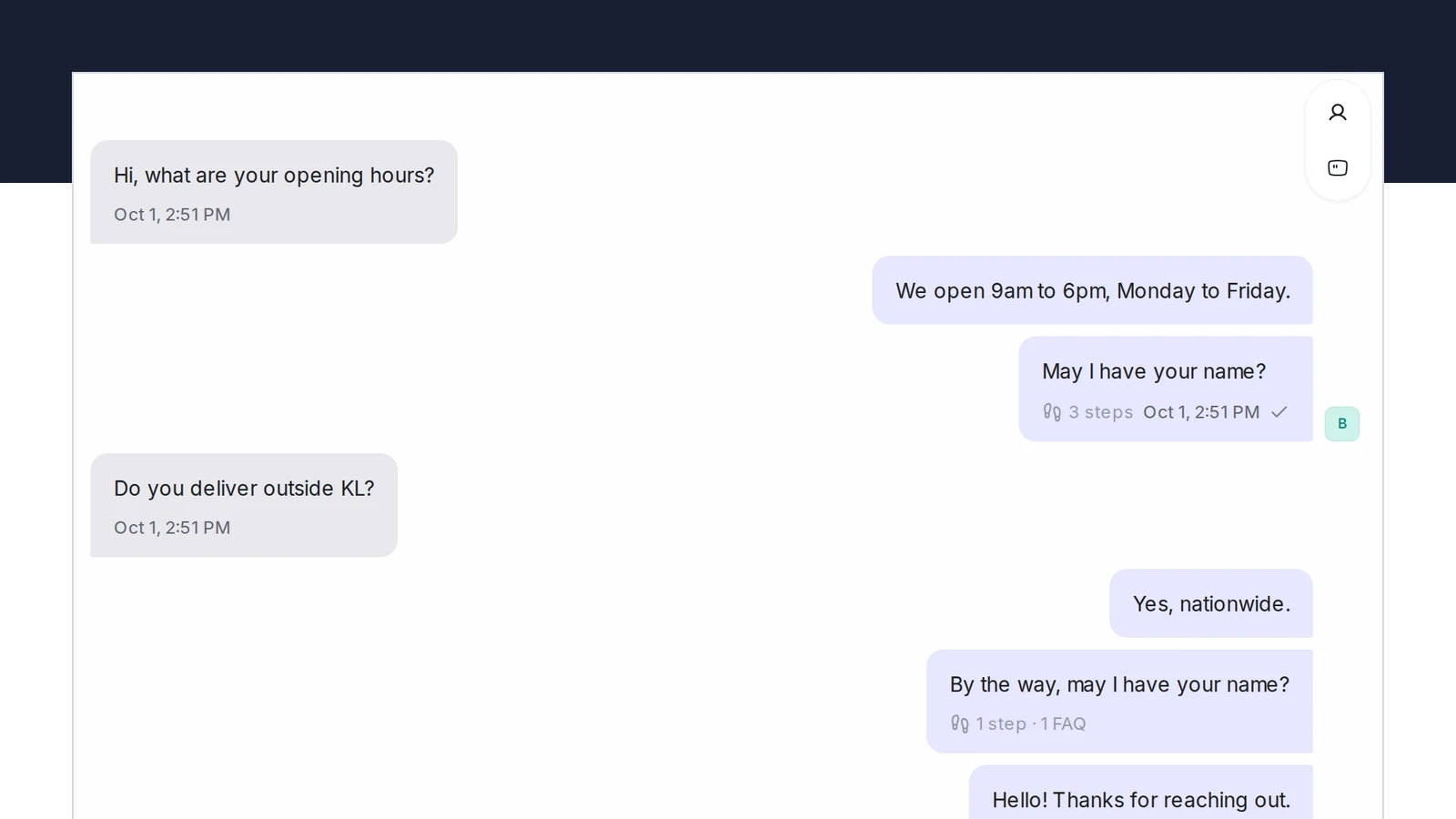
You know what an AI chatbot did in a customer chat only if every reply leaves a record: which part of the flow produced it, and which approved answer it drew on. Without that, a complaint turns into guesswork. With it, your team opens the reply, reads the steps and the source, and fixes the flow or the FAQ.
Why is it so hard to tell what a chatbot said and why?
Most businesses see their chatbot from the outside. The customer's message comes in, the bot's reply goes out, and the chat looks like any other. When the customer writes back "your bot told me delivery is free" or "it kept asking for my name", the team has three ways to find out what happened, and none of them is good.
- Reread the chat and guess. The reply is there, but not where it came from. Was it a step the owner wrote, an answer from the FAQ list, or something the model improvised? The wording alone rarely tells you.
- Replay it yourself. Someone opens the bot's test screen and types the same question. If the answer differs, which is common once the customer's earlier messages are missing, you have learned nothing about the real chat.
- Ask the vendor. Logs exist somewhere, but they are technical, they expire, and they are not in front of the person who has to answer the customer now.
The scale makes this worse, not better. Meta reported in May 2022 that one billion people message a business each week on WhatsApp, Messenger and Instagram Direct, and in Malaysia 98.0% of people were online at the end of 2025. A bot that handles even a modest share of that volume produces hundreds of replies a day that nobody reads at the time. The one you need to explain is always one of those.
What does an unexplained reply cost you?
Customers message because they want an answer now. In HubSpot's research, 90% of people rated an immediate response as important or very important when they had a customer service question, and 82% did for sales questions; "immediate" meant ten minutes or less. That is the reason to run a bot in the first place. The cost appears afterwards, when a reply was wrong or odd and nobody can say why.
- The same mistake repeats. If you cannot tell which FAQ produced a wrong price, you cannot fix that FAQ. The bot gives the same answer to the next customer, and the next.
- Staff stop trusting the bot. Once a team has been caught out by an answer it could not explain, it starts checking every bot chat by hand, which removes the saving the bot was meant to bring.
- You cannot keep a promise you cannot check. WhatsApp's business policy, effective 23 September 2026, says plainly: "Do not confuse, deceive, defraud, mislead, spam, or surprise people with your communications." A bot you cannot audit is a bot you cannot vouch for.
- Improvements become arguments. Without a record, "the bot handled that badly" and "the bot was fine, the customer was unclear" are opinions. With a record, one of them is right.
What should a record of an AI reply show?
The record does not need to be technical. It needs to answer the two questions a team member actually asks when a customer complains, and it needs to sit where that person already is: in the conversation.
- Which steps produced this reply? A chatbot built as a flow moves through steps the owner named: a welcome, a question about the service, a product lookup, a handoff. Showing those names under the reply, in order, tells you at a glance whether the customer was in the booking part or the pricing part, and whether the bot skipped something.
- Which approved answer did it use? When the reply came from a knowledge base, name the entry. Not the whole list the bot had available, only the ones this reply actually used. That is the difference between "it might have used one of these forty FAQs" and "it answered from Do you deliver outside KL?".
- When is there nothing to show? A reply that came purely from the flow should say so by showing steps and no sources. Silence about sources is a fact too.
- Is it there later? The record has to stay with the message, so the person who reads the chat tomorrow sees the same thing as the person who watched it arrive.
Keep the deeper material, such as the full list of candidate answers and the model's reasoning, for the people who tune the bot. Front-line staff need the steps and the source, not a debugging screen.
How do you check a bot's answers without reading every chat?
Four habits keep this manageable for a small team:
- Check the ones customers push back on. A reply that drew a "that's wrong" or "I already told you" is the one to open. Read its steps and its source, then fix the step or the FAQ, not the symptom.
- Test with the record on. When you change a flow or an FAQ, run the test chat and read what it shows under each reply. If the wrong FAQ is listed, you have found the problem before a customer does.
- Look at which answers get used. A knowledge base where a handful of entries do all the work and dozens are never used is telling you what customers actually ask. Trim or merge the rest.
- Separate "the bot was wrong" from "the FAQ was wrong". A reply that used the right FAQ and still misled the customer means the FAQ needs rewriting. A reply that used the wrong one means the question needs clearer wording or a sharper flow.
How does Mampu AI show you what the agent did?
In Mampu AI, every reply a Flow Agent sends in a live conversation carries a small line under its last message, such as 3 steps · 1 FAQ. Click it and a panel opens with two things: Steps, the flow steps the agent walked for that reply, by the names you gave them in the designer, for example Start → Opening hours → Ask name; and FAQs used, the questions from your AI Knowledge the answer drew on. Only the FAQs the reply actually used are listed, and a reply that answered from the flow alone shows the step count on its own. A step you have since removed from the flow reads Removed step, so an old chat still makes sense after you edit the bot.
The line arrives with the reply for everyone who has the conversation open, and it stays with the message, so the record is the same whether you read the chat now or next month. The agent badge at the top of the conversation counts the steps for the whole chat; hover over it to read the full path.
The same two things appear under every test reply in the designer's Playground, as Nodes visited and FAQs used, for everyone on your team. People who tune the bot can go deeper there, but the steps and the sources are what the front line sees. Alongside, the AI Knowledge Hub shows how many chats used each FAQ in the last 30 days, so the entries nobody needs are easy to find.
Frequently asked questions
Sources
Every rule and figure on this page is dated and linked to its source. Mampu AI figures are anonymised percentages across customers on Mampu AI.
Figures checked: 1 October 2026
Public sources
- Meta Newsroom, "Announcing New Products to Make Business Messaging Easier" (19 May 2022)https://about.fb.com/news/2022/05/announcing-new-products-to-make-business-messaging-easier/
- DataReportal, "Digital 2026: Malaysia"https://datareportal.com/reports/digital-2026-malaysia
- HubSpot, "Live Chat Exposes a Fatal Flaw in Your Go-to-Market" (updated March 2025)https://blog.hubspot.com/sales/live-chat-go-to-market-flaw
- WhatsApp Business Messaging Policy (effective 23 September 2026)https://whatsappbusiness.com/policy/
See what your AI agent did, under every reply
Message our team. We'll connect your WhatsApp and show you how each AI reply opens into the steps it took and the FAQ it answered from.

