Run several flow agents on one WhatsApp number
A label or a keyword can now hand a chat to another flow agent on the same number, such as after-sales, and hand it back when it is done.
Read inBahasa Melayu中文
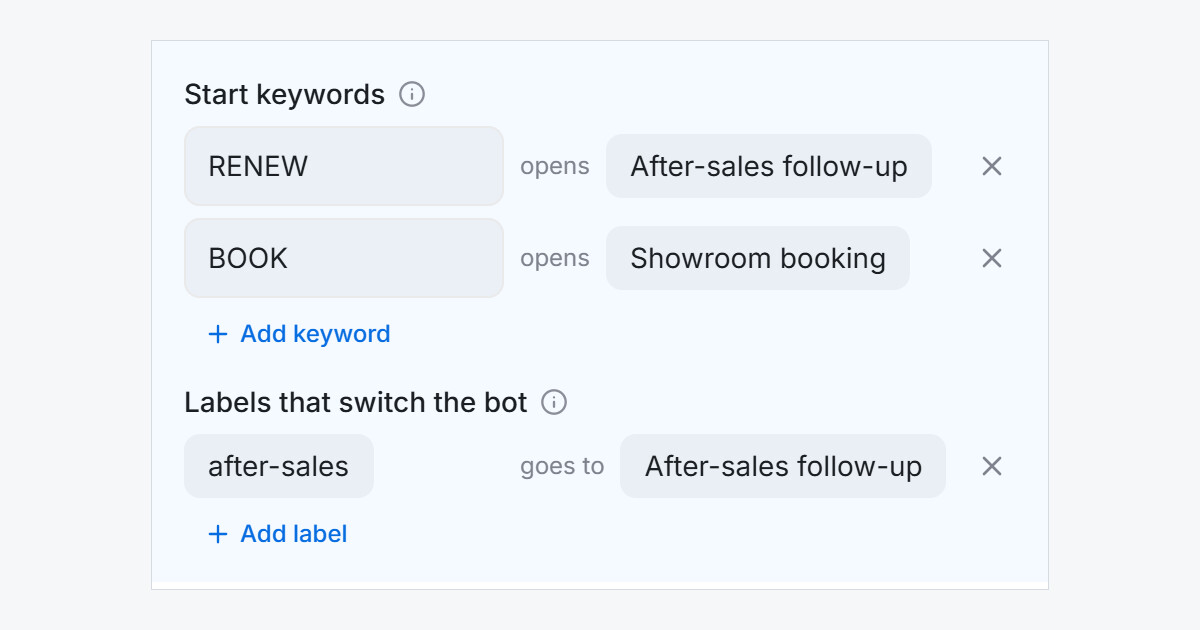
Mampu AI can now run more than one flow agent on the same inbox, on WhatsApp and every other channel. Your main agent keeps answering, and a second agent, such as after-sales or renewals, takes over the chats you choose, so you no longer have to merge everything into one big flow.
How do I send a chat to another flow agent in Mampu AI?
- Open your main flow agent and click Inboxes, then tick the inbox.
- Under Labels that switch the bot, click Add label and choose the label and the agent it goes to.
- In the automation that sends your after-sales message, add Remove a Label and then Add a Label with that label.
The customer's next reply is answered by that agent, whatever they write, and it can read the earlier chat. With Start keywords, the customer picks the agent themselves by sending a word such as RENEW.
How does the chat get back to the main flow agent?
- Remove the label and the customer's next message goes back to your main agent.
- When the label is added again, the second agent starts over and offers the last answers back: "Last time: 2 boxes. Same again?"
- A "yes" keeps the last answer, and a new answer replaces it.
- A chat your team has paused stays paused.