Send quick WhatsApp replies as one message with eco mode
Turn on eco mode on an official WhatsApp API number and an agent's quick texts in one chat reach the customer as one message, so Meta charges less.
Read inBahasa Melayu中文
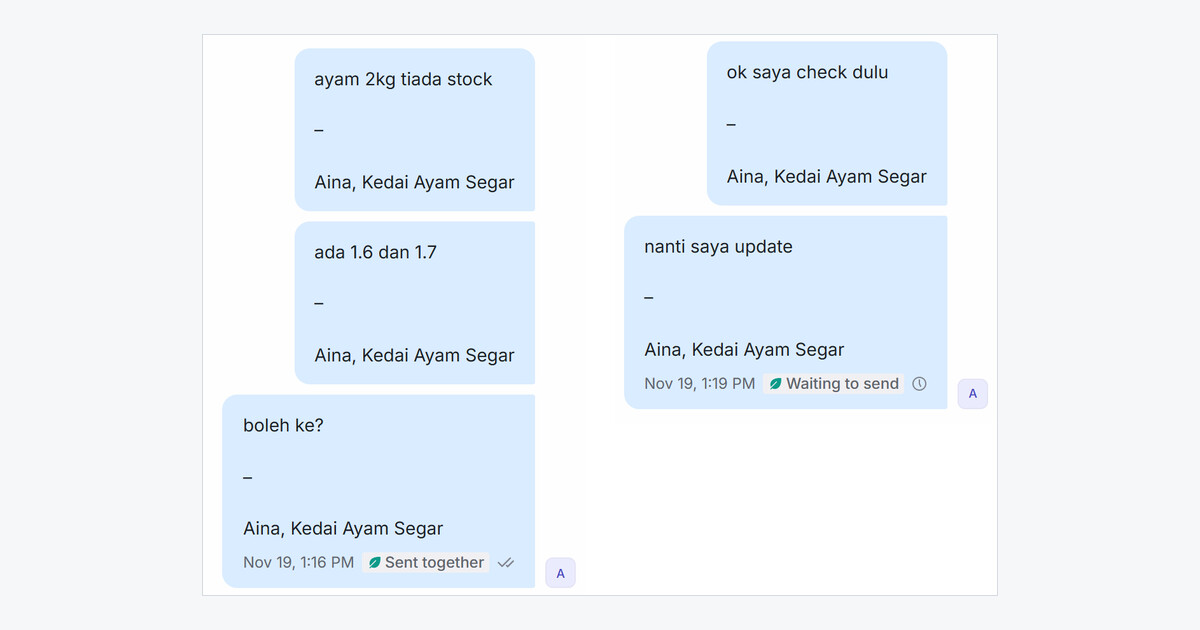
Mampu AI can now send an agent's quick texts as one WhatsApp message on official WhatsApp API numbers. Meta charges for each message beyond the monthly free allowance, and short replies typed one after another add up fast.
How do I turn on eco mode in Mampu AI?
- Open Settings → Inboxes, pick the WhatsApp number and open its Settings tab.
- Turn on Eco mode: send quick replies as one message.
- Pick Wait for the next text (15, 30 or 60 seconds) and click Update.
What does the customer get when eco mode is on?
- One WhatsApp message with a blank line between the agent's texts, sent once the agent stops for the wait.
- A text sent right after a photo or file arrives as its caption.
- An agent's signature once, at the end, not after every text.
- A customer message, a quoted reply or a new photo starts a new message.
In the chat each text keeps its own bubble, with a green leaf and Waiting to send, then Sent together. Bot replies, blasts, sequences and templates are not affected, and eco mode stays off until you turn it on.