Start your label automations from a contact import
Tick one box when you import contacts with labels, and each contact's latest conversation gets them too, so automations such as AI attributes run.
Read inBahasa Melayu中文
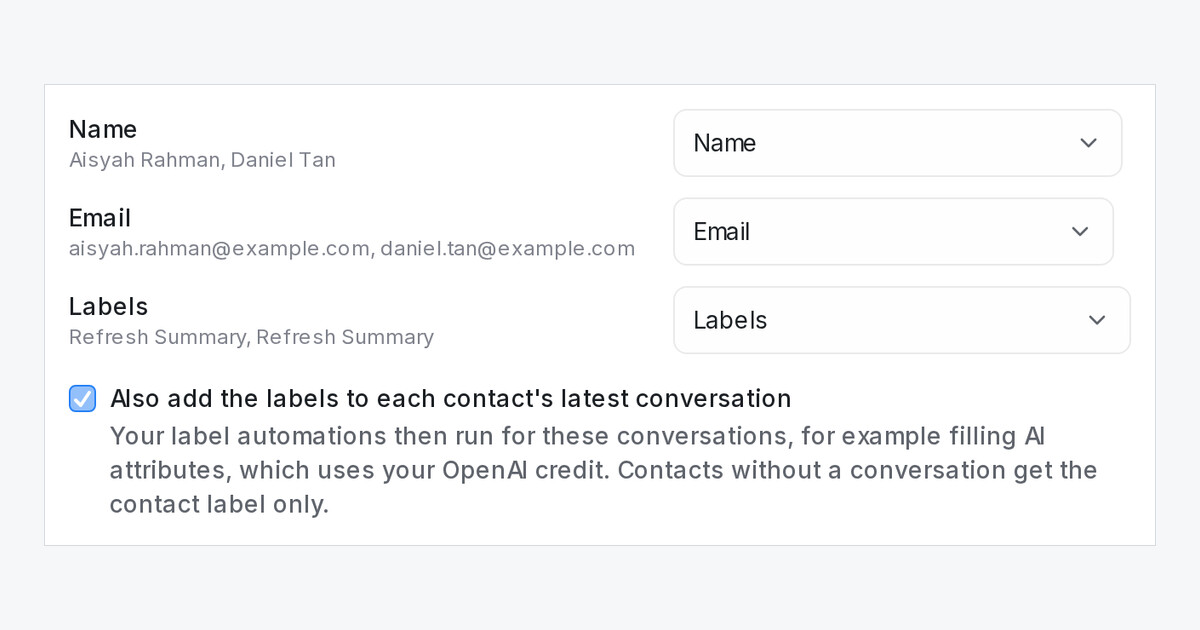
Labels you import with your contacts can now start your automations. Until now an import put labels only on the contacts, and automation rules react to labels on conversations, so a rule such as "label added, then fill AI attributes" never ran for imported leads.
How do I use it?
- Go to Contacts, open the three-dot menu and choose Import contacts.
- Match a column to Labels.
- Tick Also add the labels to each contact's latest conversation, then click Import.
Each contact's most recent conversation gets the same labels, the conversation shows who added them, and your label automations run for it. A contact with no conversation keeps the contact label only; no conversation is created.
What happens with a large import?
Automations that fill AI attributes take their turn, a few at a time, and wait when your OpenAI key reaches its rate limit instead of failing. A big import fills its leads over a while, and your incoming chats are never slowed down. Each conversation uses your OpenAI credit, so start with a small file if you want to see the result first.

