Get a red alert when your WhatsApp number may be hacked
When your WhatsApp sends zip or program files to many chats within minutes, your admins get an email and the customers who got a file are labelled.
Read inBahasa Melayu中文
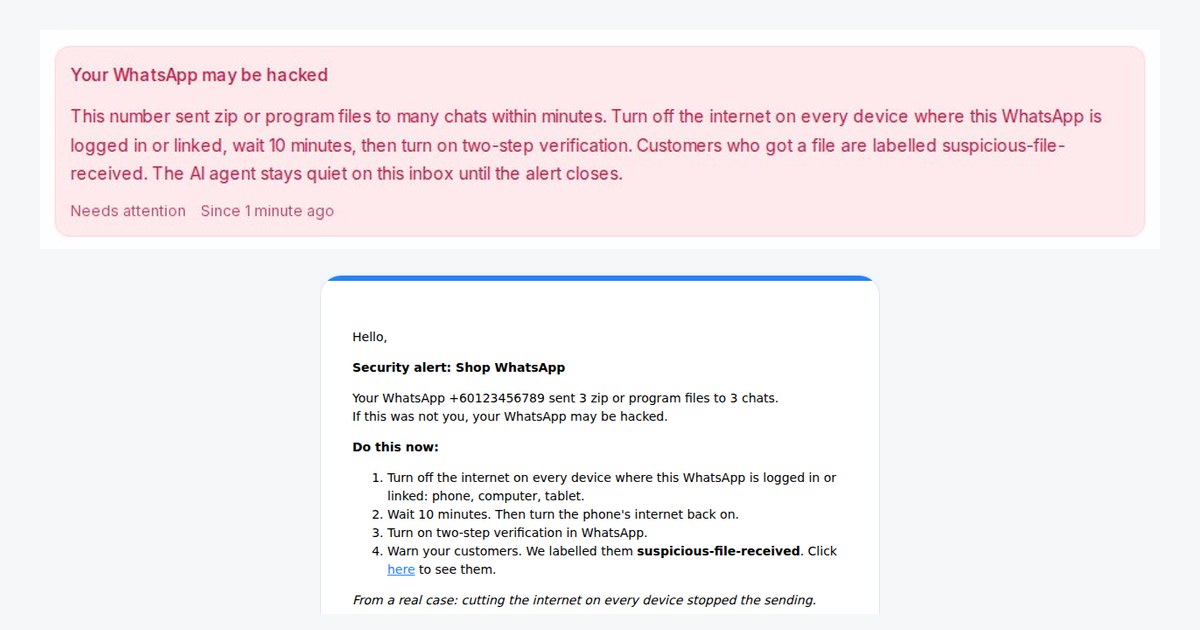
Mampu AI now warns you when your WhatsApp number may be hacked. When your number sends zip or program files to 3 or more chats within 10 minutes, the inbox shows a red alert and your workspace admins get an email with what to do. This works on WhatsApp numbers connected with Official WhatsApp API that stay in your WhatsApp Business app, and with Normal WhatsApp Web Link.
What should I do when Mampu AI says my WhatsApp may be hacked?
- Turn off the internet on every device where the WhatsApp is logged in or linked: phone, computer and tablet.
- Wait 10 minutes, then turn the phone's internet back on.
- Turn on two-step verification in WhatsApp.
- Warn the customers labelled suspicious-file-received. The link in the email opens them.
What else happens while the alert is open?
- Your admins get the email again every 5 minutes while files keep going out.
- Every customer who got a file is labelled suspicious-file-received, so you can send them a warning with WhatsApp blasting.
- On Official WhatsApp API, a ready warning template is submitted for approval, so you can reach customers outside the 24-hour window.
- Your AI agent on that inbox stays quiet, so a person answers customers who ask about the file. The alert closes after an hour with no new file.

