Group your labels into categories
Give each label a category and the sidebar and every label picker show them under headings such as Lead Progress or Role, with Other labels last.
Read inBahasa Melayu中文
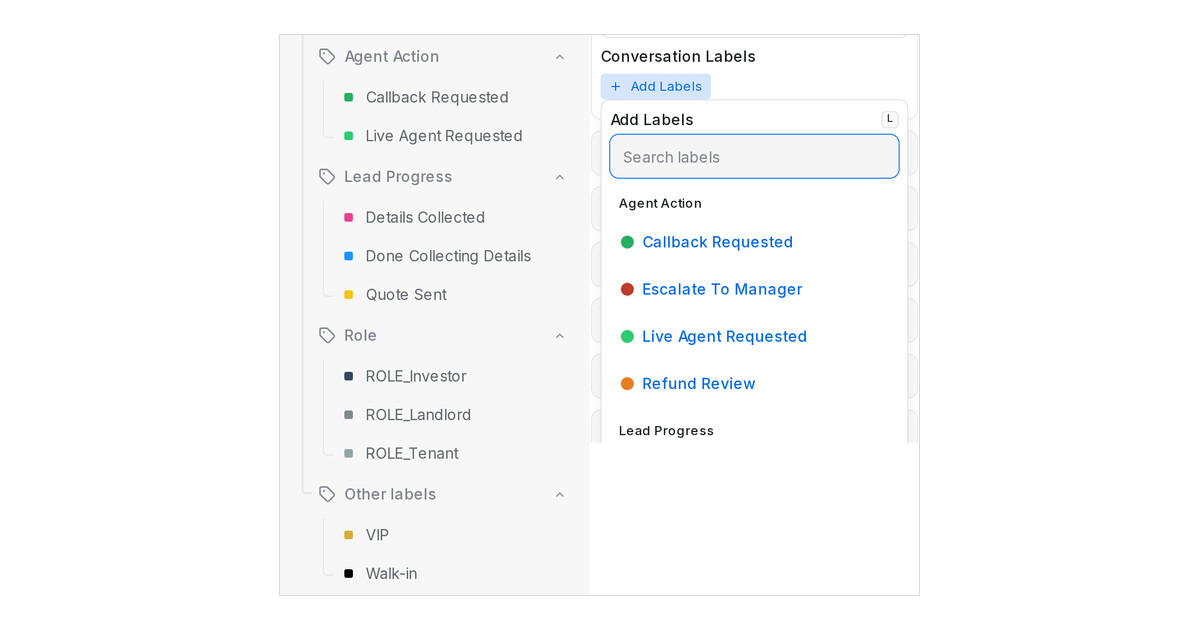
Mampu AI now lets you group labels into categories, so a long list of labels with different jobs stops hiding the one you need. A category is a name you type on the label, such as Lead Progress, Role or Agent Action. The sidebar shows one collapsible group per category, and every place you pick labels shows them under the same headings.
How do I group labels in Mampu AI?
- Open Settings → Labels and click Add label, or the pencil on a label you already have.
- In the Category field, pick a name already in use or type a new one.
- Save. Labels without a category stay under Other labels.
Where do the categories show?
- In the sidebar under Conversations, and under Tagged with on the Contacts side, each category is its own group with a chevron to collapse it.
- When you add a label to a conversation or a contact, in the bar below the conversation list, in the Labels filter and automation conditions and actions, and in the flow designer's Add label step, the list shows a heading per category. Type to search and only the matching groups stay.
- Filters, automations, reports and flows keep working as they do today, and a workspace with no categories looks exactly as before.

