Home dashboard for every workspace
Every workspace now gets the daily Home summary once an AI agent is live. Plans without AI Monitoring see the lead report and flags greyed with an Upgrade link.
Read inBahasa Melayu中文
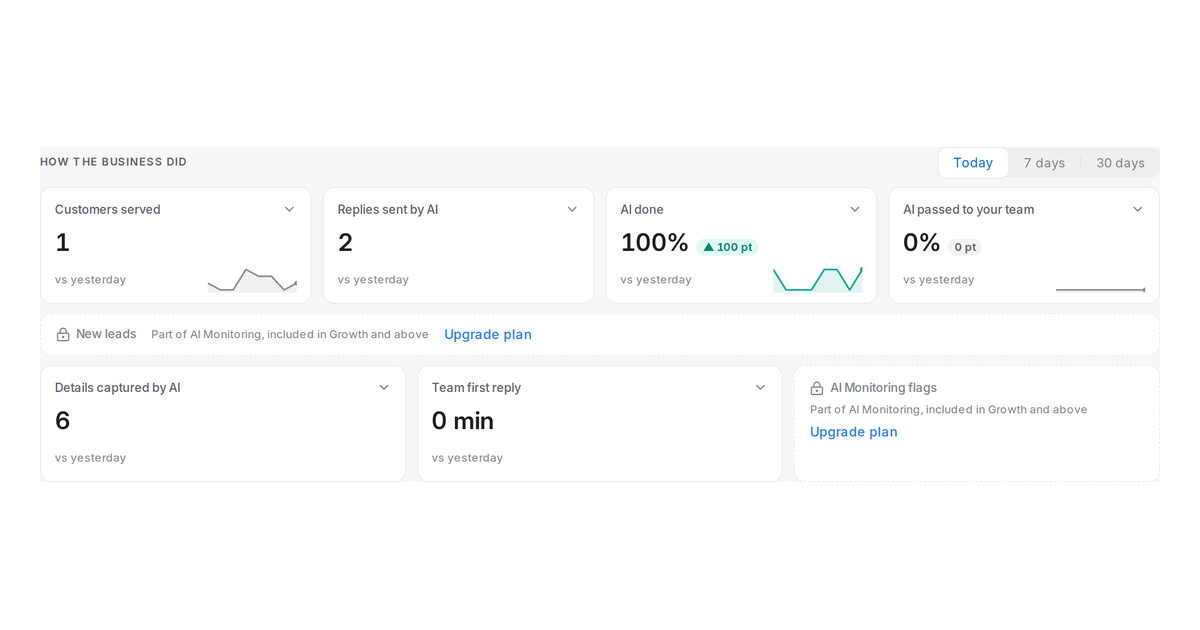
Mampu AI now shows the daily Home summary to every workspace. Until now it was switched on workspace by workspace, so a team that had finished every setup step could still see a completed checklist with nothing behind it. From today, the moment an AI agent is assigned to an inbox, administrators land on Home with what needs them and how the business did.
How do I get the Home summary in Mampu AI?
- Open Home and finish the setup checklist: create your AI agent, connect a channel, then Go live — put your agent to work to assign the agent to an inbox.
- Come back the next day. The first visit of the day opens on Home, and the sidebar's Home entry opens it any time.
- Pick Today, 7 days or 30 days above the tiles to change the window.
What do plans without AI Monitoring see?
- The New leads report and the AI Monitoring flags tile stay in their place, greyed out, with the line Part of AI Monitoring, included in Growth and above.
- Upgrade plan opens Settings → Billing, where you can move to a plan that includes AI Monitoring.
- Customers served, replies sent by AI, AI done, AI passed to your team, details captured and team first reply work the same on every plan.
- A workspace that already has AI Monitoring sees the page exactly as before.

