Build a WhatsApp chatbot from the chats you already have
Turn the questions your team answers every day into FAQs and a first flow, instead of writing them from scratch.
Read inBahasa Melayu中文
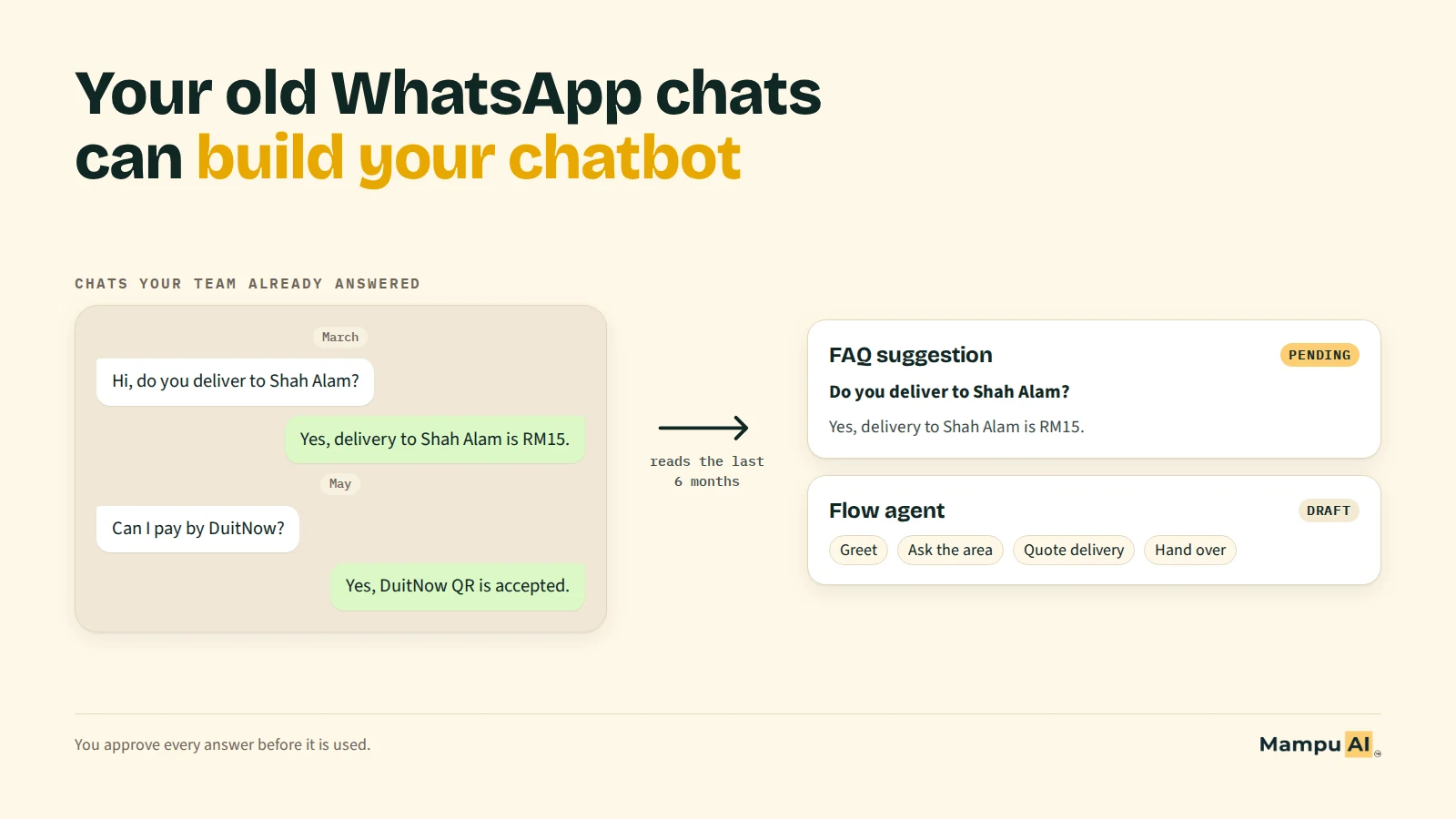
The fastest way to build a WhatsApp chatbot is to start from the chats you already have. Your team has answered the same questions for months, so the answers exist. List the questions customers ask most, copy your team's best reply to each, check it is still true, and use the usual order of a chat as your first flow.
Why does setting up a WhatsApp chatbot take so long?
Most chatbot projects stall on the blank page, not the software. Someone has to write every question a customer might ask, an answer for each, and the steps of the conversation: greet, find out what they want, give a price, collect details, hand over to a person. For a small business that is days of writing, usually by the owner, on top of running the business.
The writing is also guesswork. When you sit down to list "what customers ask", you remember the unusual questions and forget the boring ones that come in twenty times a day. The chatbot launches, misses the common questions, and customers ask for a human anyway.
Where are the answers your team already gives?
In your WhatsApp chats. If your business has used the WhatsApp Business app for a while, your chat list is a record of:
- The questions customers actually ask, in their own words and languages: "hantar ke Klang boleh?", "do you have eggless?", "几点开门?".
- The answers your team gives, including prices, areas you cover, opening hours and payment methods.
- The order of a good conversation: what your best staff ask first, when they give a price, and when they hand over to a person or send a booking link.
That is exactly what a chatbot needs: FAQs for the common questions, and a flow that follows the path your team already takes.
How do you turn past chats into FAQs by hand?
You can do this with any chatbot tool, or none:
- Pick a period. The last three to six months usually covers your current prices and products without too many outdated answers.
- Read the chats and tally the questions. Write each question the first time you see it, then add a mark every time it comes back. After fifty or so chats, most businesses find that ten to twenty questions make up the bulk of what customers ask.
- Copy your team's best reply to each of those questions. Keep your own wording: customers are used to it, and it already has the right tone.
- Check every answer is still true. Prices, delivery fees and promotions change. Replace anything out of date before it goes into a chatbot.
- Write down the usual path. In most sales chats it is short: greet, ask what the customer needs, answer or quote, collect a name or a time, then hand over or confirm. That becomes your first flow.
This works, but it is slow. Reading hundreds of chats to count questions is exactly the kind of job people put off.
What does WhatsApp let you bring over when you connect a chatbot?
If you move from the WhatsApp Business app to a chatbot or shared inbox, the WhatsApp Business Platform lets you keep using the app on the same number. Meta calls this coexistence. When you connect, you can choose to share your chat history with the platform. Meta's rules, checked on 24 September 2026:
| What | What Meta allows |
|---|---|
| Chat history | Individual (1:1) chats from the most recent 6 months (180 days) |
| Group chats | Not shared |
| Photos, videos and files in old chats | Only for messages from the last 14 days |
| Contacts | Contacts with a WhatsApp number can be shared |
| When | Only at the moment you connect: the platform has 24 hours to request it, otherwise you have to disconnect and connect again |
| App version | WhatsApp Business app 2.24.17 or later |
A few things change on the phone once the number is connected: messages are mirrored between the app and the platform, broadcast lists become read-only, and disappearing and view-once messages are turned off for 1:1 chats. Replies you type in the app stay free under WhatsApp's pricing, while replies sent through the platform follow Meta's rates.
Because the history can only be shared when you connect, decide before you start whether you want it. If you plan to build a chatbot from your chats, say yes.
What should you check before trusting answers from old chats?
Old chats are a strong starting point, but not every reply belongs in a chatbot:
- Out-of-date prices and promotions. A "RM50 off this week" reply from March is wrong in September.
- One-off promises. "I'll give you free delivery since you're a regular" was a favour to one customer, not your policy.
- Personal details. Names, phone numbers, addresses and order numbers must never end up in an FAQ answer.
- Mistakes. Staff sometimes get things wrong. If two replies to the same question disagree, pick the right one or write a new one.
- Chats that are not sales. Supplier messages, staff chats and spam are noise. Ignore them.
Whatever tool you use, approve every answer yourself before a customer sees it.
How does Mampu AI build a chatbot from your WhatsApp chat history?
Mampu AI does the reading and counting for you, on every plan. When you connect your WhatsApp Business number and share your chat history, your past chats arrive in your inbox as earlier conversations. About an hour after the last chats arrive, Mampu AI reads up to your 500 most recent chats once and prepares:
- FAQ suggestions under Flow Agents → AI Knowledge Hub → FAQ → Pending: the questions your team already answers, each shown with the customer message and the reply it came from. Nothing is used until you approve it, and you can edit the wording first.
- A draft flow agent under Flow Agents, named after your inbox and built from how your team usually handles these chats. It stays a draft and replies to no one until you check it, connect it to your inbox and publish it.
Your account's administrators get one email when this is ready. You can approve the FAQ suggestions on your free AI reply credits, without your own OpenAI key. It runs once per number; to build from newer chats later, use Analyse chats on the Flow Agents page.
Frequently asked questions
Sources
Every rule and figure on this page is dated and linked to its source. Mampu AI figures are anonymised percentages across customers on Mampu AI.
Meta rules checked: 24 September 2026
Public sources
- Meta, "Onboard WhatsApp Business app users" (coexistence, updated 26 June 2026)https://developers.facebook.com/documentation/business-messaging/whatsapp/embedded-signup/onboarding-business-app-users/
- Meta, "Pricing on the WhatsApp Business Platform"https://developers.facebook.com/documentation/business-messaging/whatsapp/pricing
- Mampu AI Help Centre, "Connecting a WhatsApp inbox"https://help.mampuai.com/settings/connecting-a-whatsapp-inbox
Turn your WhatsApp chats into your first chatbot
Message our team. We'll help you connect your number, share your chat history and review the FAQs and flow it produces.

