WhatsApp Business API pricing in Malaysia (2026)
The 1 October service message fee explained: what is billed, what stays free and what to do before 30 September.
Read inBahasa Melayu中文
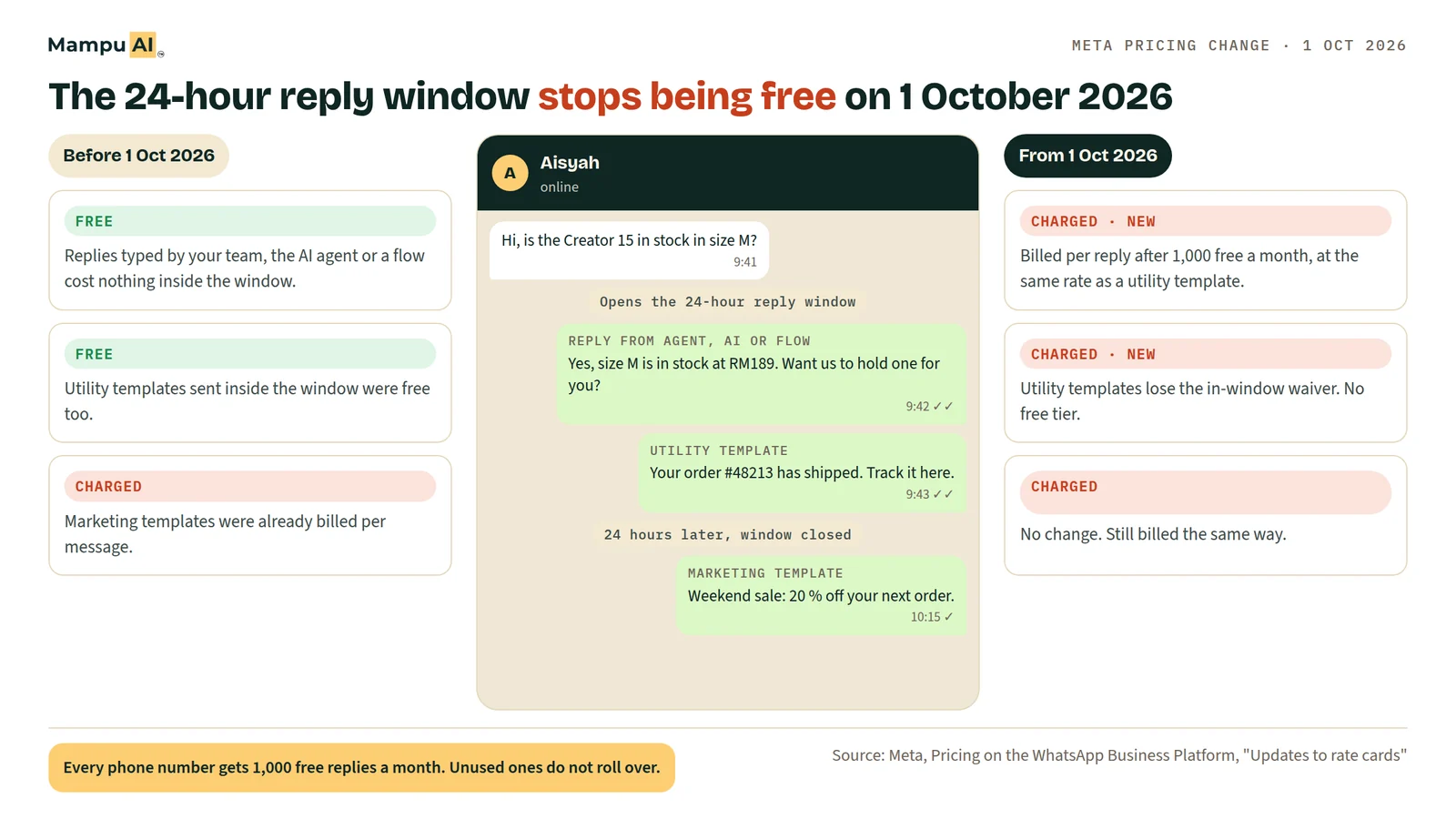
From 1 October 2026, Meta charges for WhatsApp replies that a business sends through the WhatsApp Business API, whether a person, a chatbot or an AI agent writes them. Each phone number gets 1,000 free replies a month. After that, each delivered reply to a Malaysian customer costs RM0.0564 (US$0.014). Businesses need a payment method on their WhatsApp Business Account by 30 September 2026.
What changes on 1 October 2026?
Until 30 September 2026, a free-form reply inside the 24-hour customer service window cost nothing. Meta made these "service messages" free on 1 November 2024. From 1 October 2026 they are billed again, per delivered message, at the same rate as a utility template in the customer's country.
| Message | Until 30 Sep 2026 | From 1 Oct 2026 |
|---|---|---|
| Free-form reply inside the 24-hour window (typed by an agent, or sent by a chatbot, flow or AI agent) | Free | 1,000 free per number per month, then billed per message |
| Utility template sent inside the 24-hour window | Free (since 1 Jul 2025) | Billed per message, no free tier |
| Marketing template | Billed | No change |
| Authentication template (OTP) | Billed | No change |
| Message a customer sends you | Free | Free |
Meta's definition is broad: a service message is any non-template reply "powered by a person, like a customer service representative, or by a 3rd-party AI solution". So it makes no difference which tool you use. A reply from a shared inbox, a rule-based chatbot or an AI agent is billed the same way.
How much does a WhatsApp service message cost in Malaysia?
The rate follows the country of the customer's phone number, not your business. It is the same as Meta's utility rate for that country, and it is charged in the currency set on your WhatsApp Business Account. Service messages have no volume discount tiers.
| Customer's country | Per service message (USD) | Per service message (MYR) |
|---|---|---|
| Malaysia | US$0.0140 | RM0.0564 |
| Singapore | US$0.0160 | RM0.0646 |
| Indonesia | US$0.0250 | RM0.1008 |
| Hong Kong | US$0.0260 | RM0.1049 |
| India | US$0.0014 | RM0.0056 |
| Rest of Asia Pacific | US$0.0113 | RM0.0456 |
Source: Meta WhatsApp Business Platform rate card effective 1 October 2026, "Service" column, downloaded 22 September 2026.
What a Malaysian number replying to Malaysian customers would pay in a month:
| Replies in the month | Billable after 1,000 free | Meta charge |
|---|---|---|
| 800 | 0 | RM0 |
| 2,000 | 1,000 | about RM56 |
| 5,000 | 4,000 | about RM226 |
| 10,000 | 9,000 | about RM508 |
| 30,000 | 29,000 | about RM1,636 |
The unit is one delivered message bubble. A reply split into three bubbles counts three times. A single message with buttons or a list counts once.
How many businesses will actually pay?
Fewer than the headlines suggest. We looked at the replies sent through the API by every active WhatsApp Business API number on Mampu AI, excluding our own test accounts. Across the months we checked, 67 % to 70 % of numbers sent 1,000 replies or fewer in a month, so they would have paid nothing.
The fee is concentrated in a few busy numbers. Across all numbers, 61 % of the replies in a month came from numbers that had already used their free 1,000. That's why the bill barely touches most small businesses but can run up quickly for a busy one. Use the table above to estimate yours.
Method: anonymised, aggregated share of outgoing non-template messages per WhatsApp Business API number on Mampu AI, counted per calendar month. Failed messages and replies typed in the WhatsApp Business app are excluded. The figures are an upper bound, because they do not remove replies that were free under the 72-hour ad window. The sample is small, so read them as an indication, not a market survey.
Which WhatsApp replies stay free?
Four kinds stay free after 1 October 2026:
- The first 1,000 service messages each month, per phone number. One-to-one and group replies share the same 1,000. Unused messages do not roll over to the next month.
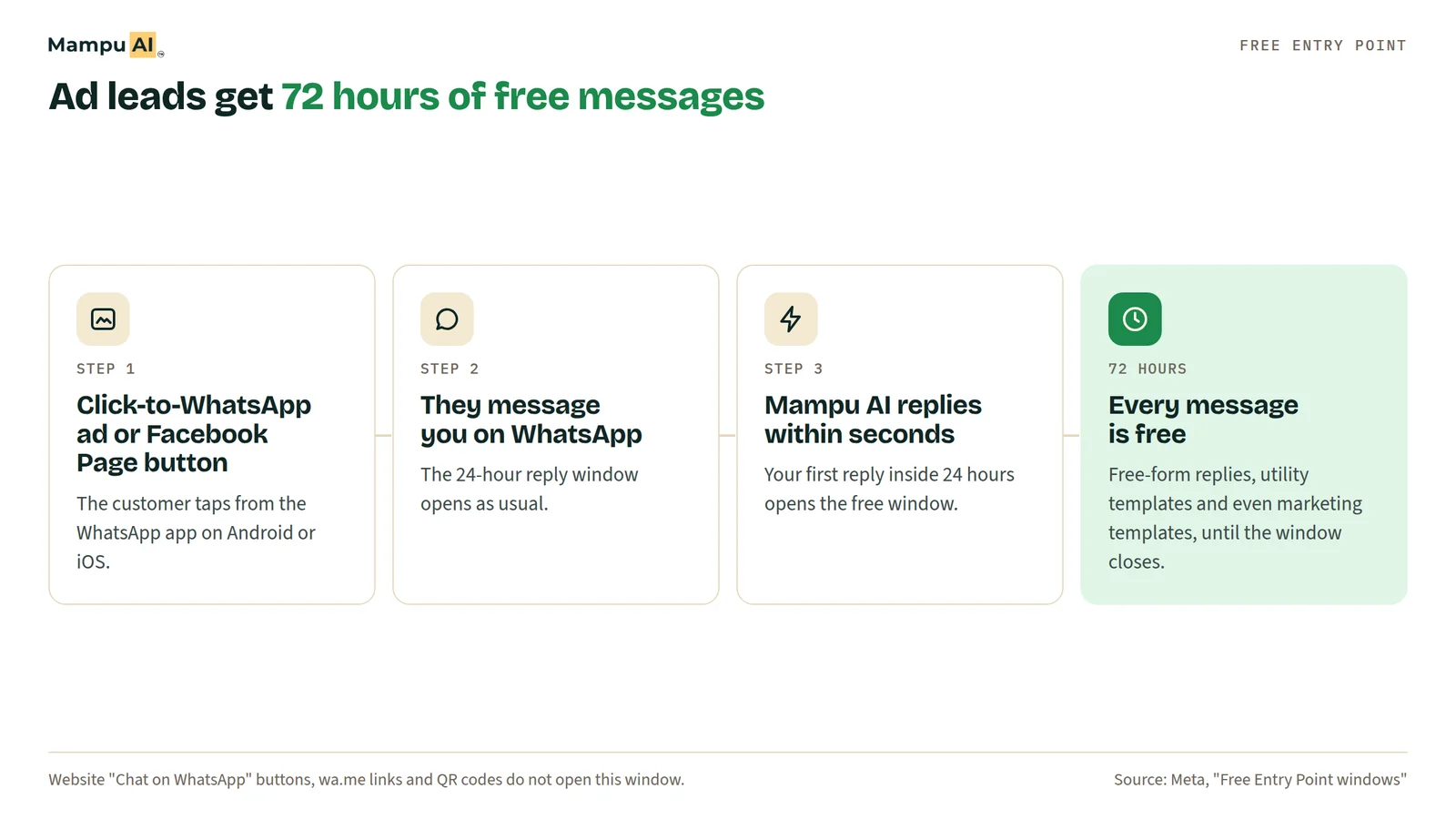
- Everything for 72 hours after a lead from a Click-to-WhatsApp ad or your Facebook Page button. When a customer messages you from a Click-to-WhatsApp ad or the WhatsApp button on your Facebook Page, and you reply within 24 hours, every message you send for the next 72 hours is free, templates included. The customer has to tap from the WhatsApp app on Android or iOS.
- Replies typed in the WhatsApp Business app on a coexistence number. If your number runs the WhatsApp Business app and the API together (coexistence), replies your team types in the app are free and do not count toward the 1,000. Replies sent through the API on the same number are billed.
- Messages customers send you, plus every channel outside WhatsApp: Instagram, Messenger, Telegram, website chat and email are not part of this change.
A "Chat on WhatsApp" button on your website, a wa.me link or a QR code does not open the 72-hour free window. Only Click-to-WhatsApp ads and the Facebook Page button do.
What happens if I don't add a payment method by 30 September?
Your replies stop being delivered once the free 1,000 are used. Meta's own wording: without a payment method, "Meta will deliver service messages within the shared free tier but not deliver them after the free tier has been used." For the rest of that month your chatbot, AI agent and team would look silent to customers.
To add a payment method, open Meta Business Suite, go to Billing & payments (Billing Hub) and attach a card to the WhatsApp Business Account that owns your number: open Billing Hub payment methods. Meta bills this account directly, so the charge appears on your Meta invoice, not on your chatbot subscription.
Does this affect the WhatsApp Business app?
No, not on its own. If you only use the free WhatsApp Business app on your phone, with no API, chatbot platform or AI agent connected, nothing changes. The fee applies only to messages sent through the WhatsApp Business Platform (the Cloud API), which is what chatbot and shared-inbox platforms use.
If you use coexistence, the app and the API run on the same number. Replies typed in the app stay free, and replies sent through the API are billed.
How do I keep my WhatsApp API bill low?
The bill is simply billable replies × rate. The rate is fixed, so the saving comes from sending fewer, more complete messages and from getting more chats into the free windows.
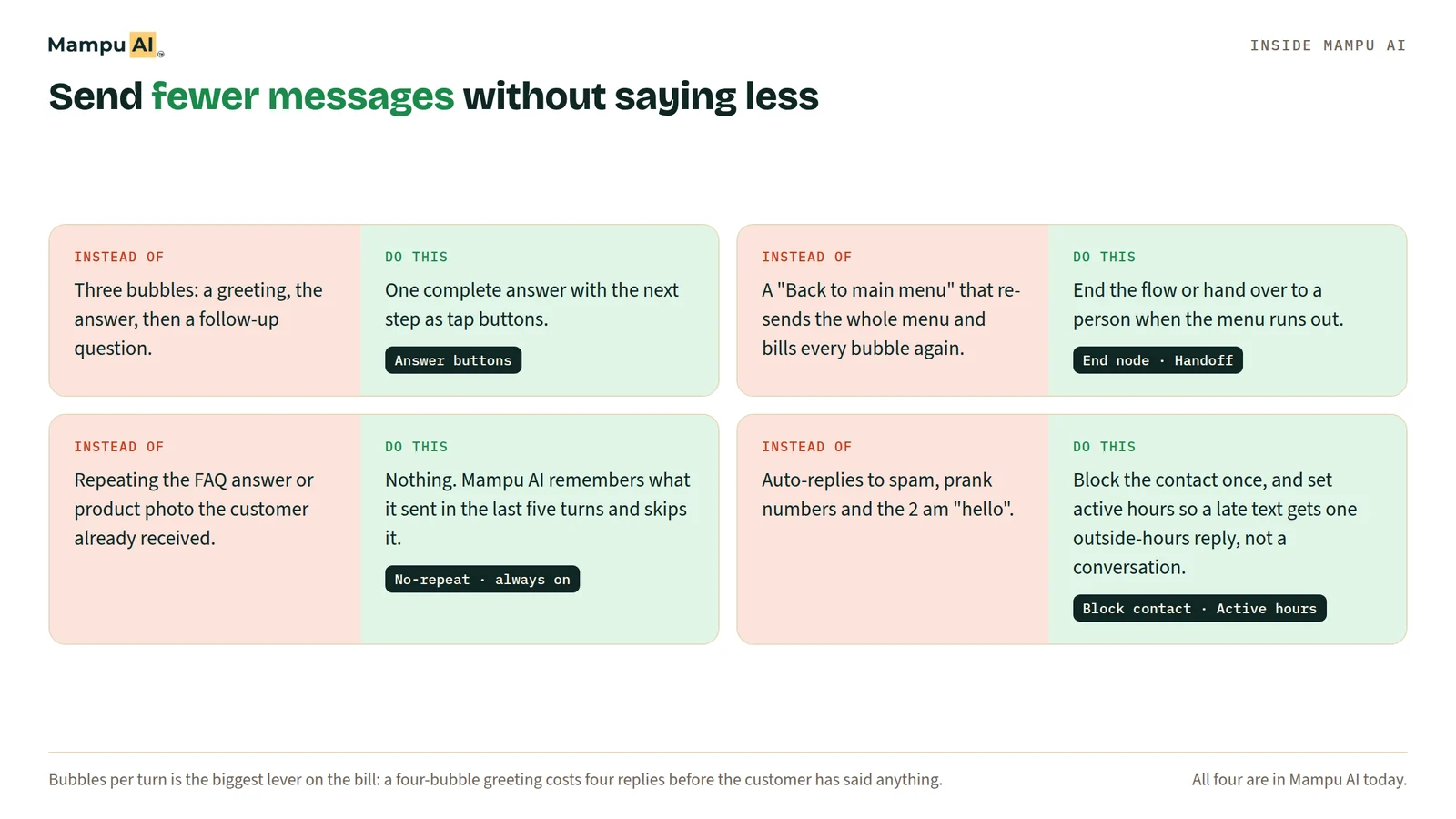
- Send one complete message per turn. Put the answer, the next question and buttons or a list in a single bubble instead of three short ones.
- Remove loops that re-send menus. A "back to main menu" option that re-sends four messages spends four messages every time a customer taps it.
- End chats cleanly. Close the flow or hand the chat to a person when the question is answered, instead of letting a bot keep prompting.
- Skip repeat welcomes. Returning customers don't need the full greeting sequence each time.
- Grow through Click-to-WhatsApp ads and the Facebook Page button. Those chats are free for 72 hours, so qualify ad leads inside that window.
- On a coexistence number, split the work. Let the AI handle the first reply and the common questions, then continue long conversations from the WhatsApp Business app, which is free.
- Block spam and set active hours. Stop the bot from replying to spam contacts or chatting at length outside hours when a short message would do.
How does Mampu AI handle the new WhatsApp fee?
Mampu AI adds no markup. Meta bills your own WhatsApp Business Account directly, at Meta's published rate. In the Mampu AI inbox, each WhatsApp message shows its Meta pricing category and, for ad leads, when the 72-hour free window ends. Ad-sourced chats carry the ad they came from, so you can route them to a qualifying flow while the window is free. On a coexistence number, the "Pause on human reply" setting keeps the AI agent quiet while your team replies from the WhatsApp Business app, then resumes when the pause ends.
If you're not sure how many replies your number sends, or how to set up the free ad window, message our team on WhatsApp and we'll go through your setup with you.
Frequently asked questions
Sources
Every rule and figure on this page is dated and linked to its source. Mampu AI figures are anonymised percentages across customers on Mampu AI.
Meta rates checked: 22 September 2026
Public sources
- Meta, "Upcoming pricing updates for Meta Business Agent, service and utility messages" (updated 25 August 2026)https://developers.facebook.com/documentation/business-messaging/whatsapp/pricing/non-template-messages
- Meta, "Pricing on the WhatsApp Business Platform", section "Updates to rate cards" (updated 10 September 2026), and the rate card effective 1 October 2026https://developers.facebook.com/documentation/business-messaging/whatsapp/pricing
- Meta, "Onboard WhatsApp Business app users" (coexistence, updated 26 June 2026)https://developers.facebook.com/documentation/business-messaging/whatsapp/embedded-signup/onboarding-business-app-users/
- Meta Billing Hub, payment methodshttps://business.facebook.com/latest/billing_hub/payment_methods
Plan your WhatsApp setup for the new pricing
Message our team. We'll look at how many replies your number sends and set up the free ad window with you.

