Your chatbot offered three times in the same hour. No wonder nobody picked one.
How many appointment times a chatbot should offer, how far apart, and how to set it up.
Read inBahasa Melayu中文
Customers skip back-to-back appointment offers because three times in one hour are one choice, not three. If that hour does not suit them, every option fails at once and the chat stalls. Offer a few times spread across the day and the next day, at least a few hours apart, and most customers can pick one straight away.
Why do customers ignore the appointment times a chatbot offers?
Picture the chat. A customer asks to book a visit. The bot checks the calendar and answers within a second: "I have 11:00, 11:30 or 12:00 today. Which one works?" It looks generous. Three options, all real, all free.
To the customer it is a single question: can you come around midday today? If the answer is no, all three options are useless at the same time. Now they have to type a counter-proposal ("anything in the afternoon?", "what about tomorrow?") and wait for another list. Many do not bother. They meant to book, the bot replied instantly, and the conversation still died.
Bots do this for a dull reason. A calendar hands back its free slots in order from now, and the simplest bot takes the first three. Those are always next to each other: the first free moment, then thirty minutes later, then thirty minutes after that. Nothing in the data says "give the customer some variety", so nothing does.
In a sample of Mampu AI's own booking chats before we changed this rule, 100% of the offers listed three slots inside a single hour. Not one offered a morning and an afternoon, or today and tomorrow.
It matters more in chat than on a booking website. A website visitor sees a whole month of open slots and picks. A chat happens in the gaps of someone's day: on the bus, between their own customers, at 11 at night. Meta reported in May 2022 that one billion people message a business every week on WhatsApp, Messenger and Instagram Direct, and in Malaysia 98.0% of people were online at the end of 2025. Those people are not sitting at a desk with their diary open. The same people expect speed: in HubSpot's research, 82% rated an immediate response as important when they had a sales question. Every extra round of "any other time?" is a delay the offer created.
How many times should a booking bot offer, and how far apart?
Three, and spread out. Fewer than three feels like take-it-or-leave-it; more than three is a list to scan on a phone screen.
- At least three hours between the times. An 11 AM and a 2 PM are different decisions: before lunch or after, this errand or that one. Two times thirty minutes apart are the same decision twice.
- Let the list run into tomorrow when today is full. "Not today" is a common reason an offer fails, so once today has no time far enough apart, the next option should be tomorrow rather than a squeezed-in slot.
- Mix the parts of the day unless the customer has told you otherwise. Morning, afternoon, next morning covers most calendars.
- Respect what the customer said. Someone who wrote "mornings only" should see only mornings, spread across the coming days, never an afternoon they already ruled out.
- Keep the gap in proportion. A one-hour consultation deserves a three-hour gap. A fifteen-minute collection slot can sit closer. Make the gap a setting, not a rule carved into the bot.
| The customer wrote | A back-to-back offer | A spread offer |
|---|---|---|
| "Can I book a visit?" (at 9 AM) | 11:00, 11:30, 12:00 today | 11 AM today, 2 PM today, 9 AM tomorrow |
| "Mornings only, please" | 9:00, 9:30, 10:00 on Tuesday | 9 AM Tuesday, 9 AM Wednesday, 9 AM Thursday |
| "Tomorrow afternoon?" | 2:00, 2:30, 3:00 tomorrow | 2 PM tomorrow, 5 PM tomorrow, 2 PM the day after |
When the calendar is nearly full, the rule bends. Offer whatever is free, even if those times are close together, and say so: "Only these are left this week." An honest short list books more than an empty "nothing matches".
What should a good booking offer look like in a chat?
A good offer reads like a receptionist who knows the diary, not like a printout of it.
- Lead with the times, in the customer's words. "I can book you for a visit at 11 AM today, 2 PM today, or 9 AM tomorrow. Which suits you?" Relative words (today, tomorrow, Thursday) beat full dates in a first offer.
- Say how long it takes, once. "The consultation is about an hour."
- Confirm the pick with the full date. "Booked: Tuesday 7 October, 2 PM." This is where the full date belongs.
- When their counter-proposal is taken, stay close to it. If the customer asks for 4 PM and 4 PM has just gone, offer 3:30 and 4:30, not a fresh spread. You now know what they want.
- Follow up on the channel they used. A confirmation message and a reminder the day before turn a booking into a visit.
- Never invent a time. Every time in the offer must be free on the calendar the moment it is sent.
How does Mampu AI space out the times it offers?
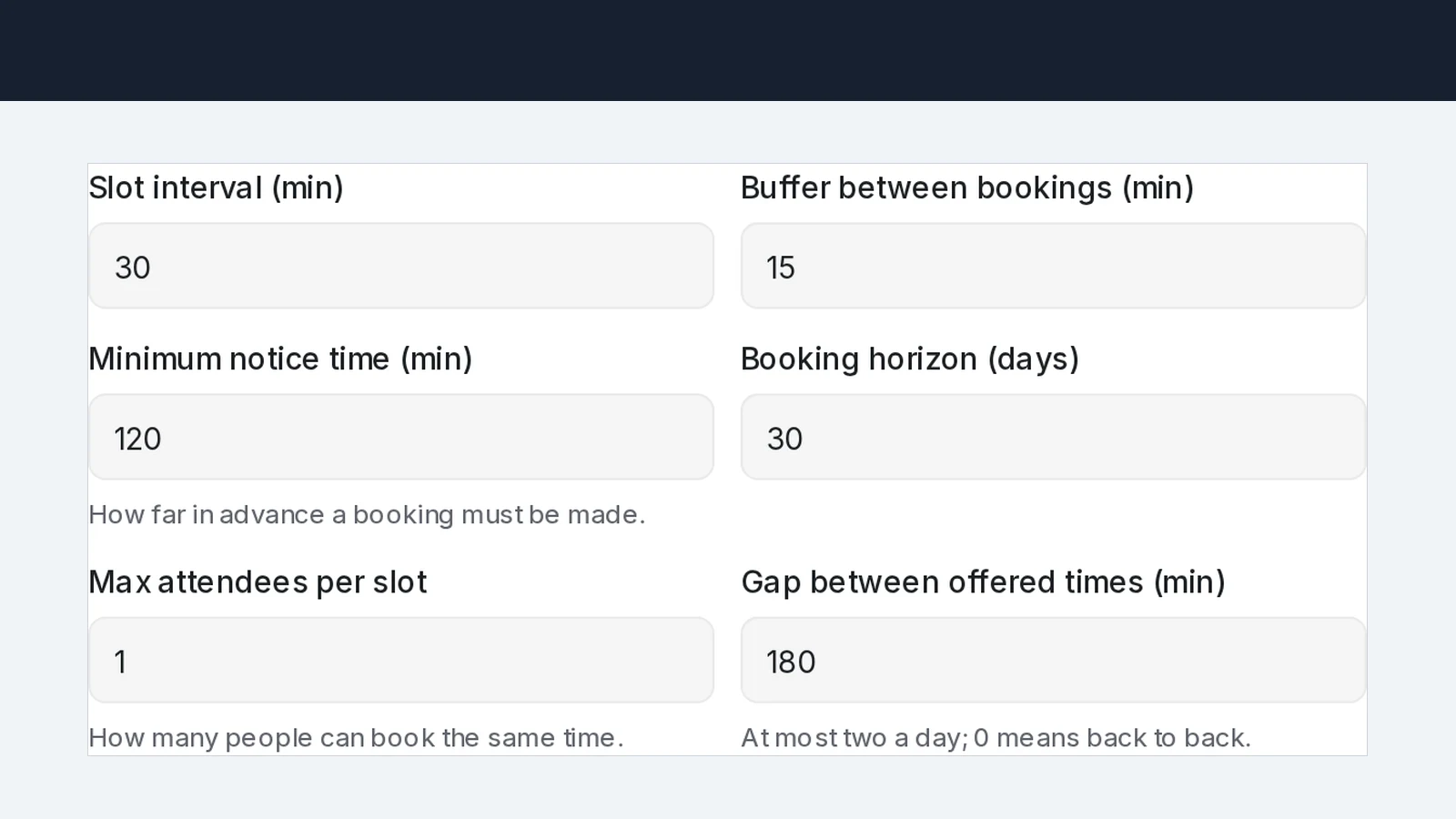
A Mampu AI Flow Agent with a calendar attached does this by default. When it proposes times in a chat on WhatsApp, Facebook, Instagram or your website, the three times are at least 3 hours apart, so a customer who asks at 9 AM sees 11 AM, 2 PM, or 5 PM today on a calendar open into the evening, or 11 AM today, 2 PM today, or 9 AM tomorrow on one that closes at five. A customer who said "mornings only" gets mornings, spaced the same way. When a chosen time has just been taken, the agent re-offers the nearest times around the one the customer asked for. The public booking page keeps showing every free slot; only the chat offers are spread.
The gap is a setting on each calendar:
- Open Flow Agents → AI Knowledge Hub → Calendar and go to the Tools tab.
- Click ⋯ → Edit on the calendar and expand Advanced settings.
- Set Gap between offered times (min). New and existing calendars start at 180. A shorter gap suits short slots; 0 offers the nearest times back to back.
- Click Save. The next offer in chat uses the new gap.
Frequently asked questions
Sources
Every rule and figure on this page is dated and linked to its source. Mampu AI figures are anonymised percentages across customers on Mampu AI.
Figures checked: 6 October 2026
Public sources
- Meta Newsroom, "Announcing New Products to Make Business Messaging Easier" (19 May 2022)https://about.fb.com/news/2022/05/announcing-new-products-to-make-business-messaging-easier/
- DataReportal, "Digital 2026: Malaysia"https://datareportal.com/reports/digital-2026-malaysia
- HubSpot, "Live Chat Exposes a Fatal Flaw in Your Go-to-Market" (updated March 2025)https://blog.hubspot.com/sales/live-chat-go-to-market-flaw
Let your chatbot offer times people can actually take
Message our team. We'll connect your WhatsApp, set up a calendar, and show you the chatbot offering spread-out appointment times and booking them on its own.

