Trigger an automation rule on any of several words
The Message Contains condition takes a list of words as chips and matches when a message contains any of them, so one rule covers every phrasing.
Read inBahasa Melayu中文
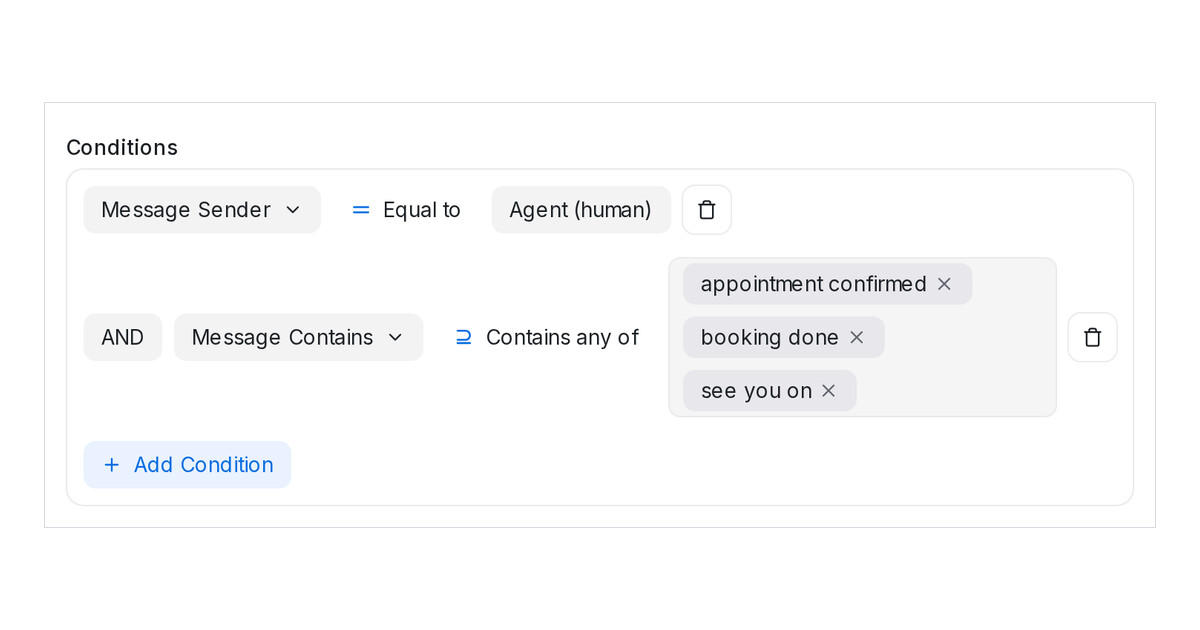
Mampu AI automation rules can now watch for several words at once. In Settings → Automation, the Message Contains condition takes a list of words or phrases, each shown as a chip, and matches when the message contains any of them. One rule covers "appointment confirmed", "booking done" and "see you on" instead of three rules.
How do I make an automation rule match any of several words in Mampu AI?
- Open Settings → Automation and click Create Automation, or edit a rule.
- Under Event, choose Message Created. Add Message Sender when the rule should fire only on your team's replies.
- Add Message Contains, type a word or phrase and press Enter. Repeat for each one.
- Add your actions and click Create.
What happens when a message contains more than one of the words?
- The rule's actions run once per message, however many of the words it contains.
- Contains any of is the default. Contains none of fires only when none of the words appears.
- Is any of and Is none of compare the whole message with each entry instead.
- Matching ignores letter case, and a word matches inside a longer message too.
- Rules you created earlier keep working; opening one shows its words as chips.

