Fill AI attributes from a profile your team keeps
An automation rule can now read one attribute, such as a Tenant Profile, and fill your other AI attributes from it, only the ones you pick.
Read inBahasa Melayu中文
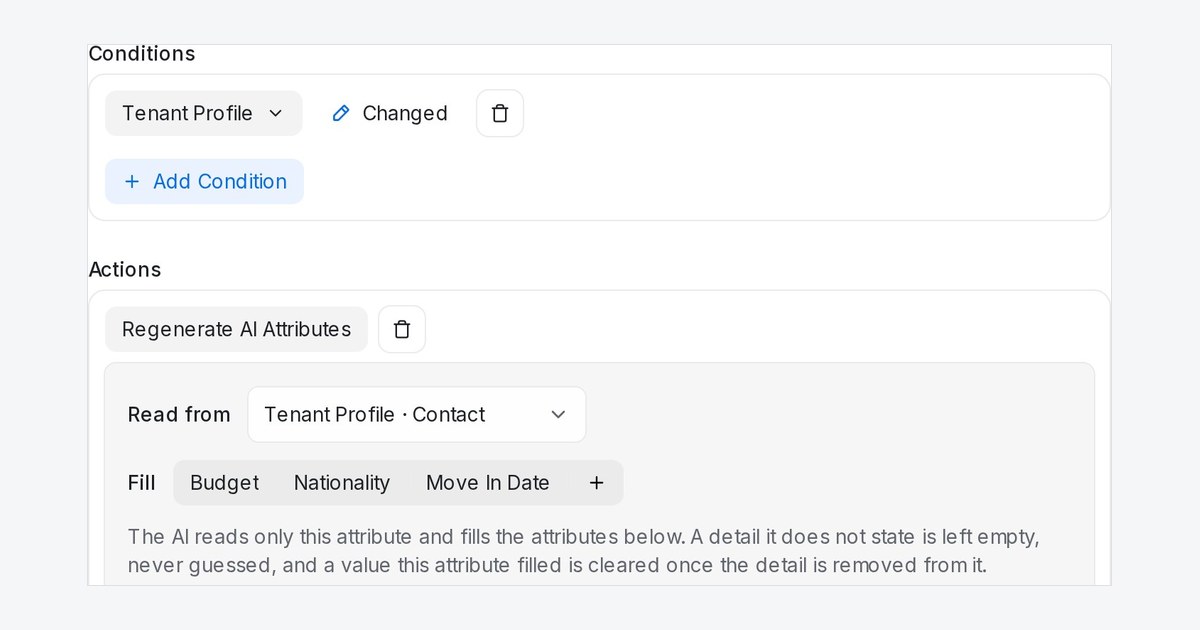
AI attributes no longer have to come from the chat. When your team writes a lead's details into one attribute, such as a Tenant Profile note, a rule can read that note and fill fields such as budget, nationality and move-in date for you.
How do I use it?
- Go to Settings → Automation and click Create Automation.
- Set the Event to Attribute Changed, and under Conditions pick the attribute your team writes in. It starts on Changed, so the rule runs whenever the note is saved with something different.
- Add the Regenerate AI Attributes action, choose the note in Read from, pick the fields in Fill, and click Create.
What happens when the note and the chat disagree?
The newer statement wins. A detail the note does not state stays empty instead of being guessed, and when a detail is removed from the note, the value it filled is cleared. Values your team typed by hand are kept unless the note says something newer. Existing rules keep reading the conversation and filling every AI attribute, as before.

