Filter contacts by how a name, email or phone starts, ends or is empty
Every text field in the contact filter now offers Starts with, Ends with, Is present and Is not present, and Does not contain also finds empty fields.
Read inBahasa Melayu中文
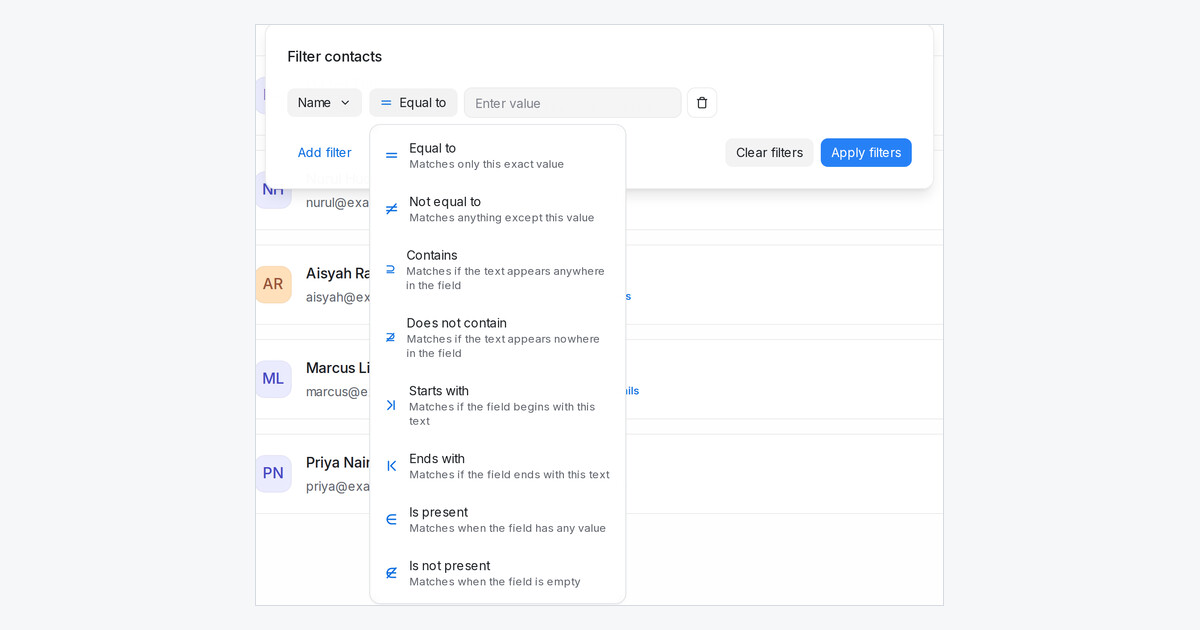
Mampu AI can now filter contacts by how a field starts or ends, and by whether it is filled in at all. Name, Email, Phone number, Identifier, City, Company and your text or link attributes offer the same eight operators in Contacts → Filter, in segments, in message sequence conditions and in AI Knowledge conditions.
How do I find contacts whose email is empty in Mampu AI?
- Open Contacts and click the filter icon.
- Pick Email as the field and Is not present as the operator.
- Click Apply filters. Save the result as a segment if you want to reuse it as a blasting audience.
A blank value counts as empty, so a contact whose email was cleared matches too.
Which operators does each field offer now?
- Text fields: Equal to, Not equal to, Contains, Does not contain, Starts with, Ends with, Is present and Is not present. Letter case never matters.
- Does not contain also finds contacts whose field is empty, so Email Does not contain
gmailincludes people with no email at all. - Phone Starts with
60matches numbers saved as +60. - Number attributes offer Is greater than and Is less than. Created at and Last activity offer Equal to for a single day, and Last activity also offers Is present and Is not present.

