Group your custom attributes into their own sections
Give attributes a category and each one shows as its own section beside a conversation, so long lists of lead details are easy to scan.
Read inBahasa Melayu中文
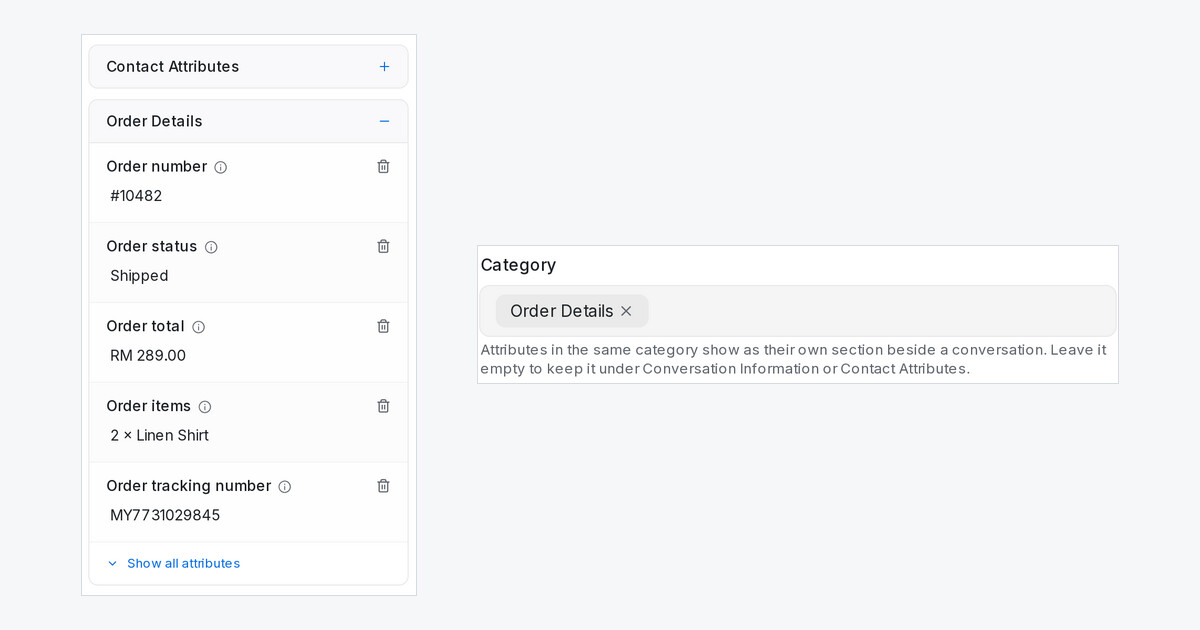
When you track a lot about each lead, two long lists in the panel beside a conversation are hard to scan. Now you can group attributes into categories, such as Tenant Details or Booking & Handover, and each category gets its own section.
How do I group attributes into a category?
- Go to Settings → Custom Attributes and edit an attribute, or click Add Custom Attribute.
- In Category, pick a category you already use or type a new name.
- Click Update or Create.
The category appears as its own section beside every conversation, right after Contact Attributes.
What else should I know?
- One category can mix conversation and contact attributes. Each value still saves where it did before.
- Attributes without a category stay in Conversation Information or Contact Attributes.
- An administrator can arrange the sections and the attributes inside them, then click Save order for everyone so the whole team sees the same layout.
- Each section shows five attributes first, with Show all attributes for the rest.
- AI attributes, filters and reports work exactly as before.

