See your FAQs on the AI Brain Map and merge the ones that say the same thing
The AI Brain Map groups your FAQs into topics by meaning, flags repeats and unused answers, and lets AI suggest merges that you review first.
Read inBahasa Melayu中文
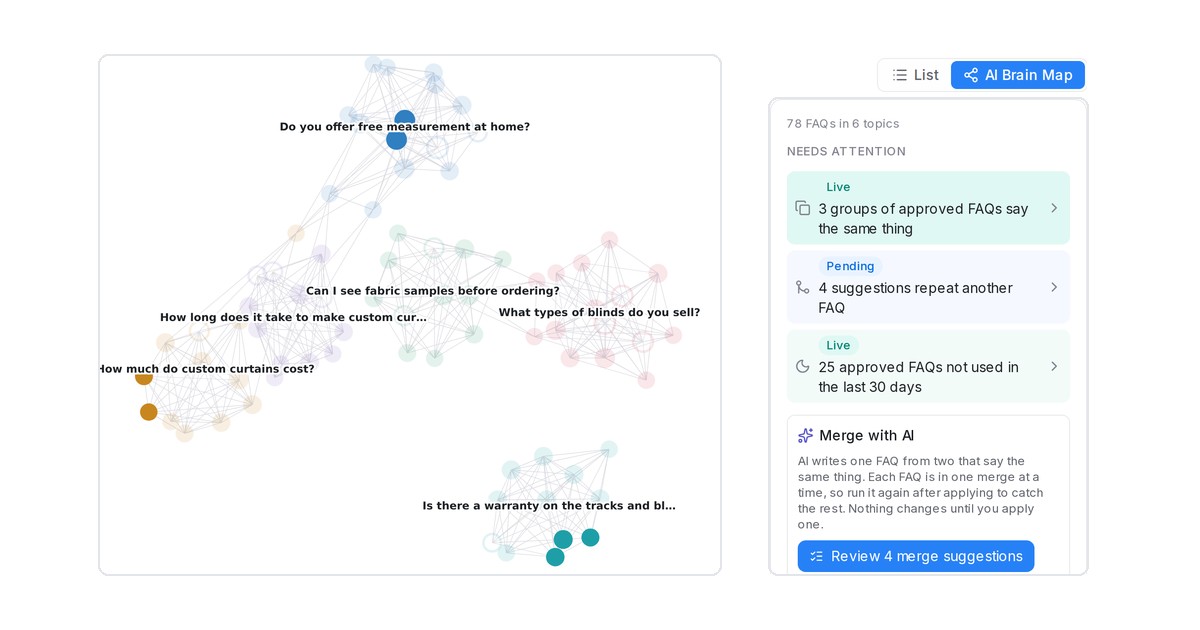
Mampu AI can now draw your FAQs in AI Knowledge Hub on the AI Brain Map. FAQs close in meaning are linked and grouped into topics automatically, and a Needs attention panel lists the FAQs that repeat each other or that no chat used, so you can keep one clear answer per question.
How do I find and merge duplicate FAQs in Mampu AI?
- Open Flow Agents → AI Knowledge Hub → FAQ and click AI Brain Map.
- Under Needs attention, click an item such as 3 groups of approved FAQs say the same thing to light those FAQs up.
- Under Merge with AI, click Suggest N merges, then Prepare suggestions.
- Click Review N merge suggestions, edit the Merged FAQ if needed, and click Apply merge or Dismiss.
What happens when I apply a merge?
- One FAQ stays, with the merged question and answer, and is approved. The other is removed, and its usage history and photos move to the one you keep.
- Nothing changes until you apply a suggestion. Dismiss keeps both, and that pair is not suggested again.
- A card warns Check this when the merged answer has a number or link that neither FAQ had.
- Items are tagged Live for approved FAQs your agent answers from, and Pending for drafts waiting for review.
- Merging uses your own OpenAI key under Settings → Integrations → AI Providers; the free AI credit does not cover it.

