See every ad click a customer makes, and send the latest to your sheet
Each tap on a Click-to-Message ad is recorded on the conversation; Google Sheets, Lark Base and webhooks can send the latest click, its time and the count.
Read inBahasa Melayu中文
Mampu AI now records every tap a customer makes on a Meta Click-to-Message ad — the tap that opened the chat, a tap on another ad while the chat is still open, and the same ad tapped again later — on WhatsApp, Facebook and Instagram. The conversation shows the latest ad, and your Google Sheets, Lark Base and webhook integrations can send it.
How do I see which ad a customer clicked in Mampu AI?
- Open the conversation and click the person icon to open the Contact panel.
- Expand Conversation Information: Came from, Ad / Post ID, Ad headline and Ad link show the latest tap.
- When the customer has tapped more than once, Ad clicks shows how many taps the conversation has had.
How do I send the latest ad click to Google Sheets or Lark Base?
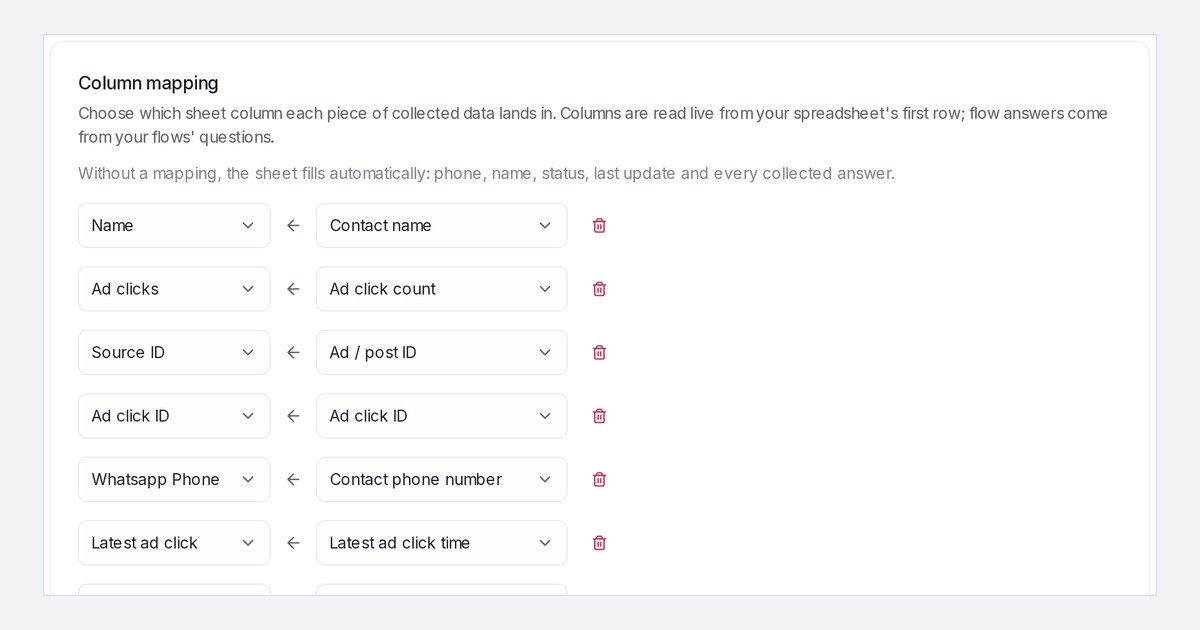
- Open Settings → Integrations, choose Google Sheets or Lark Base, click Add mapping and pick Ad click ID, Latest ad click time or Ad click count under Ad source.
- The row updates within about a minute of a new tap. A returning customer keeps one row, with the time of their latest tap, so you can count ad leads by period.
- Webhook payloads get
conversation.ad_click_id,conversation.ad_clicked_atandconversation.ad_click_countin the Insert variable menu. - Facebook and Instagram ads carry no click ID, so that column stays empty for them.

