Contact labels stay in step with Meta Business Suite on your Facebook inbox
A label set on a Messenger contact in Mampu AI appears on the same person in Meta Business Suite, and labels set there appear here, both ways and on their own.
Read inBahasa Melayu中文
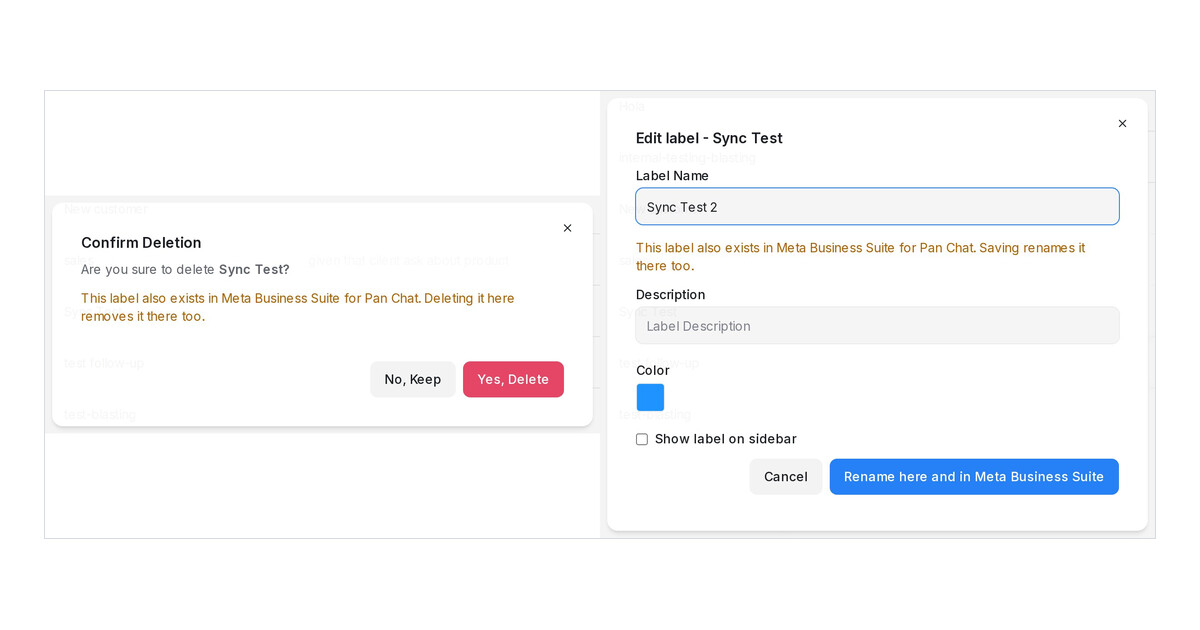
Mampu AI now keeps contact labels on a Facebook inbox in step with the labels in the Meta Business Suite inbox, both ways. A label your team puts on a Messenger contact here appears on that person in Business Suite. A label set there appears on the contact here, and on their open conversations in that inbox, as soon as Meta reports the change.
How do I sync labels with Meta Business Suite in Mampu AI?
- Have a Page admin create the first label in the Meta Business Suite inbox under Inbox → Labels and accept the Page Contact Terms Meta shows at that moment. Until then the inbox carries the yellow notice Label sync needs Meta's Page Contact Terms.
- In Mampu AI, open a Messenger customer's contact and add a label to the contact, not only to the conversation. It appears on the person in Business Suite.
- Set a label in Business Suite and watch it appear on the contact here.
Which labels sync, and what about renaming or deleting one?
- Only labels on the contact sync. A label added to a conversation alone stays in Mampu AI.
- A label is created on the Page the first time a contact there receives it.
- Deleting a synced label asks you to confirm, and the rename button reads Rename here and in Meta Business Suite.
- Instagram inboxes do not sync labels. Meta offers this for Messenger only.

