One Blasting page, and Messenger blasting from your Facebook Page
Start every blast from one page by picking the number or Page that sends it, and send utility messages on Messenger from any workspace
Read inBahasa Melayu中文
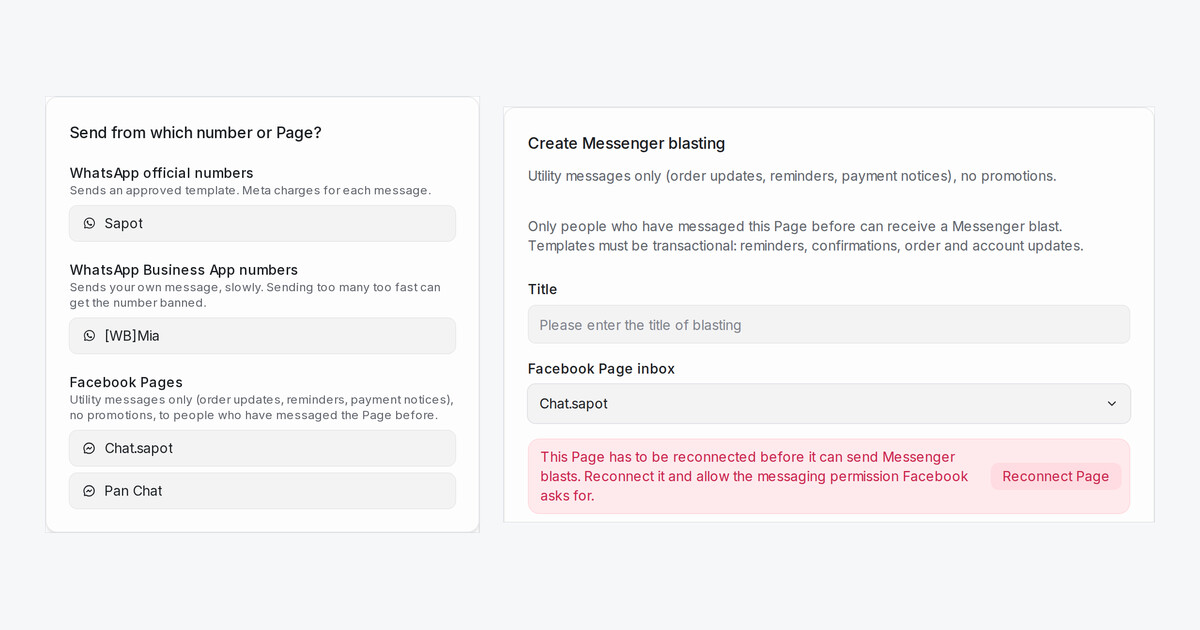
Blasting used to have a separate tab for each channel. Now there is one Blasting page with every blast from your WhatsApp numbers and Facebook Pages in one list, and Messenger blasting is on for every workspace.
How do I start a blast now?
- Open Blasting and click New blast.
- Pick the number or Page under Send from which number or Page? Each group says what it can send.
- The form opens with that sender already selected. Write the message, pick the audience and set the time.
What can I send on Messenger?
- Utility messages only, such as order updates, reminders and payment notices. Facebook does not allow promotions.
- Only people who have messaged the Page before receive it.
- The template comes from the Page's Utility Templates tab.
A Page connected earlier may ask you to reconnect it first. Click Reconnect Page in the form and allow the messaging permission Facebook asks for.
Where did live chat and SMS blasting go?
They are no longer in the menu, and the ones you set up keep running. The help page shows how to open them.

