Review AI Knowledge FAQ drafts without approving duplicates
Pending FAQ drafts now show the FAQs you already have that ask the same thing, so you can merge them into one answer or clear the copies in a click.
Read inBahasa Melayu中文
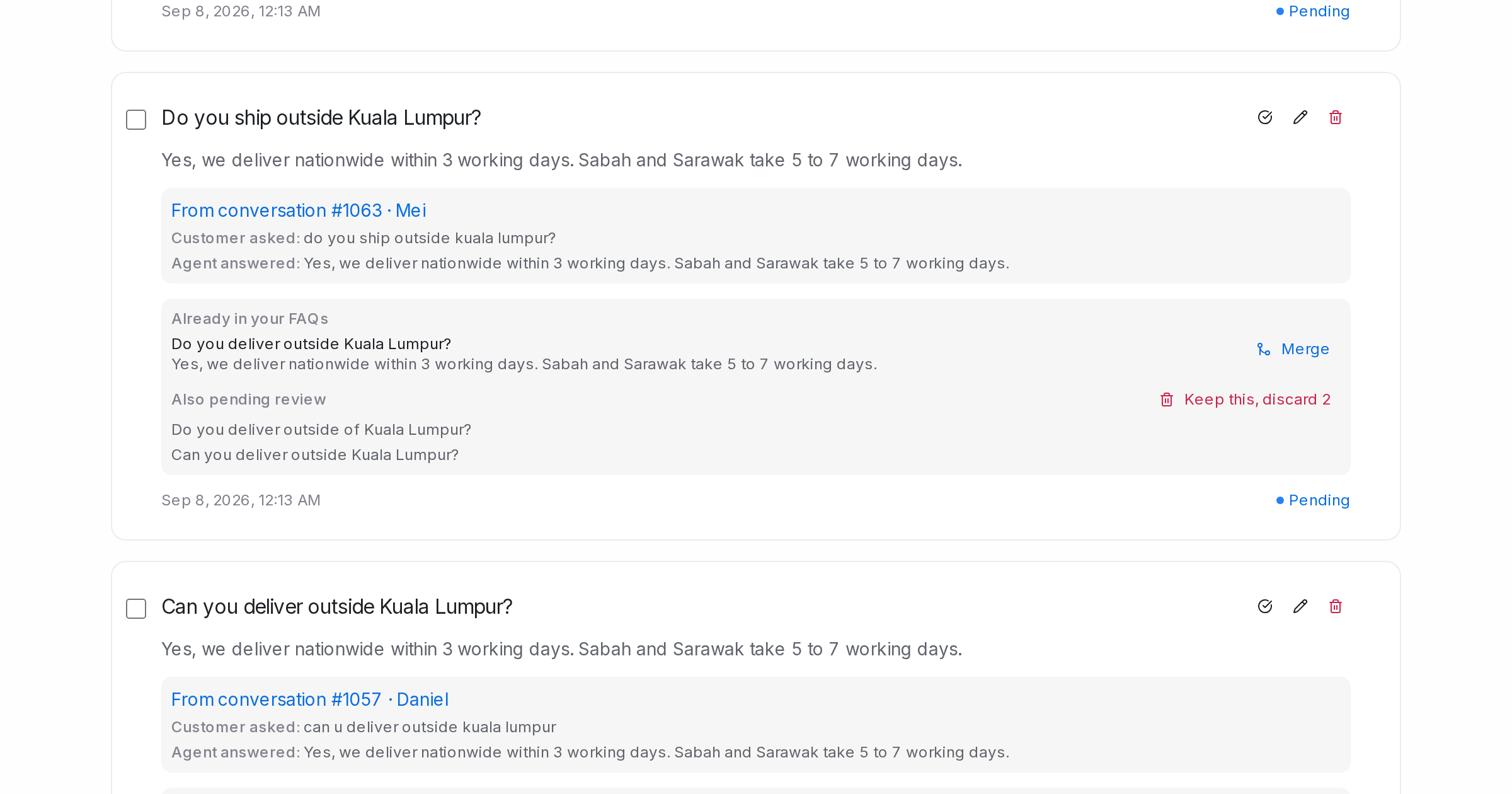
Mampu AI now shows, on each pending FAQ draft in the AI Knowledge Hub, the FAQs you already have that ask the same question. You can merge the draft into one answer or clear the look-alike copies, instead of approving several versions of the same answer.
How do I merge duplicate FAQ drafts in Mampu AI?
- Open Flow Agents → AI Knowledge Hub → FAQ and go to the Pending tab.
- Under a draft, Already in your FAQs lists the approved entries that ask the same question. Click Merge to open that entry with the draft beside it, and Use draft answer if the new wording reads better.
- Also pending review lists the other drafts asking the same question. Click Keep this, discard N to remove those copies and keep the draft in front of you.
What happens to the drafts when you merge or discard duplicates?
- Saving a merge keeps one FAQ and removes the draft.
- Keep this, discard N shows you the list of drafts it will remove, and you confirm it first.
- Questions your FAQs already answer are not drafted again, so the Pending list stays short over time.

