Send Flow Agent images as a swipeable carousel on Messenger and Instagram
A Flow Agent message step can now show its images as one carousel customers swipe on Messenger and Instagram, with a title and buttons on each card.
Read inBahasa Melayu中文
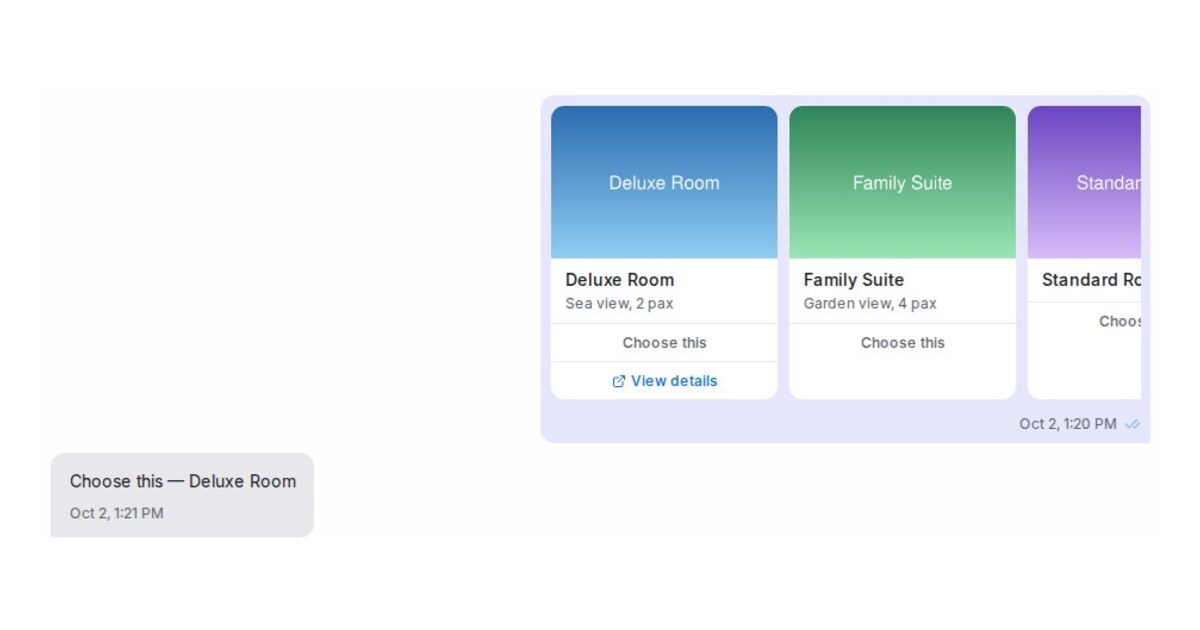
Mampu AI can now send a Flow Agent message step's images as one swipeable carousel on Messenger and Instagram, instead of one photo per message. Each card carries a title, a short description and up to three buttons, so customers can compare rooms, products or packages side by side and pick one with a tap.
How do I show images as a carousel in a Mampu AI Flow Agent?
- Open the flow in the designer and select a Send message block.
- Add 2 to 10 images under After message, then set Show images to Carousel.
- Give each card a Title, and optionally a Description and up to 3 Buttons. A button with a link opens that page; one without a link is an answer.
- Save Changes and try it in the Playground, where the cards sit side by side and the answers can be tapped.
What happens when a customer taps a card or uses another channel?
- An answer tap arrives as the customer's reply with the card name, such as "Choose this — Deluxe Room", so the next step knows which card was picked.
- Customers read the card text in their own language.
- On Instagram the carousel shows in the app, not on Instagram's website.
- WhatsApp, web chat and other channels get each picture followed by its title and description, with links written out.

