Take a separate path when a customer stops replying
A question in a Flow Agent can now continue on its own No reply path after the follow-ups, so a quiet customer gets a different offer, question or ending.
Read inBahasa Melayu中文
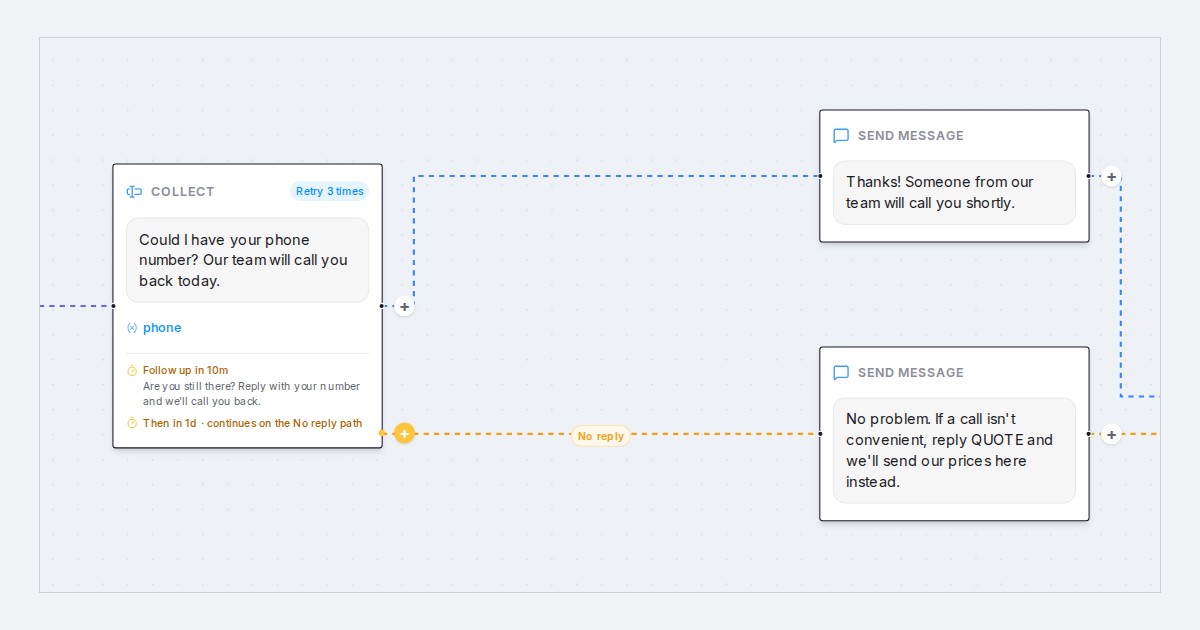
Mampu AI Flow Agents can now send a customer who stops replying down a path of their own: a follow-up continues on a No reply line to any step you choose, so the quiet customer gets a different offer, a simpler question or a clean ending instead of everyone else's next step.
How do I add a No reply path to a question in Mampu AI?
- Open the flow designer and select the Collect block that asks the question.
- Under Follow up, add your reminder steps, then one more with Continue on the No reply path under Then.
- Pick where it leads under Go to step, or choose + New message step, + New question step or + New end to write it there.
- Click Save Changes. An amber No reply line now leaves the question block.
Or tell the designer in plain words, "if they don't reply after a day, offer our prices instead", and it builds the path for you.
What happens to the customer who never answers?
- Each step waits its Follow up after time, so a flow can remind twice before moving on.
- When the last wait runs out unanswered, the flow follows the No reply line.
- A customer who answers, even after a reminder, continues down the normal line.
- The amber + on a question block adds a step on its No reply path.
- Follow-ups still respect the agent's Quiet hours for follow-ups.

