Your flow agent now reads your Meta ad's text, and you can test it
The flow agent reads a WhatsApp ad's text as well as its headline. Test it in the Playground with the new Ad headline and Ad text fields.
Read inBahasa Melayu中文
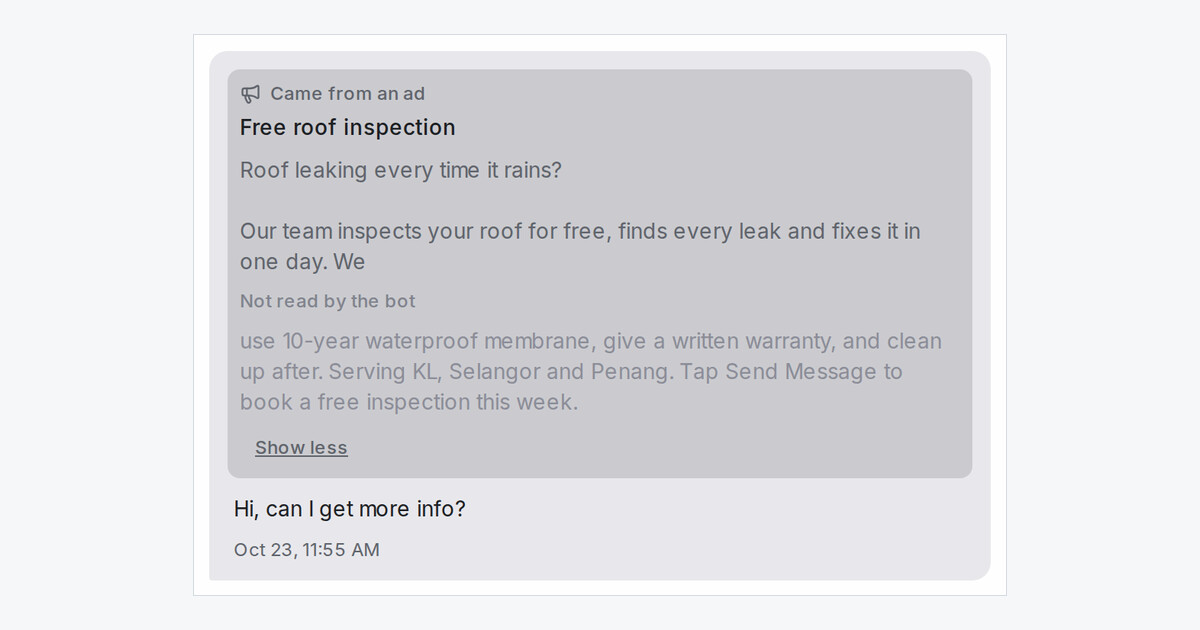
When a customer messages you from a Meta ad, the flow agent now reads the ad's text along with its headline, so its replies and route steps have the ad's details to work with. You can test this in the Playground before your ads go live.
How do I test what my agent does with an ad?
- Open your flow agent and click Playground, then Scenario.
- Under Ad, fill in Ad headline and Ad text, or use Load from a conversation to copy them from a real chat that came from an ad.
- Press Apply and send the message your customers usually send, such as "Hi, can I get more info?".
- The ad's card shows above your message. Click Show more to see which part the agent read.
How much of the ad does the agent read?
- In the agent's Settings, Meta ad text (characters) sets the limit, next to Facebook post context.
- The agent stops at the last whole word inside the limit. The rest of the text is greyed out under Not read by the bot, in the Playground and on live conversations.
- What the agent read the first time is kept for that conversation, even if you change the limit later.
- Only WhatsApp ads send their text. Facebook and Instagram ads send their headline only.

