Try message sequences and automation rules on your testers first
Switch a message sequence or automation rule to Testers only and it runs for your workspace testers alone until you switch it to Live.
Read inBahasa Melayu中文
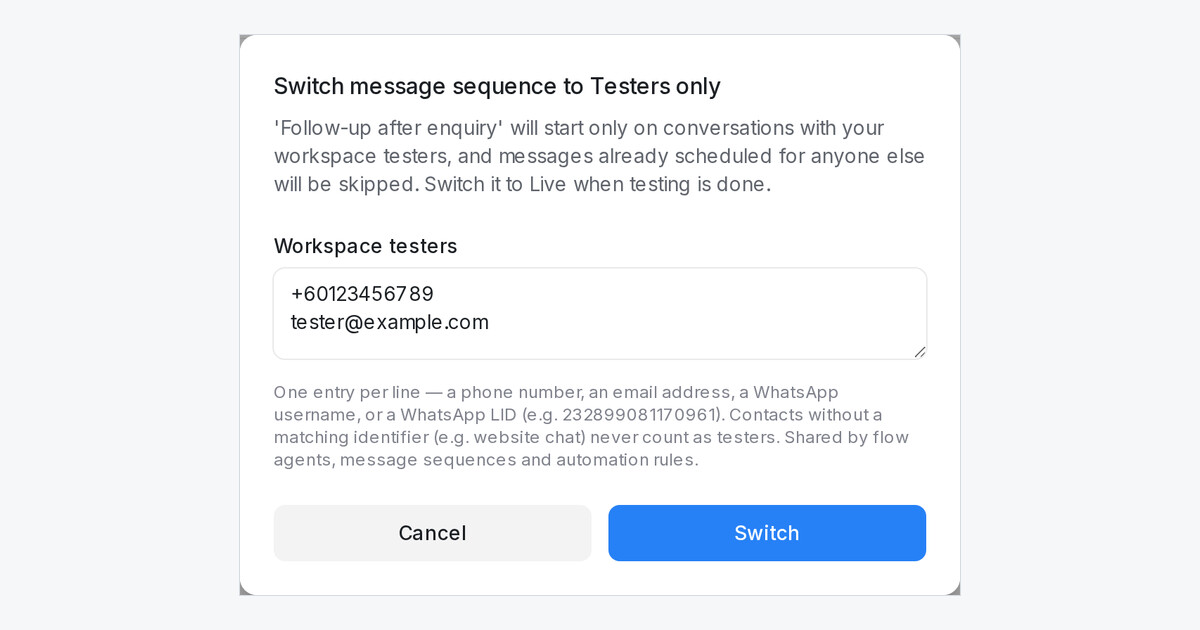
Mampu AI can now run a message sequence or an automation rule for your workspace testers alone. Each row on Settings → Message Sequences and Settings → Automation now reads Off, Testers only or Live, the same three states a flow agent has, and one tester list under Settings → Account Settings → Testers serves all three.
How do I test a message sequence or automation rule in Mampu AI?
- Open Settings → Account Settings and add your team's phone numbers, emails or WhatsApp usernames under Testers, then click Save testers.
- On Settings → Message Sequences or Settings → Automation, click the state in the Active column and pick Testers only.
- Check the list in the dialog, add a tester if you need to, and click Switch.
- When testing is done, pick Live.
What happens while a sequence or rule is Testers only?
- A sequence starts only on conversations with a tester, whichever rule, webhook or trigger applies it, and follow-ups already scheduled for anyone else are skipped.
- A rule runs only on conversations with a tester and does nothing for anyone else.
- A new sequence or rule starts Off, so nothing reaches customers until you choose Testers only or Live.
- The flow agent publish dialog reads the same list, so one change covers your agents, sequences and rules.

