Spot a WhatsApp payment problem and fix it in one click
Mampu AI now shows when Meta stops your WhatsApp messages over payment, with a button that opens that number's billing page in Meta.
Read inBahasa Melayu中文
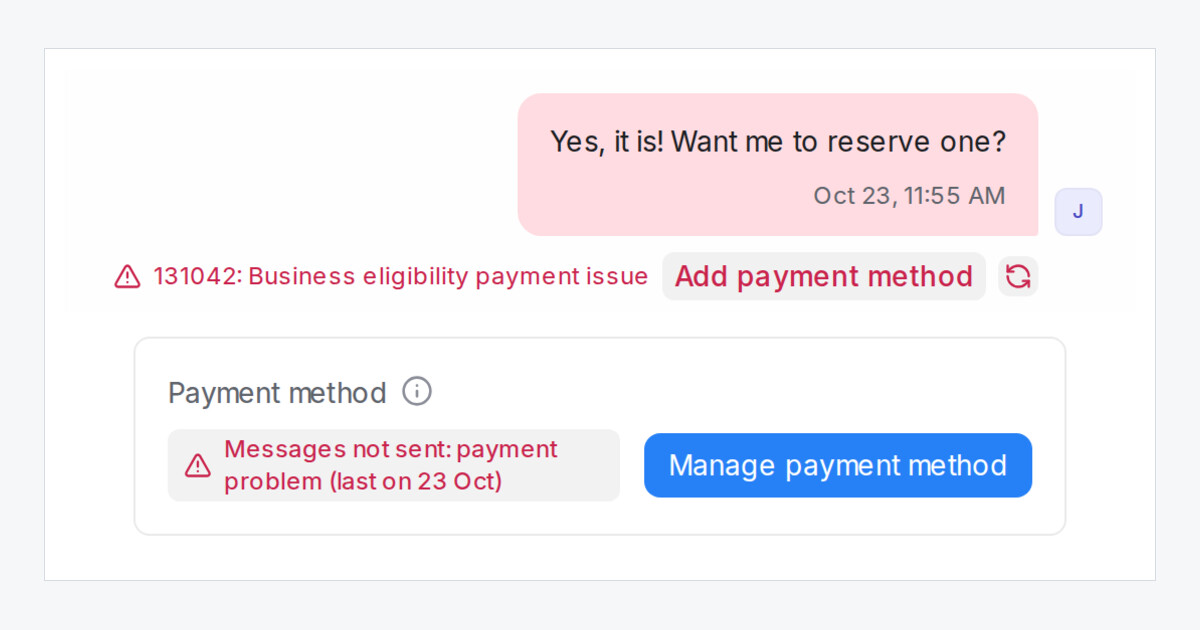
When Meta cannot charge the card on your WhatsApp messaging account, your messages fail with 131042: Business eligibility payment issue. Mampu AI now shows this in three places and takes you straight to the fix: each button opens that number's billing page in Meta, where you add or fix the card.
Where do I see a WhatsApp payment problem in Mampu AI?
- Beside the error on the message. Administrators see Add payment method next to the red 131042 error.
- On a blast card. Open not sent, and payment issue carries the same button.
- On the inbox's Account Health tab. The new Payment method card reads Messages not sent: payment problem with the date of the latest failure, Meta says a payment method is needed, or No payment problems seen. Click Manage payment method to open the billing page.
Why can't the card say my payment method is added?
Meta does not share your card details with us. The card shows what Meta reports and whether your messages failed because of payment in the last 7 days, so after you fix the card, the red line clears once 7 days pass without a payment failure.
Agents still see the error, without the button.

