Time follow-ups from any contact date, on your workspace's clock
Message Sequences count from any date saved on the contact, read in workspace time or UTC, and tell you when a date can't be read.
Read inBahasa Melayu中文
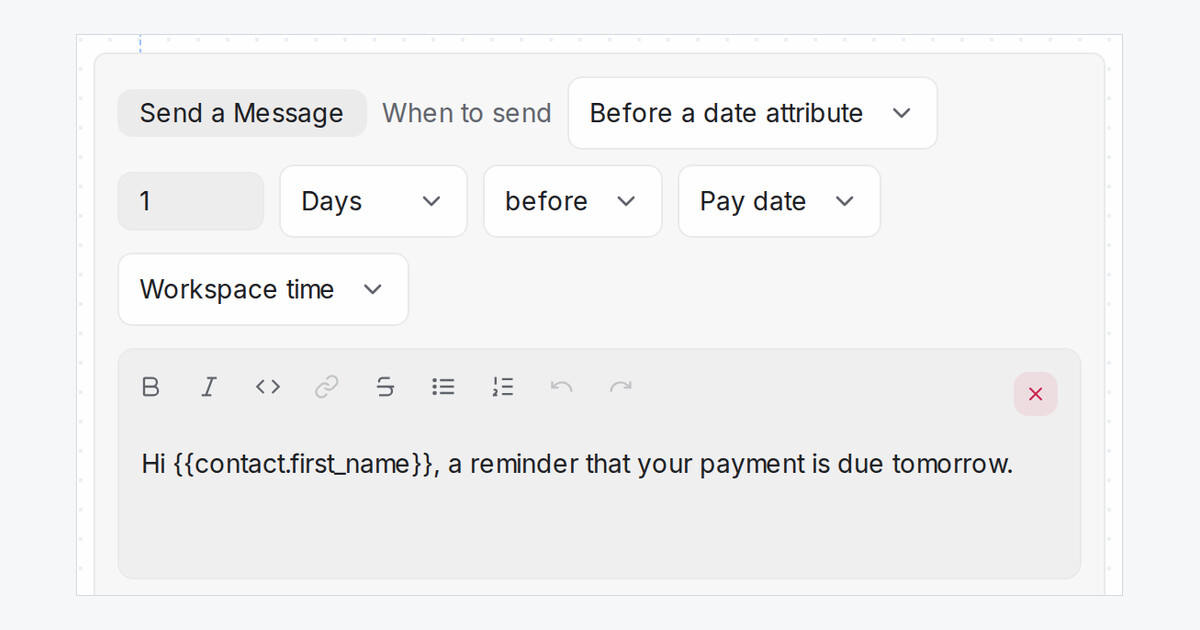
Payment dates, renewals and visits are often saved on the contact rather than booked on a calendar. Mampu AI's Message Sequences can time a step from any of those dates, and read them on your workspace's clock, so a reminder set for 3 PM goes out at 3 PM.
How do I time a follow-up from a contact date in Mampu AI?
- Open Settings → Message Sequences and edit a sequence.
- In a step's When to send, choose Before a date attribute.
- Set how long before or after, and pick the contact attribute. Date and Text attributes are both listed.
- Keep Workspace time, or choose UTC if your dates are saved in UTC.
What happens if a contact's date is missing or written wrongly?
- Dates must be written year first or day first, for example 30/10/2026, with an optional time such as 15:00.
- A missing or unreadable date means that step is not sent, and a line in the conversation names the attribute and the value it found.
- Unreadable dates are also emailed to your workspace administrators, at most once an hour, so you can fix them before a customer misses a reminder.

