Clearer names for the two ways to connect WhatsApp
The WhatsApp inbox picker now reads Official WhatsApp API and Normal WhatsApp Web Link, with a note that points coexistence seekers to the official option.
Read inBahasa Melayu中文
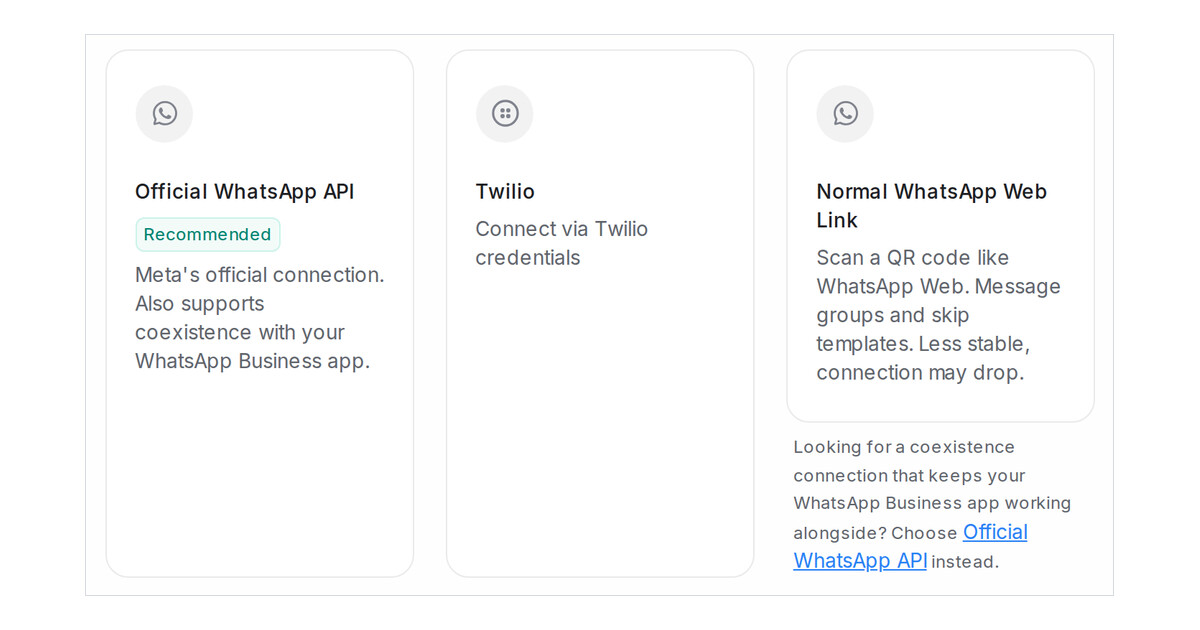
Mampu AI now names the two ways to connect a WhatsApp inbox by how they connect. The official connection through Meta reads Official WhatsApp API and the QR-code option reads Normal WhatsApp Web Link. Many business owners already hold the WhatsApp Business app on their phone and picked the option that carried that name by habit, even when the official connection was the right one for them.
How do I pick the right WhatsApp connection in Mampu AI?
- Go to Settings → Inboxes, click Add Inbox and choose WhatsApp.
- Pick Official WhatsApp API, marked Recommended, for Meta's official connection. It also supports coexistence, so the number keeps working in your WhatsApp Business app alongside Mampu AI.
- Pick Normal WhatsApp Web Link only when you want to link a number by scanning a QR code, like WhatsApp Web. It can message groups and needs no templates, but the connection can drop and WhatsApp may restrict the number.
What if I chose the QR option but wanted coexistence?
- A note under the Normal WhatsApp Web Link card says that a coexistence connection needs Official WhatsApp API, and its link opens that option in one click.
- The Normal setup page repeats the pointer in its yellow notice, with the same link.
- The names also read in Bahasa Melayu and Chinese when your workspace uses those languages.

