Show only personal chats or only group chats on a QR-connected WhatsApp inbox
On a WhatsApp inbox connected by QR code, the list row now offers Personal and Groups, and every group chat carries a people icon before its name.
Read inBahasa Melayu中文
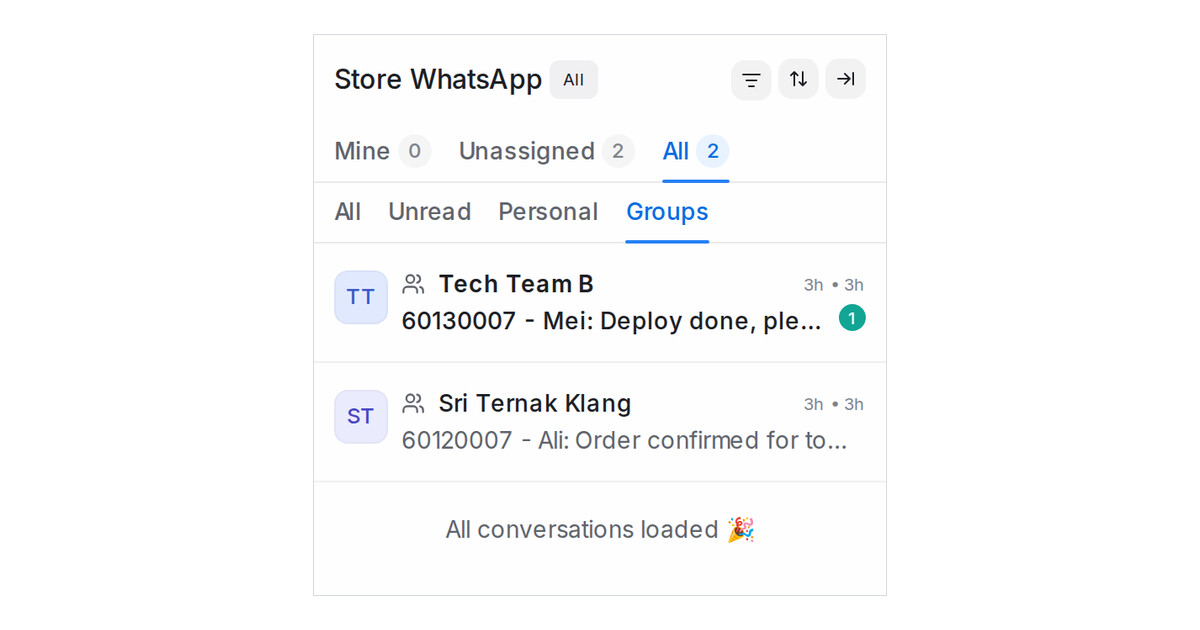
Mampu AI can now show the personal chats and the group chats of a QR-connected WhatsApp inbox separately. On a number connected with Normal WhatsApp Web Link, the WhatsApp groups the number sits in arrive as conversations next to your one-to-one chats, and a lead's message can hide between busy groups. The conversation list now tells the two apart and lets you look at one kind at a time.
How do I see only personal chats or only group chats in Mampu AI?
- In the sidebar under Channels, open the WhatsApp inbox connected by QR code.
- Under Mine, Unassigned and All, the row reads All, Unread, Personal and Groups. Pick Personal to keep one-to-one chats, or Groups to keep group chats.
- Pick All to see everything again.
How does the list mark a group chat?
- Every group chat carries a small people icon before its name, in every view. Hover over it to read WhatsApp group.
- The Mine, Unassigned and All counts follow your pick, and the status chip still applies.
- Your pick is remembered the next time you open a QR-connected inbox. All Conversations and other inboxes keep the All and Unread row.

