Offer an FAQ only to customers who match conditions
An AI Knowledge entry can now carry conditions on the customer's attributes, labels, inbox and dates, so the agent offers it only to customers who match.
Read inBahasa Melayu中文
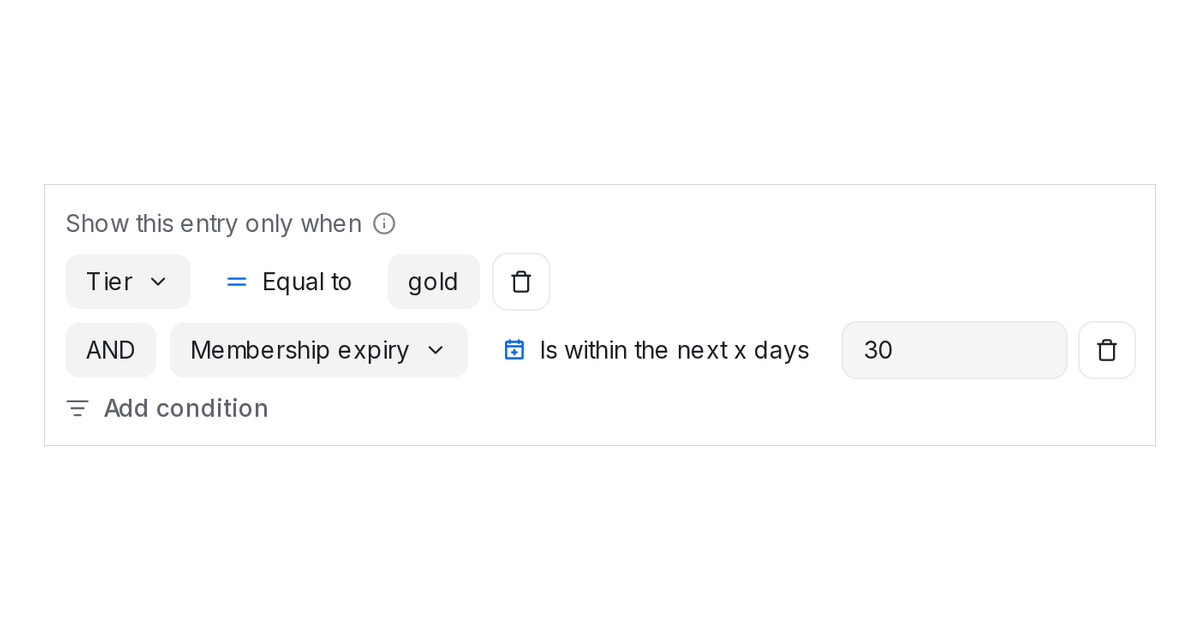
Mampu AI lets an FAQ or Promo entry decide who hears it. Until now only labels could gate an entry. An entry can now carry condition rows on anything the customer's record holds, from custom attributes and dates relative to today to labels, the inbox they wrote to and their contact details, and the agent offers the entry only to customers who match.
How do I show an AI Knowledge entry only to some customers in Mampu AI?
- Open Flow Agents → AI Knowledge and edit the entry.
- Under Show this entry only when, click Add condition and pick a field, an operator and a value, for example Tier, Equal to, gold.
- Add more rows joined with AND or OR, then Save. The card shows the conditions, and the Any conditions menu filters the list.
What can a condition check?
- Contact and conversation attributes, Labels, Inbox name, the contact's name, email, phone and country, and Current date (when answering).
- Dates offer Is within the next x days and Was within the last x days, so a renewal FAQ can appear only while a membership is about to expire.
- Conditions are checked every time the agent looks for an answer. A customer who matches no row, or has nothing to check yet, never hears the entry.
- Renaming a label or attribute updates the rows. Deleting one that was the entry's last requirement switches the entry off instead of opening it to everyone.

