Write your Flow Agent steps in other languages yourself
Write your own Malay, Chinese or other version of each Flow Agent step. Steps you leave blank are still translated by AI.
Read inBahasa Melayu中文
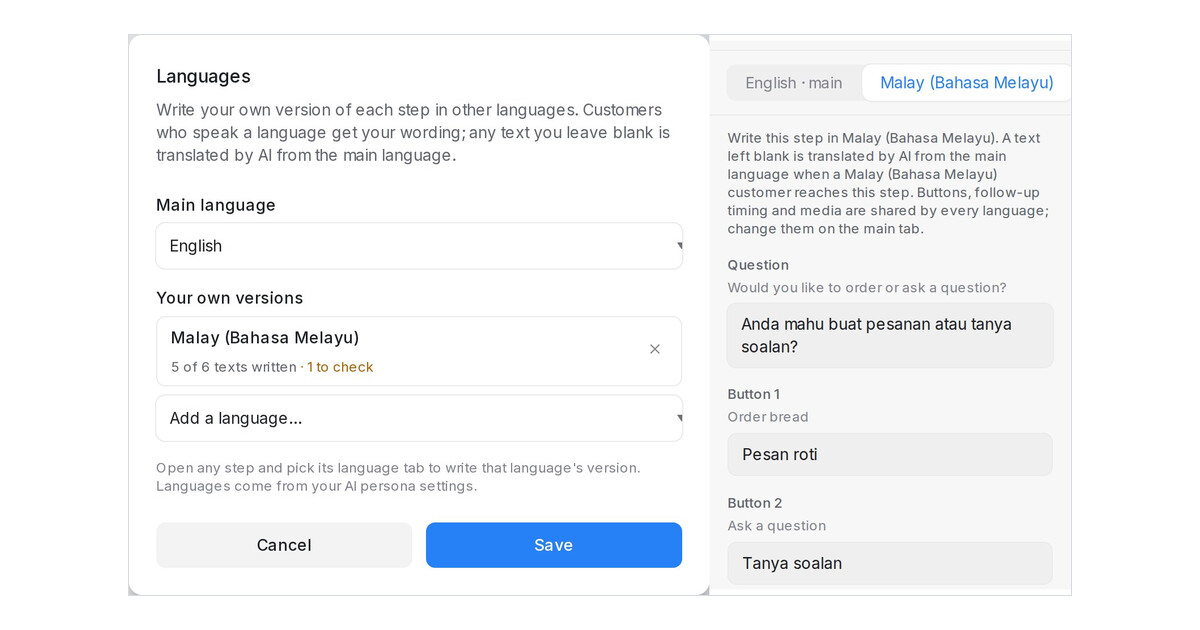
Mampu AI can now send your own wording in each language from a Flow Agent. Pick a main language, add the languages your customers speak, and write each step's version yourself. Customers who speak that language get your text, on every channel and in the Playground; any text you leave blank is translated by AI from the main language, as before.
How do I write a flow step in another language in Mampu AI?
- Open the agent in the designer and click Languages in the header.
- Pick the Main language, add a language under Your own versions and click Save.
- Click a step, open its language tab and write your version, then click Save Changes.
What happens when the main text changes later?
- Your version is still sent, and the step's language tab shows The main text changed after this was translated with the text it was Translated from.
- The Languages dialog counts, per language, how many texts are written and how many need a check.
- Which buttons a step has, where they lead, follow-up timing and attachments stay shared by every language.
- Settings is now grouped into Conversation, Handoff, Timing & hours and Channels.

