Cancel a Shopify order from the chat
Your flow agent can now cancel a customer's Shopify order on request, when it is theirs and nothing has shipped, and hands off with a note when it cannot.
Read inBahasa Melayu中文
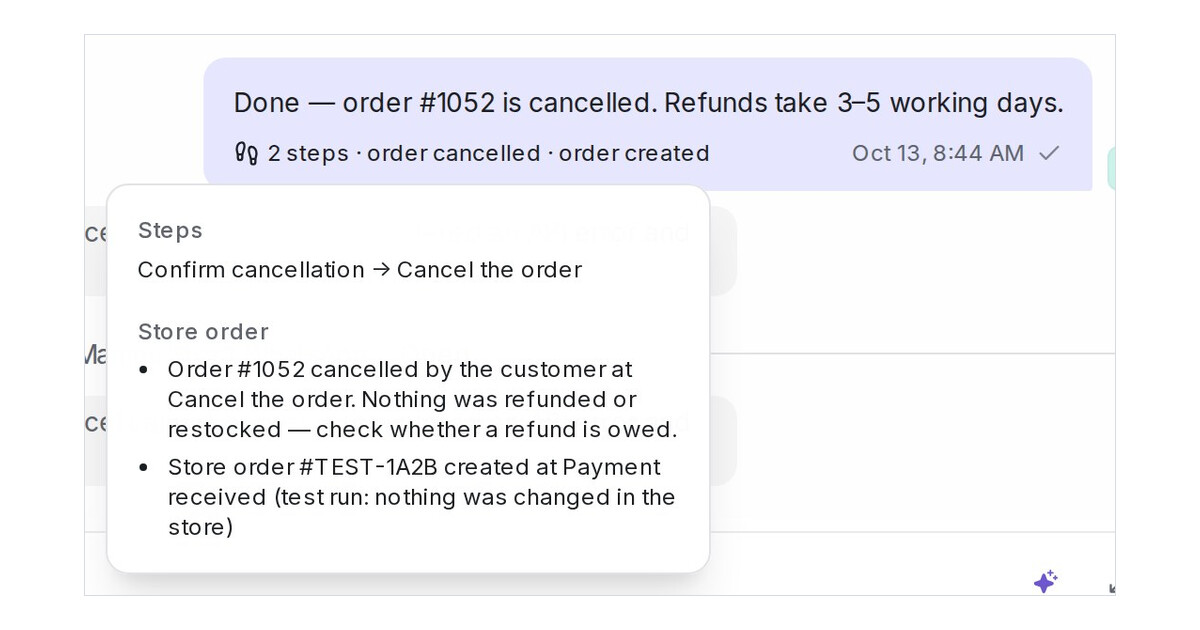
Mampu AI can now cancel a customer's Shopify order from the conversation, in Flow Agents on every channel. A store step with Cancel an order checks that the order is the customer's and nothing has shipped, cancels it in your store with no refund and no restocking, tells the customer, and leaves your team a private note that says whether a refund is owed.
How do I let the AI cancel an order in Mampu AI?
- In the flow designer, add a question step that saves the order number, then a message step with Tool type set to Store orders and What this step does set to Look up an order's status.
- Add a condition step that asks the customer to confirm.
- On the yes branch, add a message step with Cancel an order and write the message the customer reads once it is done.
What happens when the order cannot be cancelled?
- When the number is not found, belongs to someone else, the order has shipped or the store refuses, the bot hands the conversation to your team, who see the reason under the reply. If the order can't be created or cancelled set to Reply honestly and continue keeps the flow going instead.
- A Create an order in the store step now hands off the same way when no order could be placed.
- Lookups answer only the customer's own orders, and Playground test runs never change a real order.

