Let AI fill a contact's name, email and phone
Name, Email and Phone number are now System attributes the AI can fill. A new email or phone waits for your team to approve it.
Read inBahasa Melayu中文
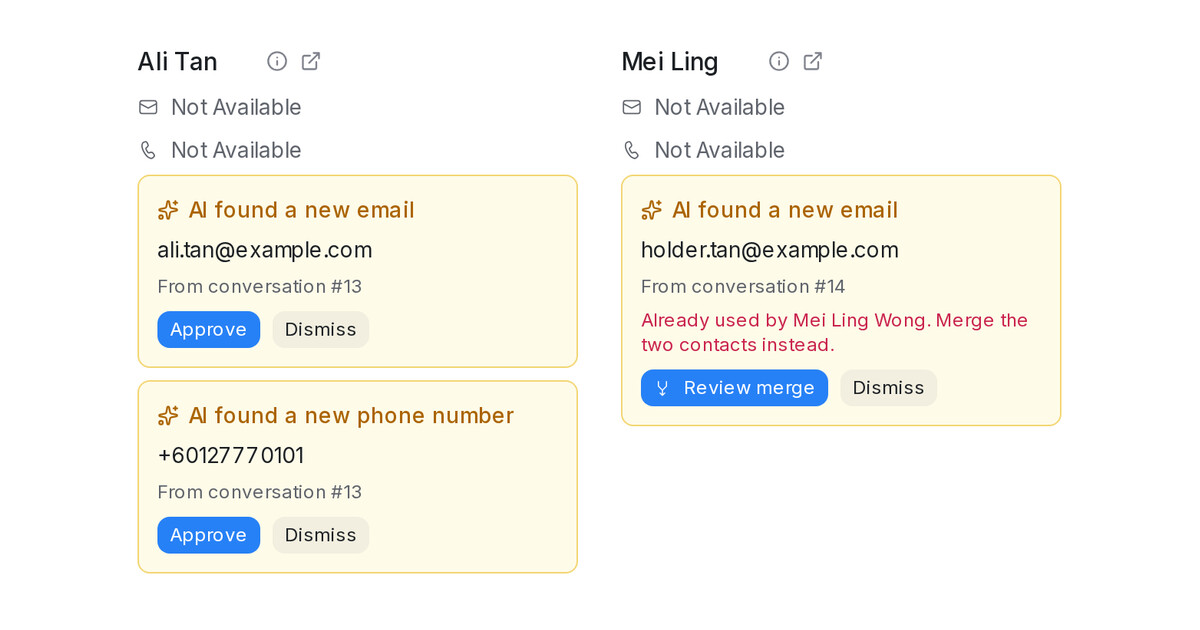
Mampu AI can now fill a contact's Name, Email and Phone number from the chat, the same way it fills your own attributes. The three fields lead the Contact tab of Settings → Custom Attributes as System attributes. A name is filled only when the contact has none, or only a phone number as their name. A new email or phone never overwrites the contact: it waits as a card in the conversation's contact panel until someone on your team approves it.
How do I let AI fill a contact's details in Mampu AI?
- Open Settings → Custom Attributes and choose the Contact tab.
- Click the edit button on Name, Email or Phone number.
- Tick Enable AI extraction and click Update.
What happens when the AI finds an email or phone?
- The contact panel shows AI found a new email or AI found a new phone number with Approve and Dismiss.
- A private note mentions the assigned agent, so they get a notification.
- A dismissed value is not suggested again, and editing the field yourself clears the card.
- When another contact already has the value, the card offers Review merge instead of Approve.
- A phone number is never suggested on WhatsApp or SMS inboxes.

