Your branch supervisor can see every branch's chats. Should they?
Most shared inboxes give two choices, agent or admin. Here is the access a supervisor actually needs, and how to give exactly that.
Read inBahasa Melayu中文
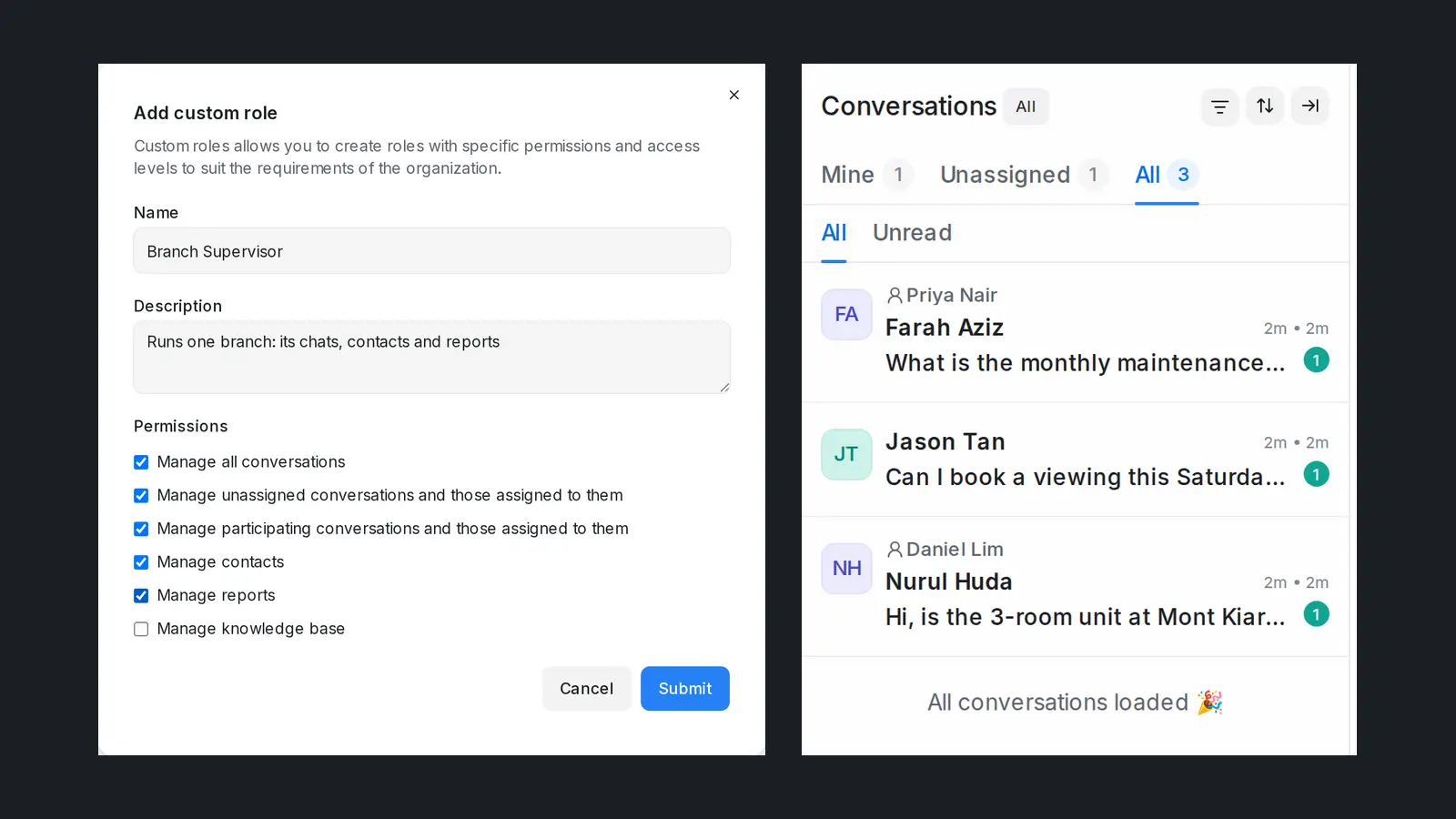
A branch supervisor should see every chat, customer and report of their own branch and nothing from the others. Most shared inboxes offer only two roles: an agent who sees too little, or an administrator who sees everything. The fix is a role in between, limited to the inboxes that person is given.
Why do branch supervisors end up seeing every branch's chats?
Shared inbox tools for WhatsApp, Instagram and Facebook usually come with two roles. An agent answers conversations in the inboxes they are added to and cannot open settings or reports. An administrator can do everything: every inbox, every report, every contact, every setting, billing included.
That works for a single shop. It breaks as soon as a business has branches, outlets or brands that share one account. The supervisor of the Penang outlet needs more than an agent gets: the reports for their team, the customer list, the unassigned chats nobody has picked up yet. The only role that offers those things is administrator, so they are made one. From that day they also see Kuala Lumpur's chats, Johor's customers and the whole company's numbers.
Nobody decided that the Penang supervisor should read the KL branch's customer conversations. It happened because the tool offered no middle ground.
What goes wrong when every supervisor is an administrator?
Usually nothing visible, which is why the setup lasts. The risks build up quietly:
- Customer privacy. Every supervisor can read every customer's chat history, phone number and notes, including customers they will never serve. If a laptop is shared or an account is compromised, the exposure is the whole business, not one branch.
- Settings changes nobody planned. An administrator can edit inboxes, automation rules, chatbot flows and templates. A well-meant change made for one branch can change replies for all of them.
- Reports that answer the wrong question. A supervisor opening the overview sees company-wide totals. To judge their own branch they have to filter by hand every time, and a missed filter turns into a wrong decision.
- Departures. When a supervisor leaves, the business has to assume they had access to everything.
Customers increasingly reach businesses through chat. Meta said in 2022 that one billion people message a business each week on WhatsApp, Messenger and Instagram Direct, and in Malaysia 85.0 percent of the population has a social media identity, according to DataReportal. The more of your customer relationship lives in chat, the more it matters who can read it.
What should a supervisor actually be able to see?
The general rule is the same one most data protection guidance gives: people should reach what their job needs, not more. For a branch supervisor that usually means:
| Area | A branch supervisor needs | They do not need |
|---|---|---|
| Conversations | Every chat of their branch, assigned or not, to pick up and reassign work | Other branches' chats |
| Customers | The contacts who wrote in to their branch | The whole company's contact list |
| Reports | Their branch's volume, response times and satisfaction | Company totals mixed with other branches |
| Settings | Nothing, or very little | Inboxes, automation, billing, other users |
Two decisions make this possible in any tool: split your channels so each branch has its own inbox (its own WhatsApp number, Instagram account or Facebook Page), and give the supervisor a role that is limited to the inboxes they belong to, rather than to the whole account.
How do you set up access by branch, step by step?
Whatever tool you use, the order is the same:
- One inbox per branch. Connect each branch's WhatsApp number or social account as its own inbox, named after the branch ("WhatsApp Penang"). If two branches share one number today, decide which team owns it before you start.
- Put each person in their branch's inbox. Agents and supervisors become members of the inboxes they work in, and only those.
- Create a supervisor role that can open conversations, contacts and reports, but no settings.
- Give the role to each supervisor and keep administrator for the owner and the one or two people who manage settings.
- Check it as the supervisor. Sign in as them, or ask them to look: the conversation list, the contacts list and the report overview should show their branch and nothing else.
Review the list of administrators every few months. It tends to grow back.
How do you handle a supervisor who covers two branches or stands in for a colleague?
Access by inbox handles both without a new role. A regional supervisor who runs two outlets is simply a member of both inboxes and sees both, with reports that add up the two and nothing else. When a supervisor goes on leave, add the stand-in to that branch's inbox for the week and remove them when the regular supervisor is back. The stand-in's role does not change; only the list of inboxes does. Keep a short note of who covers which branch, so the list of members stays a decision rather than an accident.
How does Mampu AI limit a supervisor to their own inboxes?
Mampu AI has custom roles for exactly this. An administrator opens Settings → Custom Roles, clicks Add custom role, names it ("Branch Supervisor") and ticks what it may open: Manage all conversations in their inboxes, Manage contacts of their inboxes (view, import, export), View reports for their inboxes and, if needed, Manage knowledge base. Then, in Settings → Agents, they pick the role under Role for each supervisor and add the supervisor to their branch's inbox under the inbox's Collaborators tab.
From then on, everything the supervisor sees follows the inboxes they are a member of:
- Conversations: Mine, Unassigned and All count only their inboxes, and a chat from another branch does not open.
- Reports: every report, customer satisfaction (CSAT) and the calls list count only their inboxes.
- Contacts: only customers who wrote in on one of their inboxes. Contacts that have never written in on any inbox stay with administrators.
- Search, AI summaries and reply suggestions, and macros stay inside the same inboxes.
Only administrators see every inbox, and a role never limits an administrator. Narrower choices are there too: Manage unassigned conversations in their inboxes and those assigned to them for a team lead who hands out new chats, or Manage participating conversations and those assigned to them for someone who should see only their own work.
Frequently asked questions
Sources
Every rule and figure on this page is dated and linked to its source. Mampu AI figures are anonymised percentages across customers on Mampu AI.
Give each supervisor their own branch, and nothing more
Message our team. We'll connect your channels, set up one inbox per branch and show you how a custom role keeps each supervisor to their own chats, contacts and reports.

