Give a supervisor only their own inboxes with custom roles
Create a custom role, such as a branch supervisor, that sees every chat, contact and report of the inboxes you give them, and nothing from your other inboxes.
Read inBahasa Melayu中文
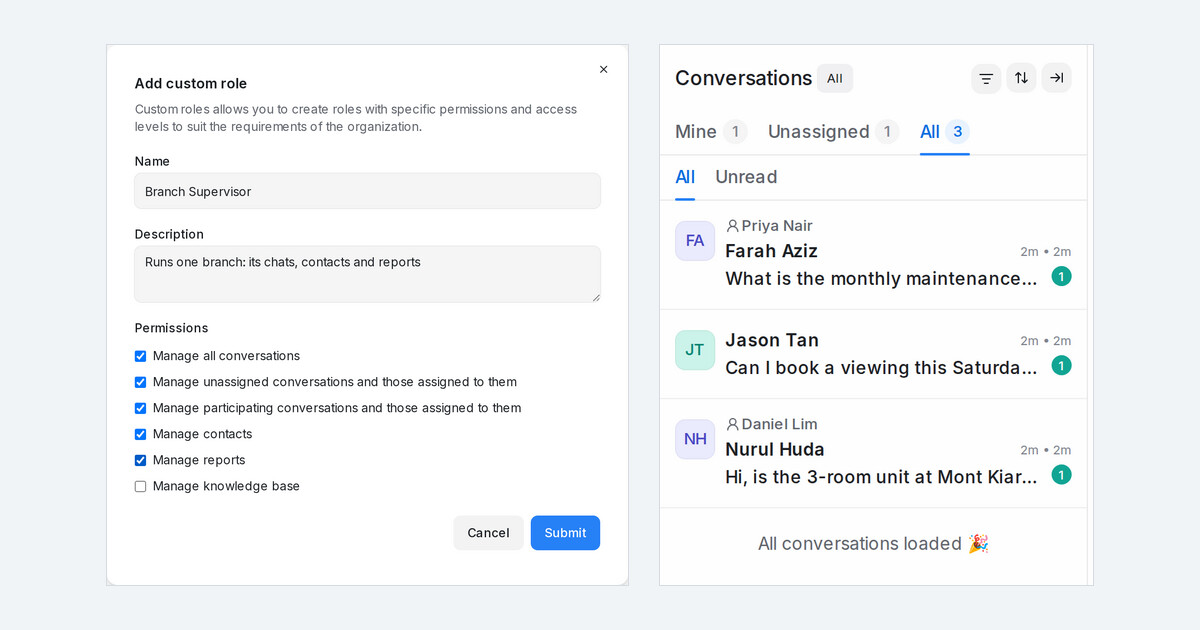
Mampu AI now lets every workspace create custom roles in Settings → Custom Roles. A custom role sits between Agent and Administrator: you choose what it can open, and the person sees it only for the inboxes they are a member of. A branch supervisor gets their branch's chats, customers and reports, not every branch's.
How do I give a supervisor access to only their own inboxes in Mampu AI?
- Open Settings → Custom Roles, click Add custom role, enter a Name and tick the Permissions, such as Manage all conversations in their inboxes, Manage contacts of their inboxes (view, import, export) and View reports for their inboxes.
- Open Settings → Agents, edit the person and pick the role under Role.
- Add them to their inboxes under each inbox's Collaborators tab.
What does a supervisor with a custom role see?
- Mine, Unassigned and All count only their inboxes; conversations from other inboxes do not open.
- Every report, CSAT and the calls list count only their inboxes.
- Contacts shows only customers who wrote in on one of their inboxes.
- Search, AI summaries and reply suggestions, and macros stay inside the same inboxes.
- Administrators still see every inbox, and a role never limits them.

