Customers keep asking for the brochure, the price list and a video. Why is your team still sending them one file at a time?
The most common request in your inbox deserves a one-tap answer. Here is how to build it.
Read inBahasa Melayu中文
Your team sends the brochure one file at a time because saved replies only ever held text, so every photo, PDF and video had to be found and attached by hand, in every chat. The fix is a saved reply that holds the texts and the files together, in a fixed order, and sends them all with one tap.
Why does the same request take five minutes to answer?
Open any sales inbox and the same three asks come up all day: "Can you send the brochure?", "How much is it?", "Do you have a video of it?". Each one has a ready answer sitting on someone's laptop. Yet answering still takes minutes, because the answer is not one thing. It is a greeting, a PDF, a photo or two, a line about prices and a video, and each piece lives somewhere else.
So the agent types the greeting, opens the folder, finds the brochure, attaches it, waits for the upload, finds the price list, attaches that, remembers the video is on the phone, switches devices, and finally types the question that should have come last. Five minutes for a request the business gets dozens of times a day, and the customer watches the typing indicator the whole time.
The volume is what turns a small delay into a daily cost. Meta reported in May 2022 that one billion people message with a business each week on WhatsApp, Messenger and Instagram Direct. In Malaysia, 35.4 million people were online at the end of 2025, a 98.0 percent penetration rate, and 30.7 million social media identities covered 85.0 percent of the population. For most small businesses, messaging is now the front counter, and the brochure request is the most common thing said at it.
What goes wrong when files are attached by hand?
Attaching by hand is slow, but slowness is the least of it. Four things go wrong quietly:
- The order scrambles. A video uploads slower than a line of text, so the question "which package would you like?" often lands before the price list it refers to. The customer reads a question about something they have not seen yet.
- Old versions survive. The price list on one agent's laptop is from March; the one on another's phone is current. Two customers asking the same afternoon get two different prices, and the business honours the lower one.
- The words drift. Each agent writes their own two lines around the files. Some mention the delivery fee, some do not. Some promise a discount nobody approved.
- Files go out bare. A PDF with no sentence before it reads like spam. Customers hesitate to open it, and the conversation stalls.
Speed matters more than teams assume. In HubSpot's research, 82 percent of consumers rated an immediate response as important or very important for marketing or sales questions, and 90 percent for support issues; "immediate" today means ten minutes or less. A brochure request is a sales question at its hottest moment, and every minute spent hunting for the file is a minute the customer spends comparing you with the next shop.
There is a platform angle too. WhatsApp's Business Messaging Policy asks businesses not to "confuse, deceive, defraud, mislead, spam, or surprise people with your communications". An out-of-date price list sent as the official one is exactly the kind of message that misleads. The policy also notes that you may reply to a customer without a message template as long as it is within the 24-hour customer service window that opens and resets with each message from them. That window is where saved replies do their work: the customer has just asked, and the complete answer should follow in seconds.
How should a saved reply with files be set up in any messaging tool?
Whatever software you use, the principle is the same as a well-packed sample kit: everything the customer needs, in the order they need it, packed once by the person who knows the product.
- One saved reply per request, named the way staff say it. "brochure", "prices", "demo". If staff have to remember a code, they will type the answer by hand instead.
- Text first, files in the middle, question last. A greeting with the customer's name, then the brochure and the photos, then the price line, then one question that moves the sale forward. The order is part of the message.
- Keep each file as its own message. Customers forward and save files individually. A video stapled to a long paragraph is harder to share with a spouse or a boss than a video on its own.
- Keep files within the channel's limits. Every channel caps file sizes, and a reply that the tool accepts but the channel rejects fails silently. Choose a tool that refuses an oversized file when you add it, and tells you the limit, rather than at send time.
- One owner, one place. When the price list changes, one person replaces the file in the saved reply and every agent sends the new version from the next chat. Nobody emails a PDF around.
- Never contradict the file in the text. If the brochure says RM 199 and the greeting says RM 189, the customer will hold you to RM 189.
How does Mampu AI send a brochure, a price list and a video from one shortcut?
In Mampu AI, a canned response can hold several messages: texts, photos, videos and files, in the order you choose.
Setting it up
- Open Settings → Canned Responses and click Add canned response.
- Give it a Short code such as brochure.
- Under Messages, write the first text. Use Add text for more texts and Add media for a photo, video, audio clip or document. Drag the handle beside a row to change the order; at least one text is needed. A file over what your channels accept is refused when you add it, and the message tells you the limit.
- Click Submit. The list shows the response with its count and a preview of its files.
Using it in a chat
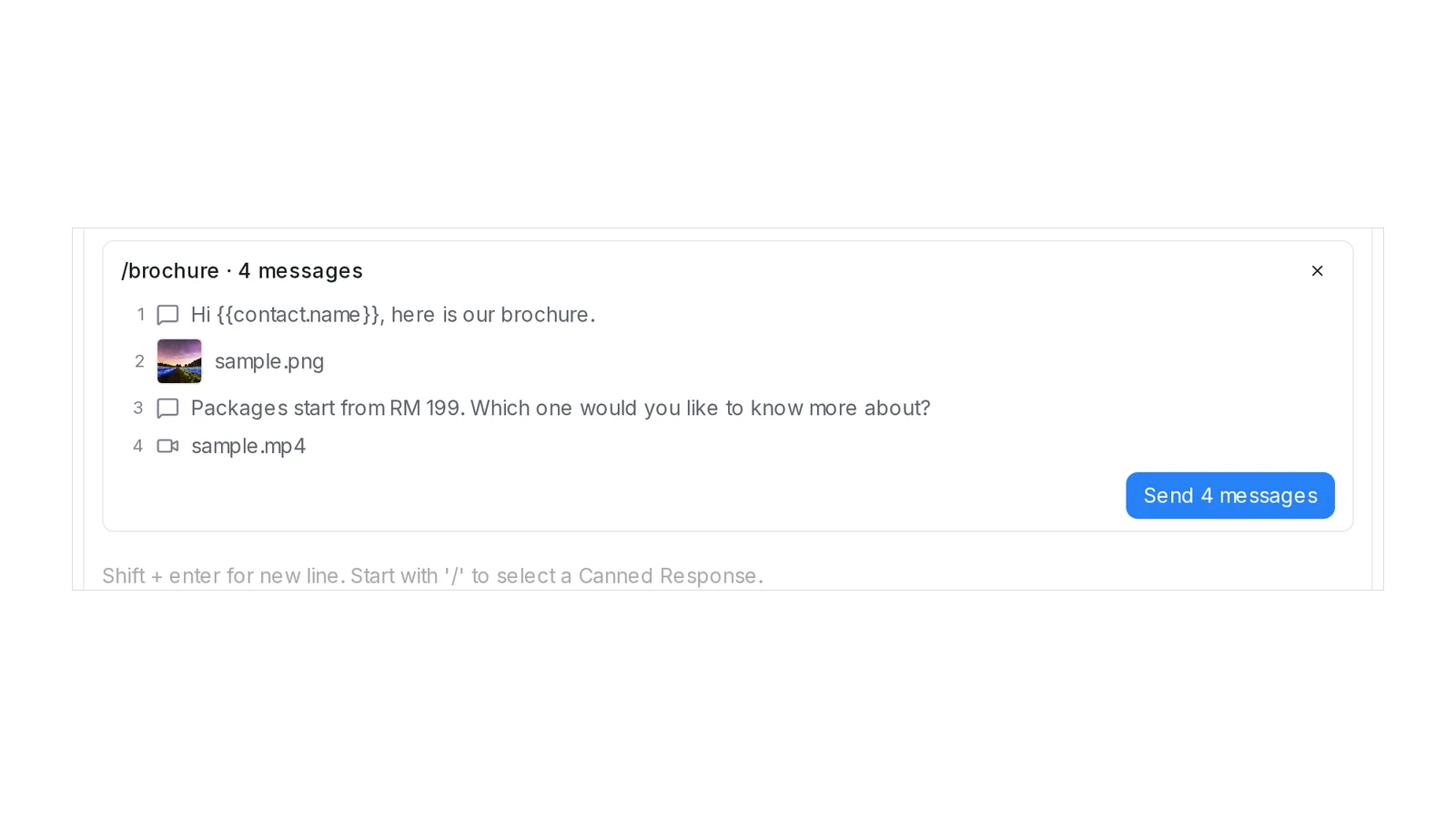
- In the reply box, type / and the short code. The list shows the response with its count, for example /brochure · 4 messages.
- Pick it. A card above the reply box lists every message in order. Nothing is sent yet.
- Click Send 4 messages. Each message goes out as its own bubble, with variables such as the customer's name filled in.
A canned response with a single text still pastes into the reply box, so you can edit it before sending. Outside a conversation reply, for example in a contact's notes, a response with several messages pastes its texts. If a file in a response has since been removed, nothing is sent and you are asked to edit the response and add the file again.
Frequently asked questions
Sources
Every rule and figure on this page is dated and linked to its source. Mampu AI figures are anonymised percentages across customers on Mampu AI.
Figures checked: 2 October 2026
Public sources
- Meta Newsroom, "Announcing New Products to Make Business Messaging Easier" (19 May 2022)https://about.fb.com/news/2022/05/announcing-new-products-to-make-business-messaging-easier/
- DataReportal, "Digital 2026: Malaysia"https://datareportal.com/reports/digital-2026-malaysia
- HubSpot, "Live Chat Exposes a Fatal Flaw in Your Go-to-Market" (updated March 2025)https://blog.hubspot.com/sales/live-chat-go-to-market-flaw
- WhatsApp, "WhatsApp Business Messaging Policy"https://whatsappbusiness.com/policy/
Turn your most-sent files into one saved reply
Message our team. We'll connect your WhatsApp and show you how a brochure, a price list and a video go out in one tap, in the order you choose, from every agent on your team.

