Your chatbot is still offering last month's promotion. How do you stop it without rebuilding the flow?
Time-limited offers belong in your chatbot. Here is how to make them start and stop on their own.
Read inBahasa Melayu中文
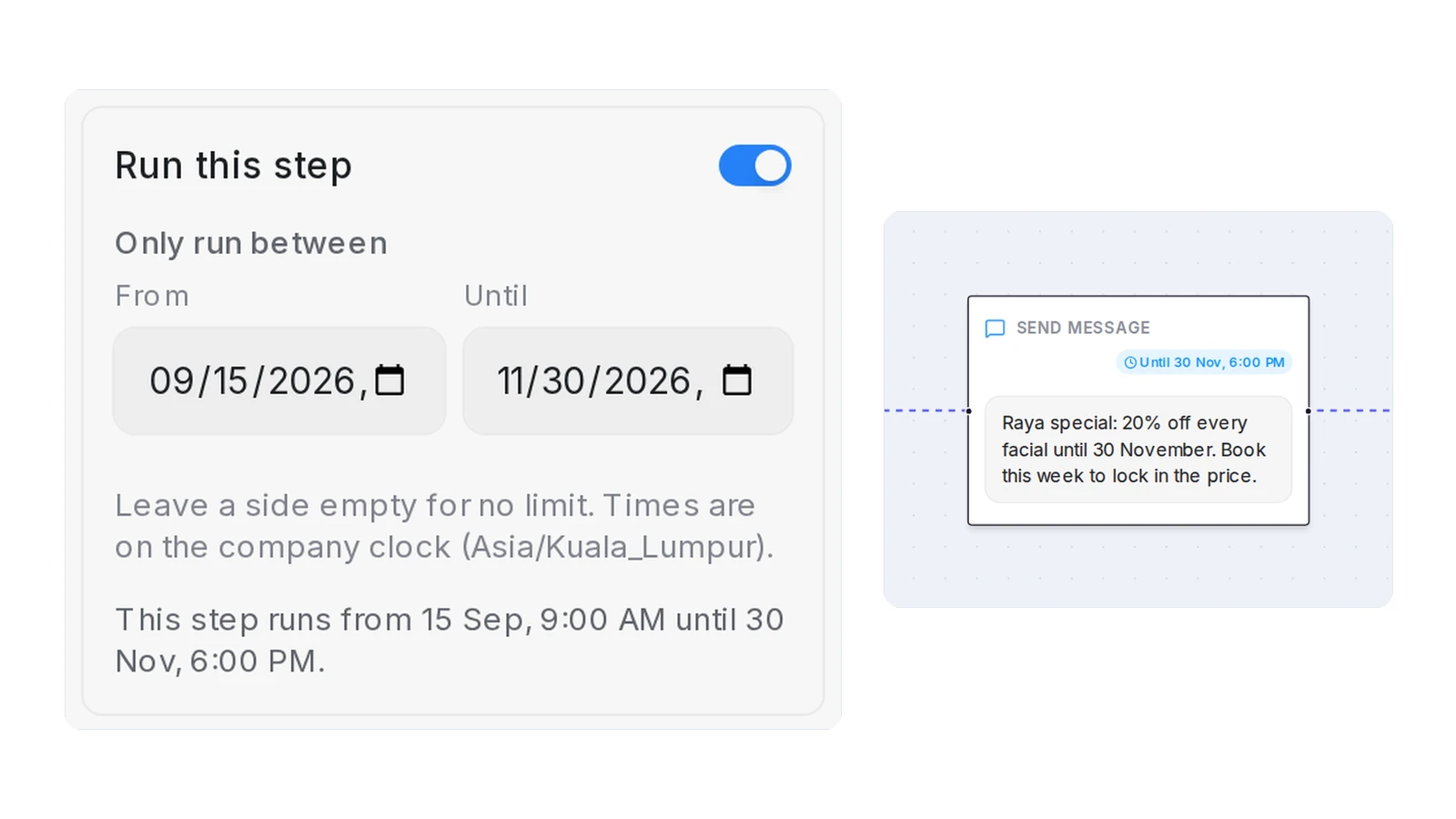
A chatbot keeps offering an expired promotion because the offer was typed into one step of the flow and nobody took it out when the date passed. The fix is to keep each offer in its own step, give that step a start and an end date, and let the flow skip it automatically outside them.
Why does a chatbot keep sending an expired offer?
Most chatbot flows are built once and then left alone. The person who set it up added a line about the Raya discount or the 11.11 bundle at the moment it was current, right where customers would see it: in the greeting, or just before the bot asks for a name. It worked. Then the promotion ended, the team moved on, and the line stayed.
Nothing in a normal flow reminds anyone. The bot does not know a date has passed; it sends the same words on 1 December that it sent on 1 November. The staff rarely see it either, because they read the human side of conversations, not the automated opening. The first person to notice is usually a customer who asks for the discount, is told it is over, and feels misled.
Three habits make this worse:
- The offer lives inside a message that does other work. When the discount is one sentence in the greeting, removing it means editing the greeting, and nobody wants to touch the greeting on a Friday evening.
- Deleting a step feels risky. The step may have attachments, follow-ups or wording that took time to get right. Deleting it means rebuilding it next season, so people leave it "just for now".
- Nobody owns the date. Marketing knows when the promotion ends. The person with access to the chatbot is often someone else.
The scale of messaging makes each stale line expensive. Meta reported in May 2022 that one billion people message with a business each week on WhatsApp, Messenger and Instagram Direct, and in Malaysia 35.4 million people were online at the end of 2025, a 98.0 percent penetration rate. When a business answers on those channels with a bot, the bot's first message is the business's first impression, hundreds of times a day.
What does an out-of-date promotion cost you?
An expired offer in a chatbot does not just look careless. It creates work and loses sales in ways that are easy to miss:
- Customers hold you to it. Someone who was told "20% off every facial this month" on 3 December expects 20% off. Your team either honours a price you no longer offer or spends the conversation explaining why the bot was wrong. Both cost money.
- Leads go quiet. A buyer who feels misled rarely argues. They stop replying. You never see the loss, only a conversation that ended after the bot's second message.
- Staff stop trusting the bot. Once a team has apologised for the bot a few times, they start switching it off or answering everything by hand, which brings back the workload the bot was meant to remove.
- It can cross a line with the platform. WhatsApp's Business Messaging Policy asks businesses not to confuse, deceive, mislead, spam or surprise people with their communications. An offer that no longer exists is exactly the kind of message that surprises people.
Speed of reply is what customers reward, and a wrong reply undoes it. In HubSpot's research, a majority rated an immediate response from a business as important or very important, 82 percent for marketing or sales questions and 90 percent for support issues, and "immediate" today means ten minutes or less. A bot that answers in seconds with last month's price has spent that speed on the wrong words.
How do you run a time-limited offer in a chatbot without rebuilding the flow?
You do not need a second flow for every campaign, and you should never need to delete a step to make an offer stop. Four rules keep promotions under control in any chatbot tool:
- Give every offer its own step. Keep the greeting about greeting. Put "Raya special: 20% off every facial until 30 November" in a separate message step right after it. Now the offer can be switched, dated or moved without touching anything else.
- Attach the dates to the step, not to your calendar. Set the start and end on the step itself, in your local business time. The flow then decides on every message whether the step runs today. When the date passes, nothing has to be edited and nobody has to remember.
- Prepare the next offer while the current one runs. Because a step can be switched off, you can build the November offer in October, leave it off, and switch it on the morning it starts. Or give it a start date and let it appear on its own.
- Test the day before and the day after. A good test tool lets you pretend it is another date. Run the flow as a customer on the last evening of the offer and again the next morning. The offer should appear in the first test and be skipped in the second, with the rest of the conversation unchanged.
The principle is the same as a shop window: the poster comes down on the date printed on it, and the shop keeps trading. If your chatbot can only remove an offer by deleting it, the poster stays up until someone notices.
What should you check before a promotion goes live in your chatbot?
A short checklist before the offer starts saves the apology later:
| Check | Why it matters |
|---|---|
| The offer is in its own step | You can switch or date it without editing the greeting or the questions around it |
| Start and end date and time are set on the step | The bot stops on its own; no one has to remember the last day |
| The dates are in your business's timezone | An offer that ends at midnight should not end at 8 a.m. because the system runs on another clock |
| The message names the end date | "until 30 November" sets the expectation, so a customer who books on 1 December is not surprised |
| The flow reads well without the step | Send a test with the offer off; the greeting should lead into the next question naturally |
| Someone owns the switch | One person knows how to turn the offer off early if stock runs out |
If a step cannot be dated in your tool, note the end date in a shared calendar with the name of the person who will remove it. It is a weaker fix, but it beats the customer telling you.
How does Mampu AI switch a step off or give it dates?
In Mampu AI, every message, question, knowledge lookup and AI task step in a Flow Agent has a Run this step switch at the top of its panel, and an Only run between period with a From and an Until date and time.
- Switch Run this step off and the flow skips the step: the customer goes from the step before straight to the step after. Nothing is deleted, and you can switch it back on later.
- Fill From, Until or both under Only run between and the step runs only inside those dates. Outside them it is skipped the same way. The times follow the company clock named under the fields, which is the inbox's own timezone when its business hours are on.
- On the canvas, a step that is not running is greyed out with an Off, Starts … or Ended … badge, and a step inside its dates shows Until …, so a promotion with an end date is visible at a glance.
- A customer who is already on the step when it ends finishes that step; nobody new enters it.
- In the Playground, a system line reads Skipped this turn with the step's name and the reason, so a missing message is never mistaken for a broken flow. Set a Scenario with a pretend time to test the day before and the day after.
The switch and the dates take effect on the next customer message. There is no republish and no second flow, and the AI designer leaves them alone when it edits the flow for you.
Frequently asked questions
Sources
Every rule and figure on this page is dated and linked to its source. Mampu AI figures are anonymised percentages across customers on Mampu AI.
Figures checked: 30 September 2026
Public sources
- Meta Newsroom, "Announcing New Products to Make Business Messaging Easier" (19 May 2022)https://about.fb.com/news/2022/05/announcing-new-products-to-make-business-messaging-easier/
- DataReportal, "Digital 2026: Malaysia"https://datareportal.com/reports/digital-2026-malaysia
- HubSpot, "Live Chat Exposes a Fatal Flaw in Your Go-to-Market" (updated March 2025)https://blog.hubspot.com/sales/live-chat-go-to-market-flaw
- WhatsApp, "WhatsApp Business Messaging Policy"https://whatsappbusiness.com/policy/
Run your next promotion in the chatbot, with an end date
Message our team. We'll connect your WhatsApp and show you how a promo step switches itself off on the date you choose, while the rest of the flow keeps working.

