Switch a flow step off, or run it only between two dates
Switch a message or question step off without deleting it, or give it From and Until dates. The flow passes over a skipped step and the card shows why.
Read inBahasa Melayu中文
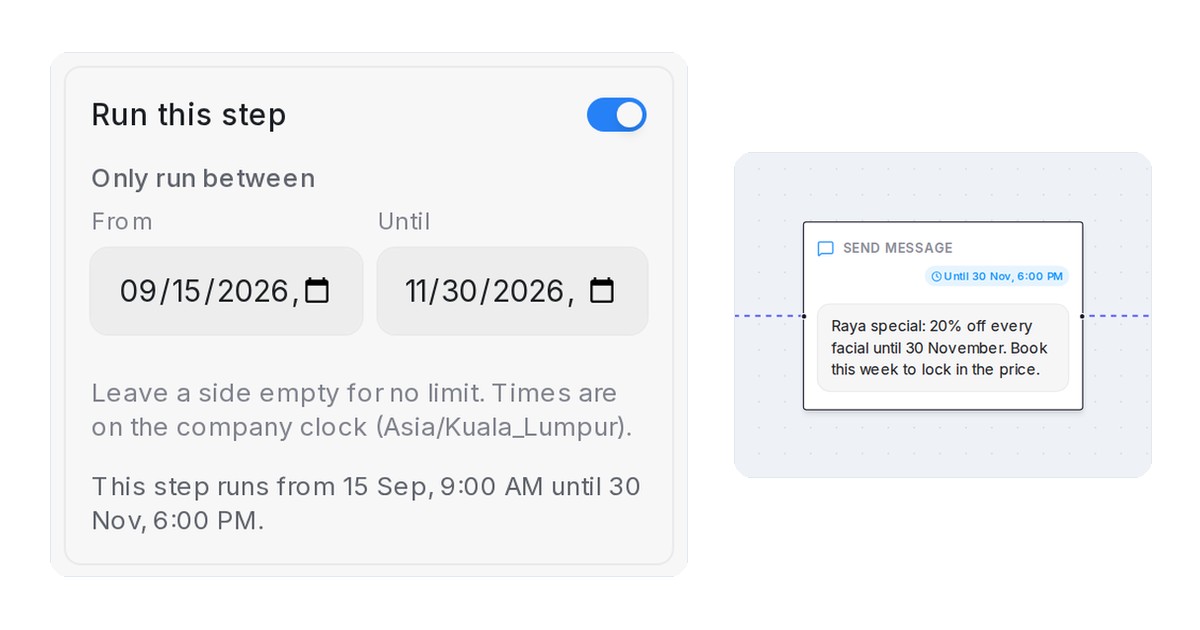
Mampu AI can now switch one step of a Flow Agent off, or run it only between two dates, without deleting it. Use it for a promotion with an end date or a question you want to pause: the flow passes straight over the step and carries on.
How do I switch a flow step off or give it dates in Mampu AI?
- Open the Flow Agent in the designer and click a Send message, Collect, Knowledge query or AI task step with one next step.
- At the top of the panel, turn Run this step off, or leave it on and fill From and Until under Only run between. Leave a side empty for no limit.
- Click Save Changes. The sentence under the fields says what the step does right now.
What happens to a step that is off or outside its dates?
- The customer goes from the step before straight to the step after. Nothing is deleted, so you can switch it back on later.
- On the canvas the card is greyed out with an Off, Starts … or Ended … badge; inside its dates it shows Until ….
- Dates follow the company clock named under the fields. Off always wins over a period.
- A customer already on the step finishes it; nobody new enters it.
- In the Playground a system line reads Skipped this turn: …, so a missing message never looks like a broken flow.

