A customer sent you an APK file. Is it a scam?
Hacked WhatsApp numbers are sending app files and zip files to everyone in their contacts, businesses included. Here is how your team stays safe.
Read inBahasa Melayu中文
Treat an APK, program or zip file on WhatsApp as a scam until the sender confirms it, even when it comes from a customer you know. Hacked numbers send these files to every contact. Don't open it on a work phone or computer, ask the customer in the chat what it is, and tell them their number may be hacked.
Why are customers sending your business APK and zip files?
Most of the time, the customer is not sending them. Their WhatsApp is.
The scam works in a chain. Someone receives a file that looks like a payment receipt, a wedding invitation, a parcel tracking notice or a legal letter. They open it. The file is really an Android app or a Windows script that gives the scammer control of the phone or computer, including WhatsApp. From that moment, their WhatsApp sends the same file to everyone in their contacts: friends, family, colleagues, and the businesses they have chatted with. That includes you.
Malaysian police have warned about this since 2023. In June 2024 the director of the Bukit Aman Commercial Crime Investigation Department said that once a victim installs such an app, "the criminal will gain full access to the victim's phone without their knowledge", and asked the public to "avoid downloading any application files (.apk) received through messages, emails, or other similar channels."
The files have changed since. In June 2026 MyCERT warned of files sent through WhatsApp that are "disguised as legitimate legal, debt, or financial documents" but are really Visual Basic Script (.vbs) files aimed at computers running WhatsApp Web and Desktop, and that "a standard antivirus scan is unlikely to detect or remove" what they install. In October 2026, reports described ZIP and RAR files "being sent from existing contacts, including friends, colleagues, and business contacts", whose WhatsApp "may have been compromised without their knowledge".
For a business, that means the file arrives in your shared inbox, from a real customer, in a chat that looks normal. Anyone on your team can tap it, especially when it is named like something you expect from a customer, such as a receipt.
Which file types should your team never open without asking?
The danger is in files that run as programs, not in ordinary documents. These are the types to stop at:
| Type | Examples |
|---|---|
| Android apps | apk, xapk, apks |
| Windows programs and scripts | exe, msi, scr, bat, cmd, js, vbs, ps1, hta, jar |
| Shortcut files | lnk, url |
| Disk images and installers | iso, img, vhd, dmg, pkg |
| Archives that can hide any of the above | zip, rar, 7z, cab |
Photos, voice notes, videos and PDFs are what customers normally send, and they are not the problem here. A file name can lie, though. "Receipt.zip" or "Receipt.img" reads like a customer sending proof of payment, but a zip can hide a program inside, and an img is a disk image that opens like a drive with a program in it. "Jemputan_Kahwin.apk" is an app, not an invitation. Look at the ending after the last dot, not the name.
Links can carry the same files. A link that ends in ".apk" or ".exe" downloads the program straight away, so treat it like the file itself. A short link that hides the ending can't be judged from the text; if you weren't expecting a download, don't tap it.
What should your team do when a customer sends one?
Real customers do sometimes send zip files, for example a set of documents for a quotation. So the goal is not to block every file, but to make sure nobody opens one without a reason. Agree on four steps with your team:
- Don't open or download it on a work device. Your work phone and the computer running WhatsApp Web hold every customer chat. That is exactly what the scammer wants.
- Ask in the chat what the file is. "Hi, we received a file from you. Did you mean to send it?" A real customer will explain. A hacked number usually doesn't answer, or the customer replies that they never sent anything.
- If it's genuine, ask for a safer format. A PDF or photos instead of a zip is a fair request. If you must open the original, do it on a device you can afford to wipe.
- If the number looks hacked, tell the customer. They often don't know. Suggest they turn off the internet on every device where their WhatsApp is logged in, and turn on two-step verification.
Write these four steps where every agent sees them, and make sure the newest staff member knows them. The person most likely to tap the file is the one who doesn't know it can be dangerous.
What if your own business number starts sending files?
The same scam can reach your number. If someone on the team opens one of these files on the phone or computer that runs your business WhatsApp, your number can start sending the file to your customers within minutes, and every one of them now gets a file "from" your business.
Act fast:
- Turn off the internet on every device where your business WhatsApp is logged in or linked: phone, computer and tablet.
- Wait 10 minutes, then turn the phone's internet back on.
- Turn on two-step verification in WhatsApp, and never share your 6-digit code.
- Then warn the customers who got the file, so they don't open it.
MyCERT's advice for an infected device is the same first step: "immediately disconnect the affected device from the Internet to cut off the attacker's remote access." It also asks people not to forward suspicious files, and to report them to Cyber999 at [email protected].
How does Mampu AI warn your team about risky files?
Mampu AI watches both directions of your WhatsApp chats.
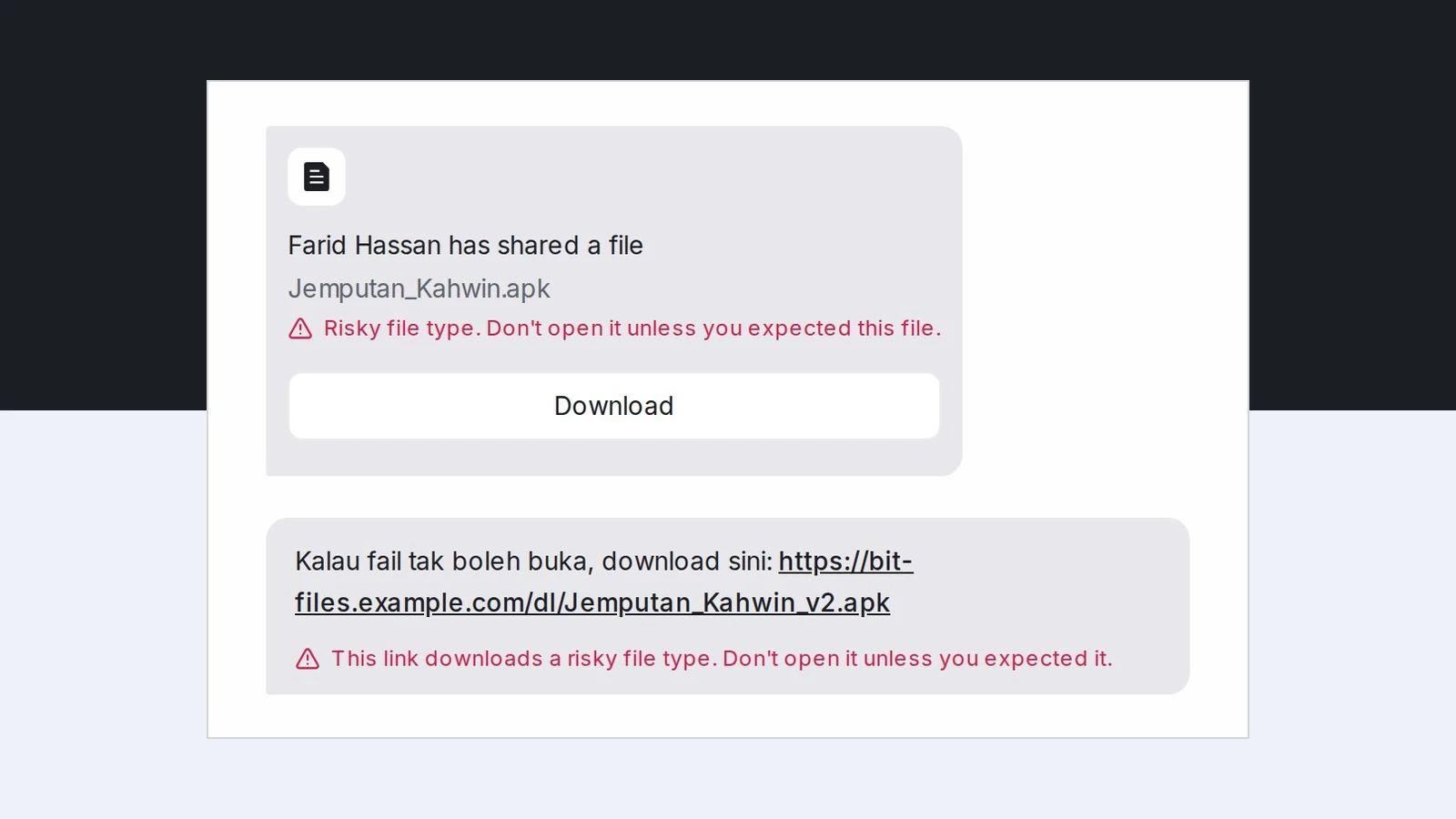
When a customer sends a risky file or link, the chat marks it in red: Risky file type. Don't open it unless you expected this file. under the file, and This link downloads a risky file type. Don't open it unless you expected it. under a link that points straight at one. The agent assigned to the chat and every admin get a Risky file or link notice in My Inbox naming the file or link; when nobody is assigned, the admins get it. It only warns: nothing is blocked, no label is added and your AI agent keeps answering, because real customers send these files too. Each person can also turn on email or push for this notice in their notification preferences.
When your own number sends zip or program files to 3 or more chats within 10 minutes, your inbox shows a red alert and your admins get an email at once, then again every 5 minutes while files keep going out. Your AI agent on that inbox stays quiet so a person handles the questions, and every customer who got a file is labelled suspicious-file-received, so you can warn them all with one WhatsApp blasting.
Frequently asked questions
Sources
Every rule and figure on this page is dated and linked to its source. Mampu AI figures are anonymised percentages across customers on Mampu AI.
Warnings checked: 25 October 2026
Public sources
- The Vibes, "Beware of wedding invites carrying malware, says Bukit Aman" (4 June 2024)https://www.thevibes.com/index.php/articles/news/102258/beware-of-wedding-invites-carrying-malware-says-bukit-aman
- The Star, "MyCert warns of malware being spread through WhatsApp Web and Desktop" (25 June 2026)https://www.thestar.com.my/tech/tech-news/2026/06/25/mycert-warns-of-malware-being-spread-through-whatsapp-web-and-desktop
- SAYS, "Malaysians Are Receiving ZIP & RAR Files From WhatsApp Contacts. Here's What You Shouldn't Do" (21 October 2026)https://says.com/my/tech/malaysians-are-receiving-zip-rar-files-from-whatsapp-contacts-heres-what-you-shouldnt-do
Get warned before anyone opens a risky file
Message our team. We'll connect your WhatsApp and show you the red warning on risky files and links, and the notice your admins get when a customer sends one.

