Send automation messages through any WhatsApp inbox, including Normal WhatsApp
The Send a Message automation action now works with Normal WhatsApp inboxes too, to message the contact, a typed phone number or a WhatsApp username.
Read inBahasa Melayu中文
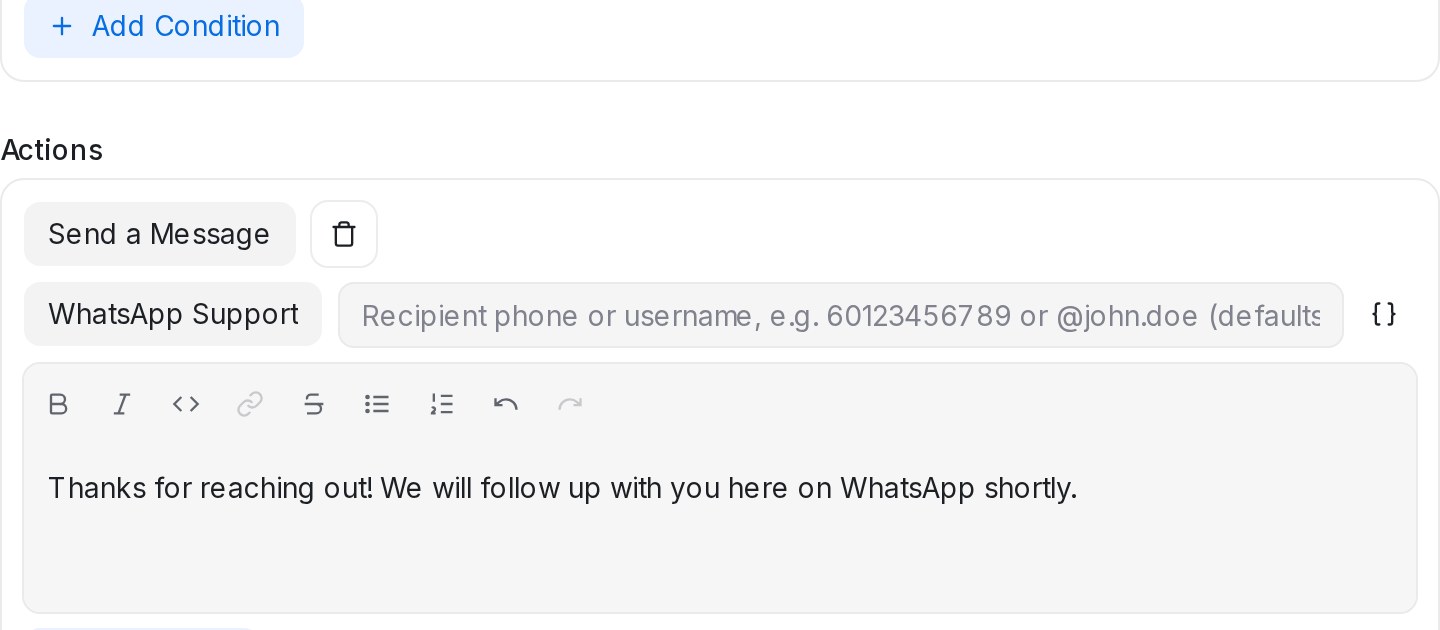
Mampu AI automation rules can now send messages through every WhatsApp inbox on your account, Normal WhatsApp as well as WhatsApp API. Pick your WhatsApp inbox on the Send a Message action, and the message reaches the customer on WhatsApp, whichever channel they wrote in on.
How do I send automation messages from any WhatsApp inbox in Mampu AI?
- Go to Settings → Automation and create or edit a rule.
- Add the Send a Message action and choose your WhatsApp inbox next to it.
- Fill in the recipient field beside the inbox, or leave it blank, then write the message.
Who can a WhatsApp automation message be sent to?
- Leave the recipient blank to message the contact using their own phone number.
- Or type a recipient: a phone number with the country code (like 60123456789) or a WhatsApp username (like @john.doe), handy for notifying a teammate. Usernames work for people already in your contacts.
- Variables work in the recipient and the message, so either can use answers your AI agent collected.
- On WhatsApp API inboxes, messages sent outside the 24-hour customer service window may not be delivered. Normal WhatsApp inboxes don't have this restriction.

