Edit your bot's messages from Canned Responses
Bot messages marked Staff can send this now show on the Canned Responses page, so one edit changes what the bot and your team send.
Read inBahasa Melayu中文
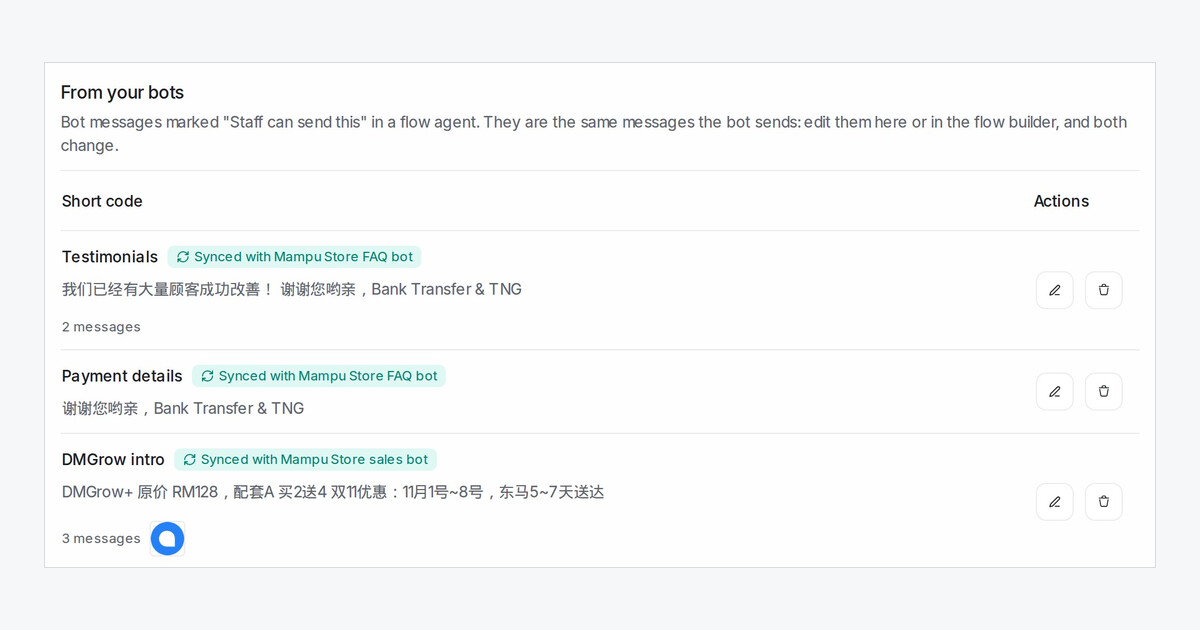
Many teams keep the same price lists, promotions and product photos twice: once in their canned responses and again in their flow agent. Every change meant editing both, and the copies drifted apart. Now the bot's messages are the only copy, and you can edit them from the page your team already uses.
Where do I find my bot's messages?
Open Settings → Canned Responses. Under From your bots you see every message marked Staff can send this from the chat in a published flow agent, with a Synced with badge naming the bot and how many messages it sends.
What happens when I edit one?
Click the pencil, change the texts, pictures and files, then confirm with Yes, update the bot. Each block in the dialog is one bot step. The bot and your team's / menu send the new version from the next message on, so the dialog warns you before it saves.
Language versions have the same tabs as in the flow builder. Adding or removing steps stays in the flow builder, and the dialog links straight to the step.
If someone changes the same bot in the flow builder at the same time, neither save overwrites the other: the later one is asked to reload first.