See why your Flow Agent handed a chat to your team
When a Flow Agent passes a chat to your team, the chat line now says why, and a card shows the step, what to do next and a way to mark a wrong hand-off.
Read inBahasa Melayu中文
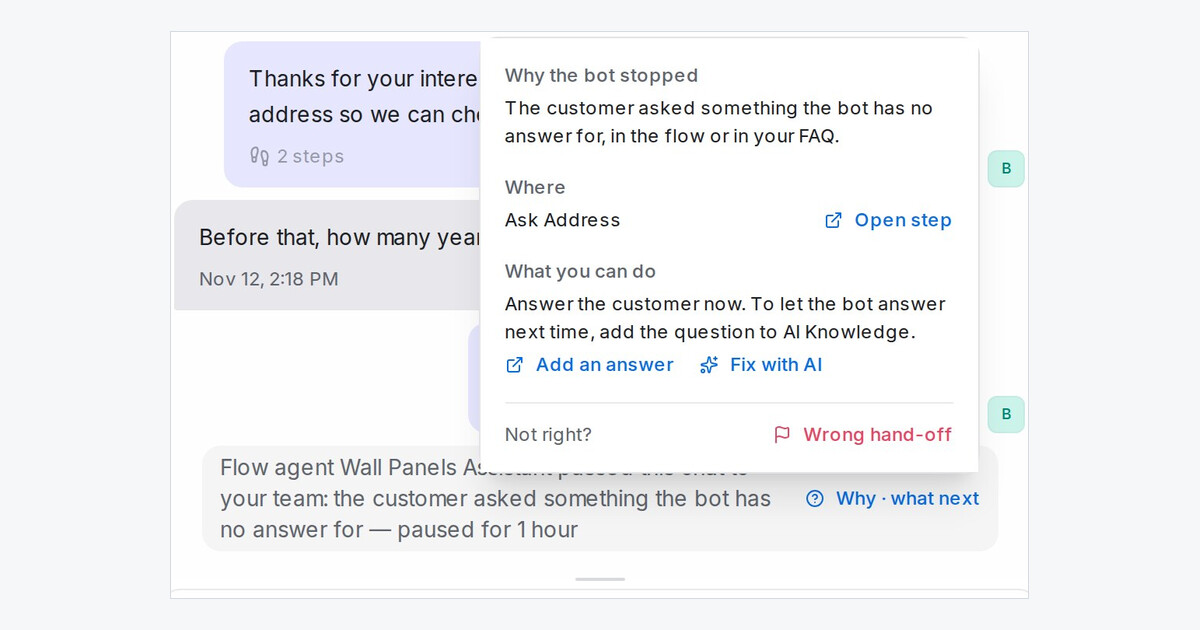
Mampu AI now tells you why a Flow Agent passed a chat to your team. The reason is on the hand-off line in the chat itself, on every channel and for every workspace, so nobody has to guess or open the flow to find out.
How do I see why my bot handed off a chat in Mampu AI?
- Open the chat. The hand-off line ends with the reason, for example the customer asked something the bot has no answer for.
- Click Why · what next at the end of the line.
- Read the card: Why the bot stopped, Where (the step in the flow) and What you can do.
What can I do from the hand-off card?
- Add an answer: administrators open AI Knowledge on a new FAQ entry with the customer's question already filled in.
- Fix with AI: administrators open the flow designer on that step with a drafted request in the chat box. Nothing is sent until you finish the request and send it.
- Wrong hand-off: anyone on your team can mark a hand-off that should not have happened, with a note on what the bot should have done.
- Marked hand-offs show in Reports → Flow agents. Marked wrong appears under the chat's reason in Handed to a person, and as a column in Why they were handed off.