Hand a chat back to the bot with an automation rule
A team member types a keyword such as bot, and your flow agent takes the chat back from the step where it stopped.
Read inBahasa Melayu中文
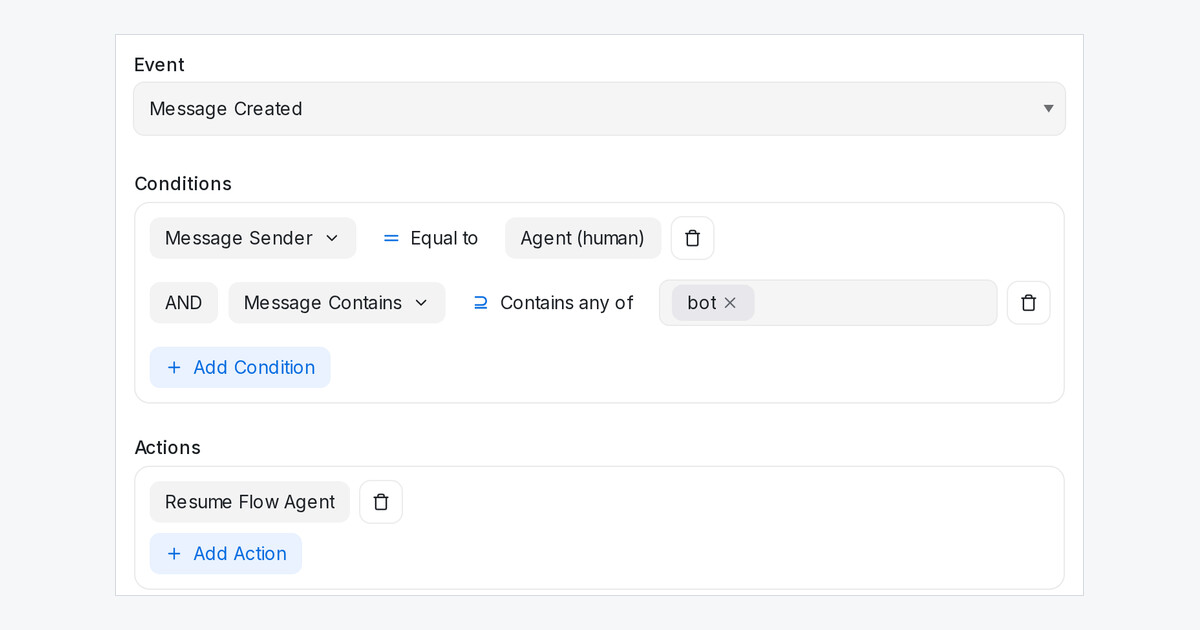
When your flow agent hands a chat to your team, it stays paused until someone resumes it. Automation rules now have two new actions, Resume Flow Agent and Pause Flow Agent, so a keyword can give the chat back without anyone pressing Resume.
How do I set it up?
- Open Settings → Automation and click Create Automation.
- Set the Event to Message Created.
- Under Conditions, pick Message Sender and Agent (human), then add Message Contains with your keyword, for example bot.
- Under Actions, pick Resume Flow Agent, click Create, then set the rule to Live.
What happens when my team types the keyword?
- The bot carries on from the step where it stopped and keeps what the customer already answered.
- The keyword message itself does not pause the bot again, even with Pause when a human replies on. A later reply from your team still does.
- If the customer wrote while your team had paused the bot, and the inbox has Answer what came in during the pause on, the bot answers that message straight away.
Type the keyword as a private note so the customer never sees it.