Ask the internal AI chat, and keep answers for your team only
Team members can ask an AI that answers only from your AI Knowledge, and entries marked Team only stay out of every bot and customer reply.
Read inBahasa Melayu中文
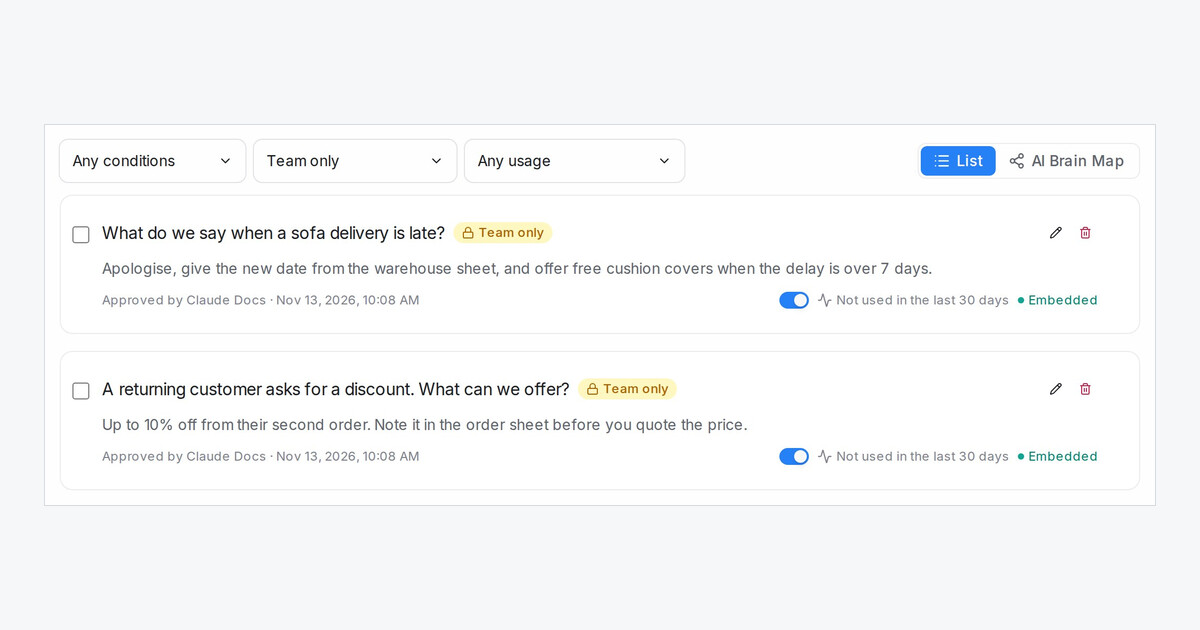
Your team can now ask an AI when they are not sure how to answer a customer, instead of waiting for the owner. The internal AI chat answers only from your AI Knowledge Hub and names the entries it used. Customers never see it.
How do I keep an answer for my team only?
- Open AI Knowledge Hub and click the pencil on an FAQ, promotion or product entry.
- Switch on Team only and press Save.
- The card shows a Team only badge, and the new filter lists Team only or Shown to customers.
Flow agents, comment replies, Suggest a reply and AI apps connected to your workspace never use a team-only entry.
How does my team ask the internal AI chat?
- On any page outside a conversation, click the round button at the bottom right to open Internal AI chat.
- Ask a question. The answer lists its sources under From your knowledge, with a lock on team-only entries.
- When nothing in your knowledge answers it, the chat says so instead of guessing.
The chat runs on your workspace's own AI key or your free AI credit. It is switched on per workspace, so ask our support team to turn it on for yours.