See which conversations are hot, warm or cold leads
Every sales enquiry now carries a hot, warm or cold badge, rated from what the customer writes, using rules you describe in your own words.
Read inBahasa Melayu中文
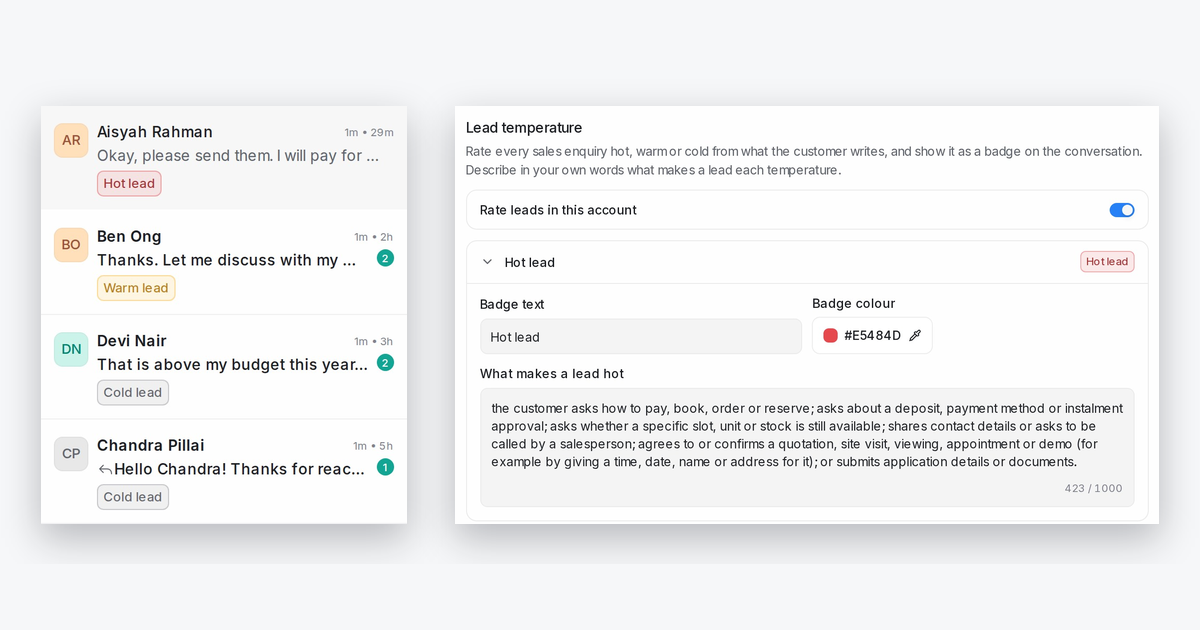
Mampu AI can now rate each sales conversation as a hot, warm or cold lead from what the customer has written so far, and show it as a badge on the conversation, so your team can see who is ready to buy without opening every chat.
How do I rate leads as hot, warm or cold in Mampu AI?
- Open Settings → AI Monitoring and scroll to Lead analysis.
- Switch on Rate leads in this account.
- Expand each category card to set its Badge text and Badge colour, and describe in your own words, in any language, what a customer says or asks at that stage.
- Click Save changes.
How does Mampu AI decide a lead's hot, warm or cold badge?
- The badge shows on each card in the conversation list and in the header of an open conversation.
- Hover the badge to see why the lead was rated that way and the highest temperature it has reached, for example Was hot.
- Only the customer's own words count, and a lead takes the highest temperature any of their messages matches.
- A lead you replied to that goes quiet moves down to cold after the number of hours of silence you choose, from 1 hour to 30 days.

