Send follow-ups only to leads in a chosen status
Message sequences, automation rules, folders, segments and blasts can now check a lead's Pipeline status, from New to Won and Lost.
Read inBahasa Melayu中文
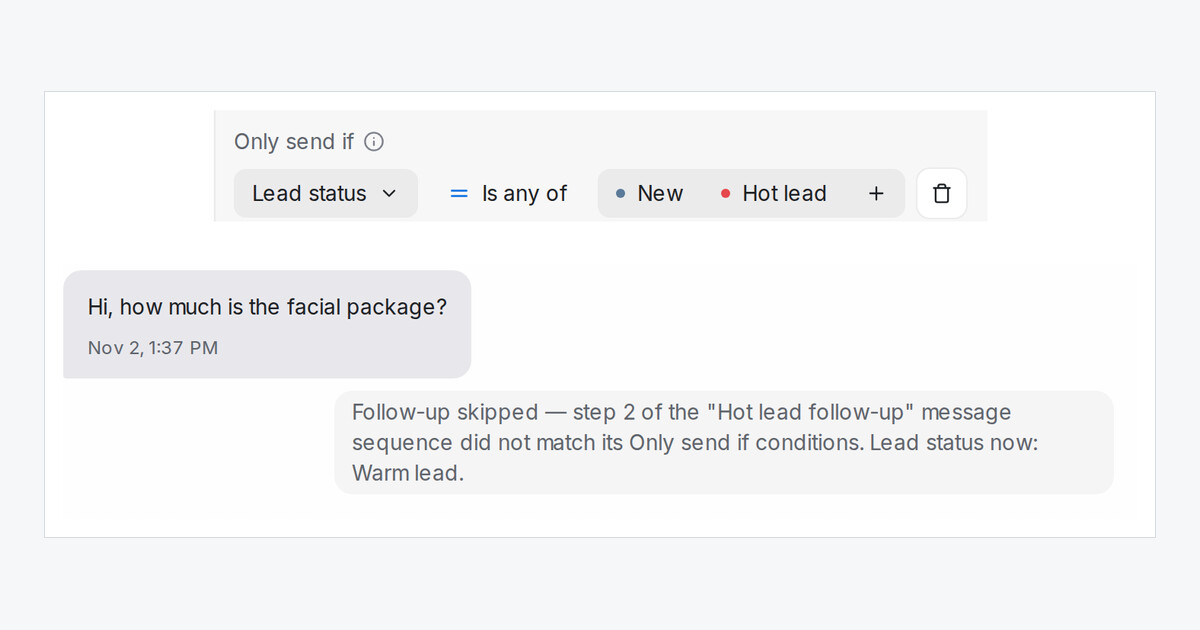
A follow-up written for hot leads reads wrong when it reaches someone who has gone cold. Now each step can check where the lead sits on your Pipeline right before it sends.
How do I send a step only to hot leads?
- Open Settings → Message Sequences and open a sequence.
- On the step, click Add condition and pick Lead status.
- Choose Is any of and pick the statuses, for example Hot lead.
The check runs right before the step goes out. If the lead has moved to Warm lead by then, that step is skipped and the rest of the sequence carries on.
What can I pick?
- New for chats nobody has rated yet, then your lead categories, Not a lead, Won and Lost.
- A status the AI set and one a teammate set by hand count the same.
- The same Lead status condition works in automation rules, conversation folders, contact segments and blasting audiences.
How does my team see a skipped step?
A note in the conversation says which step was skipped and the lead's status at that moment. Your customer never sees it.