Choose how team calendars assign bookings
Fill one member's schedule first, prefer members in order, or keep spreading bookings evenly — team calendars now have an assignment setting.
Read inBahasa Melayu中文
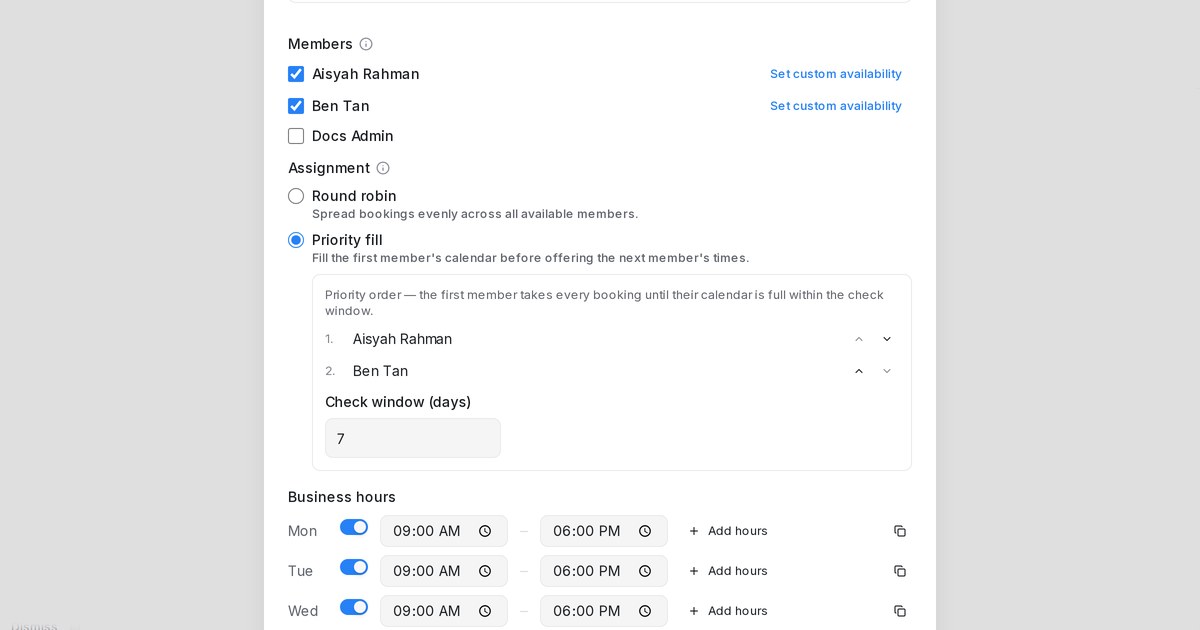
Mampu AI now lets you choose how a calendar with two or more members hands out bookings: spread them evenly, prefer members in the order you set, or fill one member's schedule before offering the next.
How do I choose how bookings are shared between calendar members in Mampu AI?
- Open Flow Agents → AI Knowledge Hub, choose the Calendar tile and go to the Tools tab.
- Click Add calendar, or open a calendar that has two or more Members.
- Under Assignment, pick Round robin or Priority fill.
- Reorder members with the arrows to decide who comes first, and for Priority fill set the Check window (days).
How do Round robin and Priority fill assign bookings?
- Round robin spreads bookings evenly across everyone who's free. It stays the default, so existing calendars behave as before.
- Tick Assign by priority order to keep offering everyone's times while each booking goes to the highest member in your list who's free at that time.
- Priority fill books the first member in your order until they have no free times within the check window. Only then are the next member's times offered.
- When a time frees up on an earlier member's schedule, new bookings return to them automatically.

