Focus your AI on the right FAQs
Group your FAQs into categories, then let each part of your flow answer only from the categories you pick — general FAQs included when you want.
Read inBahasa Melayu中文
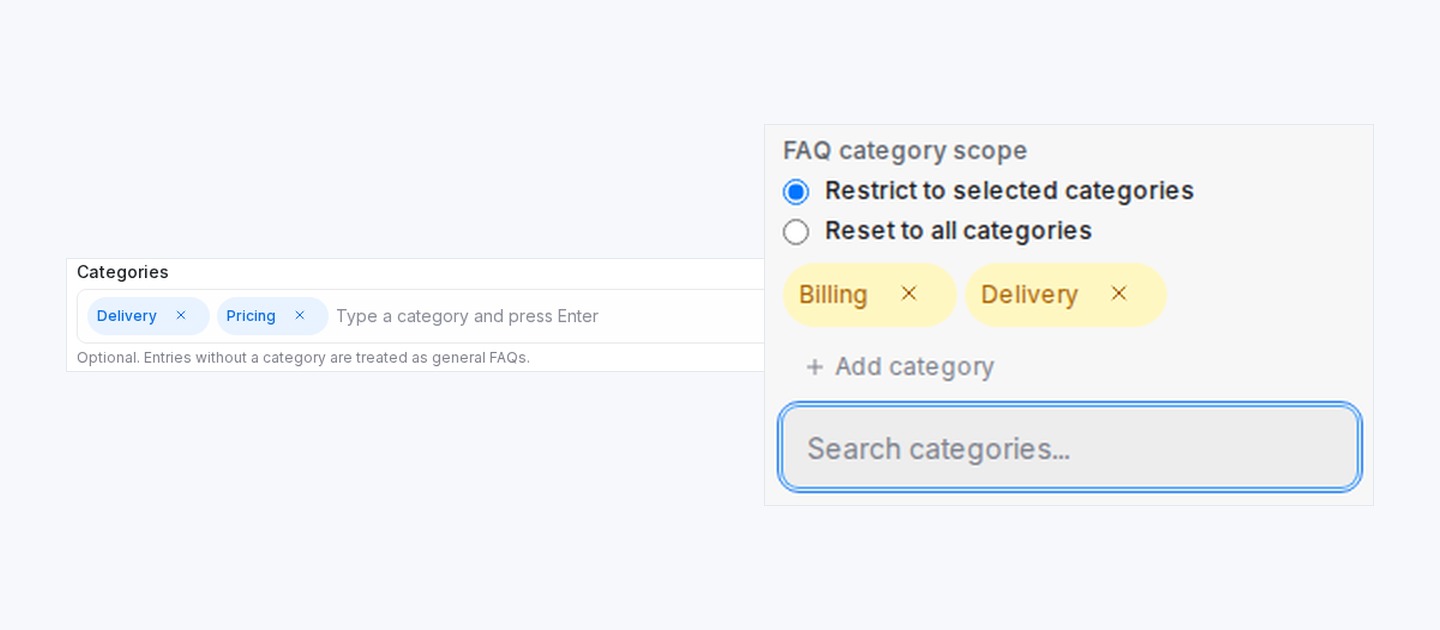
Mampu AI now lets you group FAQ and Promo entries into categories and tell each part of a flow to answer only from the categories you pick, so a Flow Agent stays on topic at every step of the conversation.
How do I limit my AI agent to certain FAQ categories in Mampu AI?
- In AI Knowledge Hub, give FAQ and Promo entries one or more Categories (for example Delivery or Pricing) when you create or edit them.
- In the flow designer, open a block's Actions → FAQ category scope and choose Restrict to selected categories.
- Pick the categories for this part of the flow, and tick Include general FAQs (no category) to also allow entries without a category.
- Where the conversation opens back up, add a scope action set to Reset to all categories.
How long does an FAQ category scope stay active?
- The scope stays active from that step onward, until another block changes it.
- Scoped blocks show an FAQ badge on the canvas.
- Every scope change appears as a note in the conversation, and in the playground while testing, so your team can see what the agent is drawing from.
- You can filter the knowledge list by category as your library grows.

