See how each WhatsApp API blast delivered
Every WhatsApp API blast card now shows Delivered, Read, Failed, Pending and Expired counts, and an Overview sums up the period you pick.
Read inBahasa Melayu中文
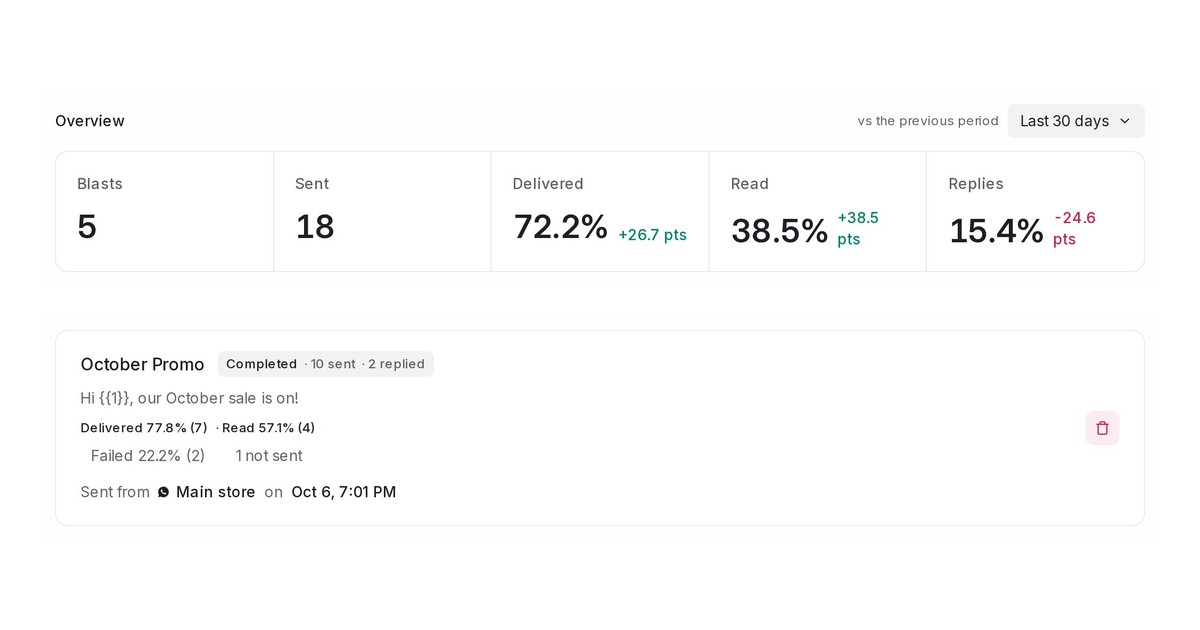
Mampu AI now shows how each WhatsApp API (WABA) blast delivered: the share of messages that reached the customer's phone, the share read, and the failed, pending and expired counts, on every blast card. An Overview above the list sums up the period you pick against the period before it.
How do I see how a WhatsApp blast delivered in Mampu AI?
- Open Blasting → WhatsApp API (WABA).
- Read the Overview at the top: Blasts, Sent, Delivered, Read and Replies for Last 30 days, or pick Last 7 days, Last 90 days, This month or Last month. The green or red figure beside a percentage is the change in points.
- On any blast card, read the line under the message, for example Delivered 77.8% (7) · Read 57.1% (4), then the Failed, Pending, Expired and not sent counts.
- Hover a figure for what it means; click Failed or not sent for the reasons in plain words.
What do Delivered, Read, Failed and Pending mean on a blast?
- Delivered: reached the customer's phone, opened or not. Charged by Meta.
- Read: opened by the customer, as a share of delivered. With read receipts off it counts as Delivered only.
- Failed: WhatsApp tried and could not deliver — held by Meta's marketing limit, opted out, or not on WhatsApp. Not charged.
- Pending: accepted, no receipt yet; WhatsApp keeps trying for 30 days. Expired: pending past 30 days.
- Not sent: stopped before WhatsApp tried by a payment, media or template problem. Left out of the shares.

